 AideAI
All the Places Your Student Life Already Lives — Connected
Your semester is not stored in one app.
Assignments live in Canvas or Google Classroom. Drafts live in Google Docs. Deadlines live in Calendar. Half-formed ideas live in Notes. Professor updates sit in Mail. The reading you need is in a PDF on your Mac or a tab you opened yesterday.
None of these tools is useless on its own. Together, they create a familiar problem: you become the integration layer.
Before you can study, write, or decide what matters tonight, you rebuild context by hand.
AideAI is useful here because it connects to the systems students already use — and pulls relevant academic context into one assistant workflow instead of another blank chat.
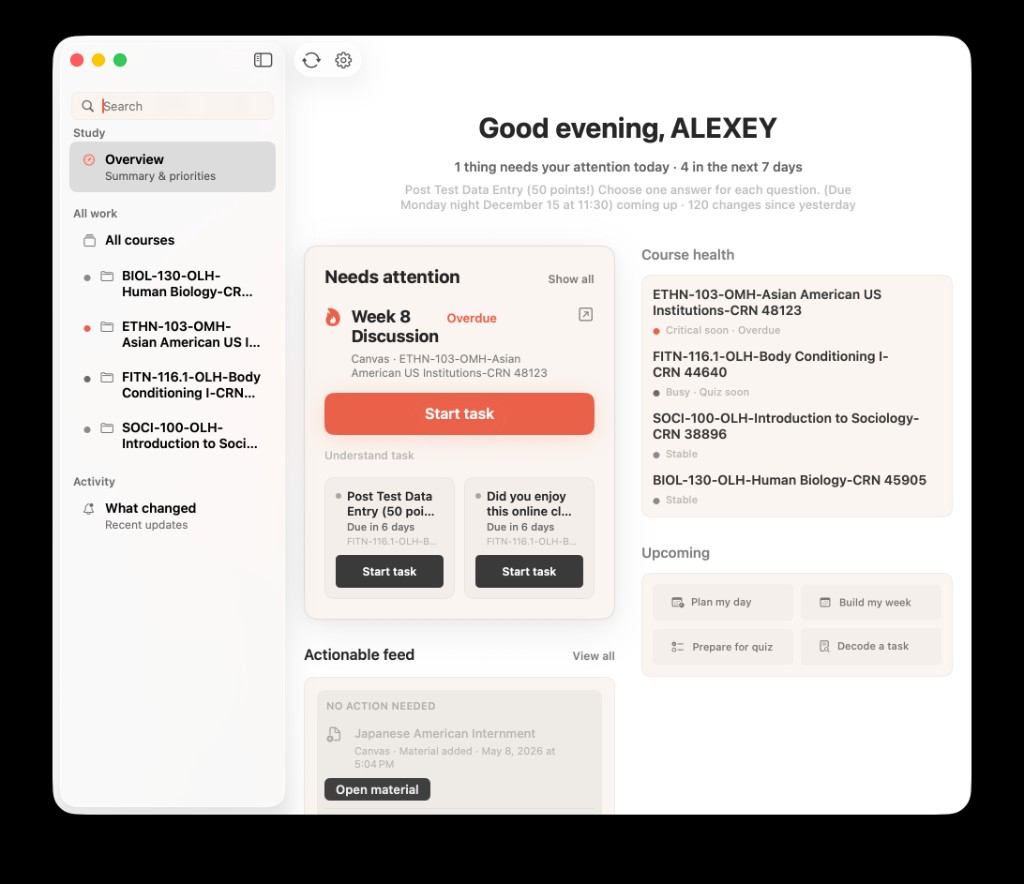
Connected student workflows start from real course context — not from whatever you remember to paste into a prompt.
The Hidden Work Before Real Work
Monday evening looks quiet on the calendar.
Inside your head, it is not quiet at all.
You know there is a Canvas assignment due Wednesday, lecture slides somewhere in Drive, notes from last week in Apple Notes, a professor email you should reread, and four browser tabs from a research rabbit hole you never closed.
The actual task — start the essay, review for the quiz, finish the problem set — has not started yet. You are still collecting.
That collection tax is what fragmentation costs:
- reopen the LMS
- search Notes
- find the right Drive file
- check Mail for the clarification
- remember which tab had the source
- only then ask what to do first
Smart assistants that start from zero do not remove that work. They just add another window.
A Map Of Where Student Context Actually Lives
Think of your semester as layers, not apps.
| Layer | Where it lives | What you need from it |
|---|---|---|
| Course structure | Canvas, Google Classroom | assignments, announcements, materials |
| Documents | Google Docs, Drive, local files | drafts, slides, readings, rubrics |
| Time | Apple Calendar | classes, deadlines, meetings |
| Ideas | Apple Notes | lecture thoughts, essay angles, questions |
| Logistics | Apple Mail | professor updates, section changes |
| Live research | browser tabs, history | pages you already found |
| Capture | recordings, Voice Memos, Plaud | lectures and meetings |
AideAI's extension layer is built to reach into those real sources when you ask academic questions — not to replace them with a new walled garden.
What Changes When The Assistant Can See Your Stack
Compare two versions of the same question:
What should I focus on tonight?
Disconnected version: you explain your classes, deadlines, and worries from memory. The assistant gives reasonable generic advice.
Connected version: the assistant can work from course updates, calendar timing, files you linked, and recent academic context. The answer is shorter because less setup happened in the prompt.
Same for:
What changed in my classes since yesterday?
Where is the file I need for this assignment?
Help me plan the rest of the week around my actual deadlines.
The value is not magic. It is coherence — fewer hops before a real next step.
For the semester-wide view, read How to Finally See Everything Going On in Your Semester. For daily prioritization, read What Should I Do Today? A Better Way to Plan Your College Work.
The Integrations Worth Connecting First
You do not need all sixteen extensions on day one.
Start with the sources that hold the most academic truth for your semester:
Canvas LMS if your school runs on Canvas. Course context, assignments, and materials feed the Study workflow. Read Canvas LMS integration for students when you are ready to set it up.
Google Workspace and Classroom if your coursework lives in Docs, Slides, Drive, or Classroom. Read Google Workspace in AideAI and Google Classroom in AideAI.
Apple Calendar for class timing and meeting-aware planning.
Apple Notes and Mail when important context keeps landing there instead of the LMS.
Local Files for PDFs, readings, and class folders on your Mac. Read Local Files in AideAI.
Browser History and Browser Automation when your research and signed-in web workflows matter. Read Browser History in AideAI and Browser Automation in AideAI.
Connect what you actually use. Ignore the rest until you feel a gap.
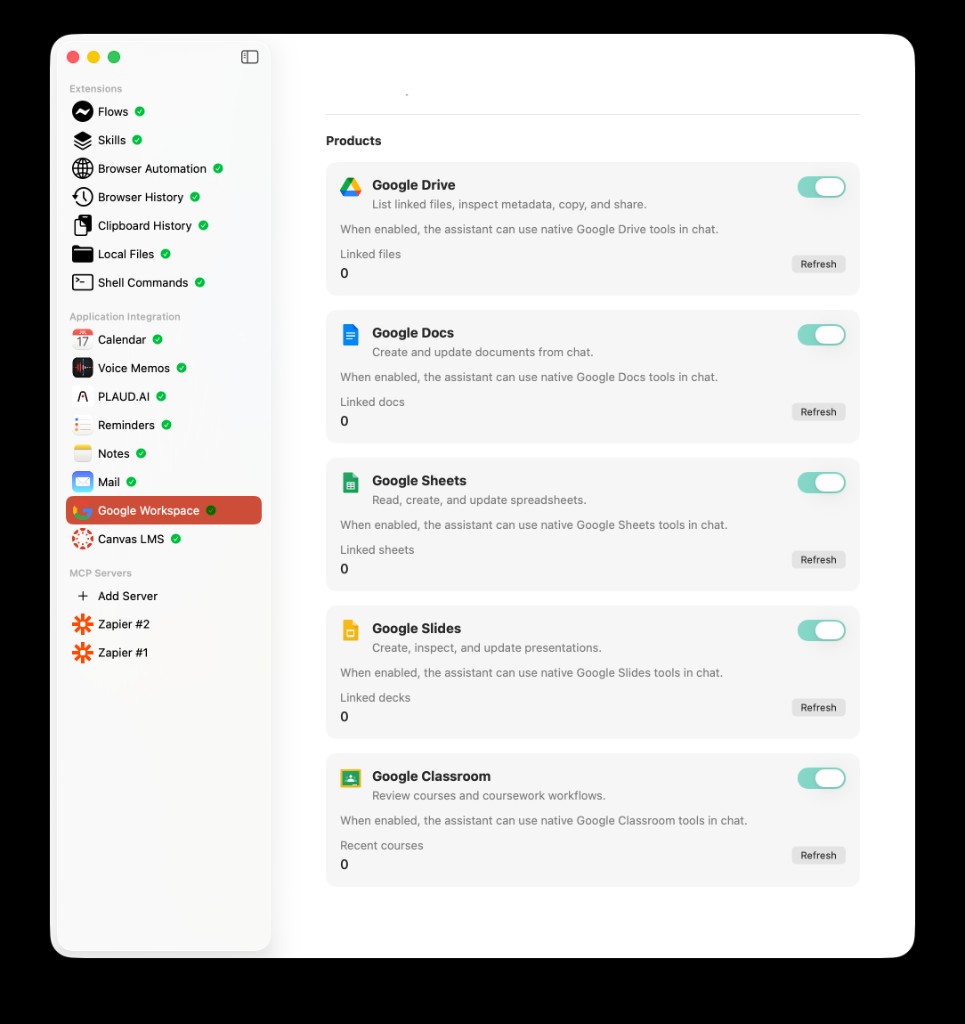
Integrations work best when they mirror the tools you already rely on for coursework — not every possible app at once.
Extensions Are On Free — That Is The Point
One of the most important details about AideAI pricing: built-in extensions are available on Free and Premium.
Canvas, Google Workspace, Calendar, Notes, Mail, local files, browser history, browser automation, MCP support — the connected workflow is part of the core product, not a paywall teaser.
Premium adds power features such as stronger models, built-in web search, image generation, realtime voice, and speaker diarization. Those can make the assistant sharper. They do not unlock the basic idea that your student life can be connected in the first place.
For the full Free vs Premium breakdown, read What Premium Adds to AideAI — and What You Already Get for Free.
A Monday Night Without Tab Triage
Before: Canvas in one window, Notes in another, Mail unchecked, Drive search open, three tabs you mean to reread. Twenty minutes pass before you write a sentence.
After: you open AideAI, ask what changed and what matters tonight, attach the file you need, and move into planning or writing with the context already in place.
Same tools. Less reconstruction.
Connect What You Already Use
If your semester is spread across LMS pages, docs, notes, mail, files, and tabs, the win is not another place to store work. It is one assistant that can work with the places you already live.
Start on AideAI Free. Connect the two or three sources that matter most this week. Then use that connected context for planning, studying, and writing instead of rebuilding it every night.
Compare plans on Pricing.