 AideAI
What Premium Adds to AideAI — and What You Already Get for Free
Pricing pages often answer the wrong question first.
They list what costs money. They do not always explain what you can already do without paying — or whether Premium changes the core student workflow or just adds power on top.
For AideAI, the honest framing is simpler:
Free is the real product. Premium is the power layer for heavier use.
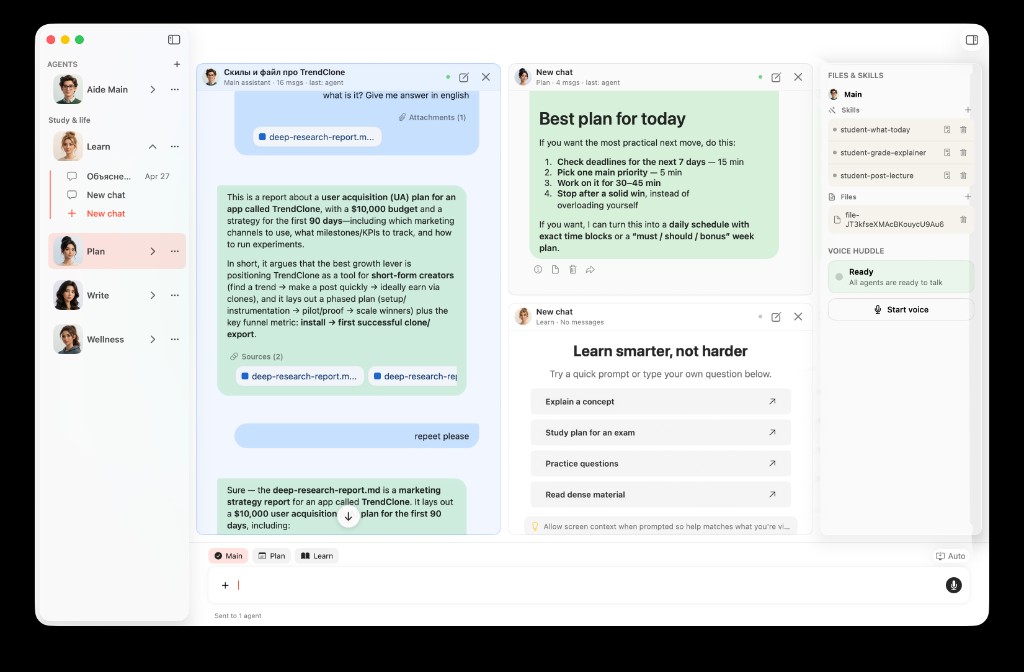
The core student workspace — chat, modes, files, extensions, Skills, and Flows — starts on Free.
The Question Worth Asking First
Before comparing feature lists, ask:
Can AideAI already help with the way I study, plan, and write on Free?
For many students, the answer is yes.
If you mainly need help deciding what to do today, studying from your materials, improving drafts, keeping coursework organized, and connecting Canvas, Google tools, notes, files, and calendar context, Free is designed to be genuinely usable — not a demo that stops working after a week.
Premium becomes interesting when you repeatedly hit limits around model strength, live web answers, image generation, realtime voice, or speaker diarization.
What Free Already Includes
Here is the part pricing pages sometimes bury.
On Free, students already get:
- core AideAI chat for study, planning, and writing
- Learn, Plan, Write, and Wellness modes
- the Study dashboard with Today, changes, and next actions
- all current built-in extensions, including Canvas, Google Workspace, Calendar, Notes, Mail, local files, browser history, browser automation, and MCP support
- Skills and Flows
- meetings, on-device transcription (Parakeet v3 by default), file attachments, screenshots, OCR, and semantic search
That is not a stripped-down teaser. It is the main academic workflow.
Read All the Places Your Student Life Already Lives — Connected for the integrations story. Read What Should I Do Today? A Better Way to Plan Your College Work for the planning workflow that already starts on Free.
What Premium Adds
Premium is for students who want more capability on top of that base:
| Premium capability | Why it matters |
|---|---|
| Stronger AI models | Harder analysis, revision, and reasoning tasks |
| Built-in web search | Current, sourced answers without leaving the app |
| Image generation in chat | Visual drafts, diagrams, and creative coursework support |
| Realtime voice assistant | Talk to your study assistant instead of typing |
| Speaker diarization | See who said what in meetings and recordings |
None of that is required to get real value from AideAI. It is what you reach for when Free is already part of your routine and you want the highest-end workflows.
For voice specifically, read Talk to Your Study Assistant: When Voice Is Better Than Typing.
Two Students, Two Decisions
Maya uses AideAI four or five times a week for planning, lecture review, and essay outlining. She connects Canvas and Google Drive, uses Plan and Write modes, and runs a weekly review Flow. Free covers her semester comfortably.
Jordan lives in the app daily, uses harder writing and research tasks, wants built-in web search for current sources, generates images for presentations, and prefers realtime voice while working through problem sets. Premium matches how heavily Jordan uses the product.
The upgrade decision is not "basic vs real." It is core workflow vs power workflow.
What Premium Does Not Gate
Worth stating plainly because it surprises people:
- Extensions are not Premium-only. The connected student stack works on Free.
- Skills and Flows are not Premium-only. Repeatable workflows start on Free.
- Write, Plan, Learn, and Wellness are not Premium-only. The mode system is core product.
Premium changes how strong and how advanced the experience can get. It does not hold the basic student workflow hostage.
A Simple Decision Checklist
Stay on Free if:
- you are still testing whether AideAI fits your semester
- your main needs are planning, studying, writing, and organization
- connected extensions already solve your context problem
- you rarely need live web search, image generation, or voice
Consider Premium if:
- you use AideAI heavily every week
- you want the strongest models for harder academic work
- built-in web search would save you constant tab switching
- you prefer voice for certain study sessions
- lecture and meeting transcription quality is a bottleneck
If you are unsure, start on Free for two weeks of real coursework. Upgrade when you can name the specific limit you keep hitting — not because the pricing page made Free sound incomplete.
Why Transparent Pricing Matters For Students
Students already juggle enough decisions.
Clear Free vs Premium framing lowers adoption friction: you can start with real academic work, learn whether the workflow sticks, and pay only when the power layer is obviously worth it.
That leads to better outcomes for everyone:
- faster time to value on Free
- more trust in what the app actually includes
- upgrade decisions based on use, not confusion
Start On Free, Upgrade With A Reason
Visit Pricing for current plan details.
If you have not tried the core workflow yet, start there first — planning, studying, writing, and connecting the tools you already use. Premium is the answer when you already know AideAI fits your semester and want the strongest version of it.