 AideAI
Best AI Note Taker for College Lectures: What Actually Helps Students
Search for "best AI note taker for college lectures" and you get ranked lists of apps that all look interchangeable.
The rankings rarely ask the question that actually decides your semester: what happens to the recording on Wednesday night, when the problem set references something from Tuesday’s lecture and you do not want to scrub through forty-seven minutes of audio.
This post is a buyer guide, not a logo tournament. It helps you judge tools by outcome — transcript, summary, reuse in study — and points to deeper walkthroughs where a specific workflow matters more than comparison. For the full capture pipeline, read How to Turn Lectures Into Notes, Summaries, and Action Items. For summarization and exam review, see How to Summarize Recorded Lectures Without Replaying the Whole Class and How Students Can Review Lectures Faster Before Quizzes and Exams.
Three Moments That Expose A Weak Note Taker
Before comparing apps, picture three failures students actually hit:
The problem-set minute.
Your homework asks about competitive inhibition. You remember the professor covered it, but your notes say "enzyme thing, check recording." A good note taker lets you search the transcript for the term and read the surrounding explanation — not replay the whole lecture at 1.5x speed.
The midterm pile.
You recorded reliably all term. Voice Memos now holds twelve files with default names. Exporting, transcribing, and summarizing each one by hand becomes a second job you skip until panic week.
The one-off chat summary.
You paste a transcript into a generic chatbot, get a decent summary once, and move on. Next week you paste lecture two. Lecture one’s context is gone. You are rebuilding the same prompt instead of building a semester system.
If a tool only helps with capture — or only helps once you already have clean text — you still owe yourself a second workflow to make lectures study-ready.
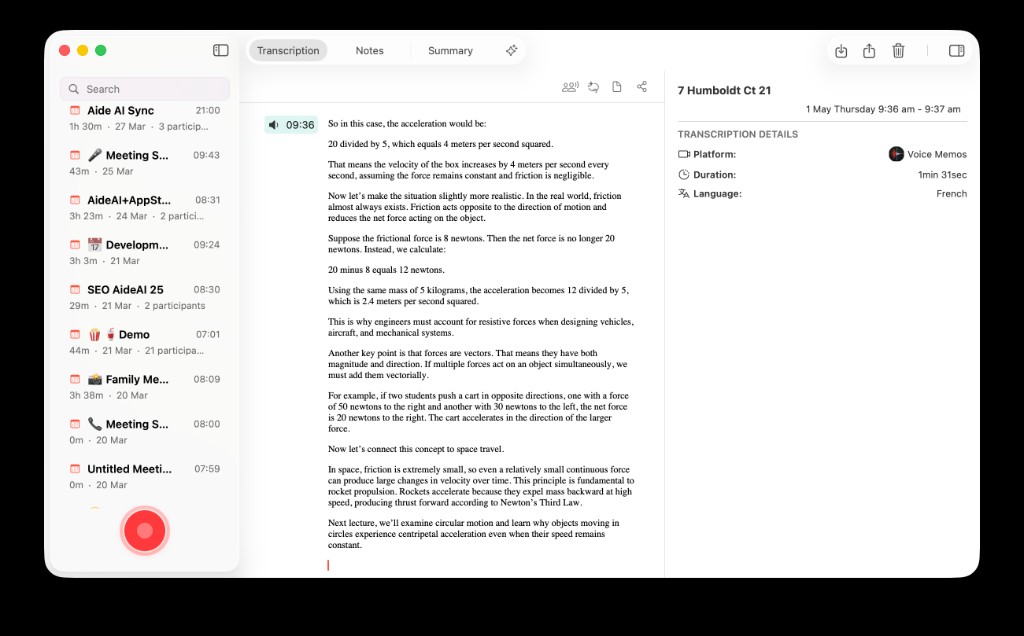
In AideAI, an imported lecture opens as a meeting: searchable transcript on the Transcription tab, review notes on Summary — the two surfaces most students need after class, without replaying the full recording.
Four Categories Students Actually Shop In
These are not brand rankings. They are tradeoff buckets — with honest best-when guidance.
Phone-only recorders
Good at: one-tap capture in the lecture hall when your Mac is closed.
Weak at: turning a phone folder into something you study from on the Mac where essays and problem sets live.
Typical break: recordings stay on the phone until export day, then sit in Downloads until exam week.
Best when: capture speed matters most and you have a real processing habit — not just good intentions.
Generic AI chat
Good at: explaining a paragraph you paste in, or summarizing one transcript you upload manually.
Weak at: keeping twelve lectures organized, searchable, and attached to the same course context across a term.
Typical break: every lecture becomes a new chat thread; transcript search and course files live somewhere else.
Best when: you already have clean text and need a one-off explanation — not a lecture archive.
Cloud lecture notebooks
Good at: transcription and summaries inside one product, often with slick mobile capture.
Weak at: connecting lectures to Canvas deadlines, Google Docs drafts, local PDFs, calendar blocks, and the assistant you use for everything else on Mac.
Typical break: the notes live in a silo; your semester still spans five other apps you manually copy between.
Best when: you want one closed notebook and rarely leave it.
Mac-native assistant workflow
Good at: capture → on-device transcript → summary → reuse in the same place you plan, write, and study.
Weak at: being the smallest possible single-purpose recorder with zero setup.
Typical break: none, if you actually want lectures inside academic context — but overkill if you only need a pocket recorder.
This is the category AideAI targets: lecture notes as part of your semester stack, not a standalone app you forget to open. Extensions for Canvas, Calendar, Voice Memos, local files, and more are available on Free — not locked behind Premium.
Five Questions Before You Commit
Use these as a checklist when a marketing page says "AI notes in one tap."
1. Where does the recording live after class?
If the honest answer is "a folder I never open," the note taker failed — regardless of star rating.
2. Can you search by term, not timestamp?
Transcripts beat replay for definitions, examples, and "will this be on the exam?" moments.
3. Does the summary match how you review?
You want terms, headline ideas, and professor signals — not a generic essay about "the importance of the topic." See How to Summarize Recorded Lectures Without Replaying the Whole Class for what good output looks like.
4. Can slides and readings sit in the same workflow?
Lecture notes rarely stand alone. Read Use PDFs, Notes, Docs, and Audio as Real AI Context.
5. Does processed material feed exam prep?
Summaries should connect to faster review and chat follow-ups — not become another archive. Read How Students Can Review Lectures Faster Before Quizzes and Exams.
Where AideAI Fits — And Where It Does Not
AideAI is strongest for Mac students who want lecture capture inside a broader assistant: record in-app, import from Voice Memos or files, or sync from connected sources like Plaud cloud — then transcribe on device, summarize, and pull transcript and summary into chat when homework starts.
That is a different promise from "we record and summarize." The promise is: the lecture becomes study material in the workflow you already use — alongside Canvas context, calendar planning, and local course files.
It is not trying to win "smallest possible recorder with zero setup." If that is your only goal, a phone app may be enough — as long as you also have a processing habit.
Capture-source setup (not repeated here):
- Apple Voice Memos Integration for Students: Turn Recordings into Study Notes
- Plaud and AideAI: Why connect PLAUD.AI Cloud to your assistant
When the lecture is processed but a concept still will not stick, switch to Learn mode — read Use AI to Understand Class Material Faster, Not Just Generate Answers.
Free vs Premium for Lecture Work
On Free, you can run the core lecture loop: record or import audio, transcribe on device with Whisper (the default engine), generate summaries, reuse meetings in chat, and enable extensions such as Voice Memos, Canvas, Calendar, and local files.
Premium adds power layers — not the basics of note taking: a more capable chat model, built-in web search, image generation, realtime voice, and speaker diarization for multi-speaker sessions. On-device transcription with Parakeet v3 is included on Free.
Many students can validate the full lecture workflow on Free first. Upgrade when you hit a specific limit — model quality, voice, or transcription edge cases — not because capture itself is paywalled.
Details: What Premium Adds to AideAI — and What You Already Get for Free and Pricing.
A Practical Pick For Three Common Setups
Phone in lecture, Mac for everything else:
Pick capture you will actually export — Voice Memos is fine — then judge processors by how fast they turn audio into searchable transcript and a two-minute summary. Setup: Apple Voice Memos Integration for Students: Turn Recordings into Study Notes.
Most schoolwork on a Mac:
Prefer a note taker that keeps lectures in the same assistant as planning, files, and writing — so you are not manually moving context every Sunday.
Exam prep is the pain point, not capture:
Prioritize summary shape, active recall, and chat reuse over fancy recording features you never process. Start with How Students Can Review Lectures Faster Before Quizzes and Exams.
"Best AI note taker" is really two questions: best at recording, and best at making the recording worth keeping. Most ranked lists optimize for the first. Students need the second at least as much.
Try The Workflow, Not The Marketing Page
Pick one lecture this week. Capture or import it. Let it transcribe. Skim the summary before the next class. When the problem set starts, ask one follow-up in chat using the transcript — not your memory of minute thirty-two.
If that loop feels faster than your old pile of unopened recordings, you have your answer — regardless of which app logo topped the listicle.
Start with AideAI Free on Mac. Compare plans on Pricing.