 AideAI
How to Turn Lectures Into Notes, Summaries, and Action Items
Recording a lecture feels responsible.
Reviewing a fifty-minute audio file on Sunday does not.
Most students capture class because they do not want to miss anything. Then the recording becomes storage — too long to replay, too messy to scan, too far from the quiz to feel urgent.
The useful shift is not "record more." It is capture → transcript → summary → action items → reuse in chat.
That is the lecture workflow AideAI is built for.
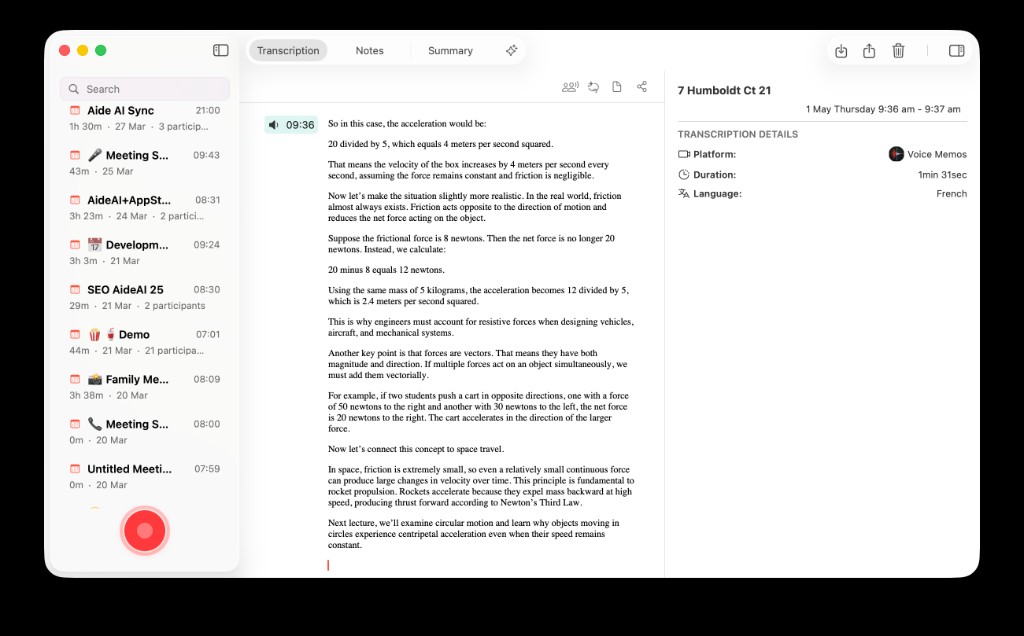
A lecture becomes useful when it shows up as transcript, summary, and reusable study context — not just a file you never reopen.
What You Actually Need After Class
After a dense lecture, you rarely need to relive every minute.
You need:
- the main ideas in plain language
- terms and definitions the professor emphasized
- examples that might reappear on homework
- what to review before the next class
- a way to ask follow-up questions later without replaying the whole recording
Raw audio gives you a timeline. It does not give you that list.
Capture Paths Students Already Use
AideAI supports more than one lecture source.
Record in AideAI when you want the class session to land directly in your meeting workflow with transcription and summary support.
Import audio when the lecture already lives as a file — Voice Memos, a downloaded recording, or audio from another device.
Sync from connected sources when your recorder or cloud workflow already handles capture. For example, Plaud users can pull cloud recordings into AideAI as first-class meetings with transcript and summary fields. Read Plaud and AideAI: Why connect PLAUD.AI Cloud to your assistant. Apple Voice Memos can follow a similar path through the Voice Memos integration.
The capture method matters less than the output: usable study material.
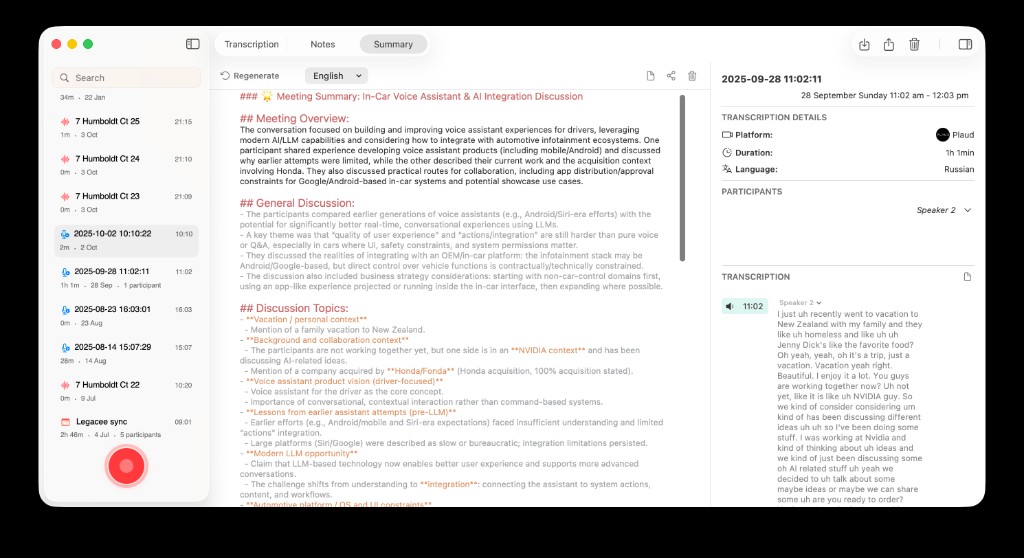
Whether the lecture came from a live recording or a synced device, the goal is the same: transcript and summary you can work from.
The Post-Lecture Workflow In Four Steps
1. Capture while context is fresh
If you record live, do it with a workflow you will actually maintain. A lecture you capture but never process is still dead weight.
If you take handwritten notes during class, that is fine. The recording becomes backup and review material, not a replacement for paying attention.
2. Transcribe on device
Transcription turns speech into something searchable and quotable.
That matters when you need to find the exact moment the professor defined a term, walked through an example, or hinted at exam scope.
Premium adds speaker diarization for multi-speaker audio. Parakeet v3 is the default on-device engine for everyone; Whisper remains available in Settings. The core lecture workflow already starts from meaningful transcript output without making transcription a premium-only story.
3. Summarize into study notes
Ask for a summary shaped for review, not a generic recap wall.
Try prompts like:
- Summarize this lecture into review notes with key terms and examples.
- What would I regret not reviewing before the quiz?
- Turn this into five bullet points I can scan in two minutes.
- What did the professor emphasize compared to the reading?
This is where lecture capture connects to learning. For deeper understanding after class, read Use AI to Understand Class Material Faster, Not Just Generate Answers.
4. Extract action items
Lectures often hide logistics inside content.
Office hour changes. Assignment clarifications. "This will be on the midterm." A follow-up reading. A lab step students miss if they only skim a summary.
Ask explicitly:
What action items, deadlines, or warnings did the professor mention?
That turns passive capture into something that affects your week.
Reuse The Lecture In Chat Later
The best lecture workflow does not end at the summary.
Two days later, you are doing problem set questions and realize you remember the topic but not the method. Instead of replaying forty minutes of audio, bring the lecture transcript or summary back into chat.
Attach the file. Ask:
- Explain the example from Tuesday's lecture again, more slowly.
- Compare what the professor said to this homework question.
- Quiz me on the parts I usually forget.
For attaching readings, slides, and audio together, read Use PDFs, Notes, Docs, and Audio as Real AI Context.
If the course has a dedicated thread, keep lecture review skills attached there. Read One Study Playbook for Your Class Chat: Attach Skills to a Thread.
When Recording Helps And When It Does Not
Recording helps when:
- the instructor moves fast
- the course is cumulative and terminology-heavy
- you miss details while taking notes
- you want searchable backup for exam prep
Recording helps less when:
- you treat it as a substitute for showing up mentally
- you collect files but never run transcript or summary
- you never connect the lecture to homework or review
The failure mode is not the recorder. It is stopping at capture.
A Biology Lecture, End To End
Before: fifty-minute recording sits in Voice Memos until exam week. You tell yourself you will listen later. You never do.
After: the lecture lands in AideAI, gets transcribed, summarized into key terms and examples, and produces three action items — one reading, one quiz warning, one lab clarification. On Thursday, you attach the summary to your problem set chat and ask where your reasoning breaks.
Same lecture. Different outcome.
Try It On Your Next Class
Use one lecture this week as a test case.
Capture or import it. Transcribe. Summarize for review. Pull out action items. Reuse the material in chat when homework starts.
That is how lecture recordings stop being guilt storage and start becoming study assets.
For plan details and premium transcription options, visit Pricing.