 AideAI
Use PDFs, Notes, Docs, and Audio as Real AI Context
Students rarely work from one clean prompt.
Most real schoolwork starts with a pile of material: a PDF from class, lecture slides, a rubric, a Google Doc draft, notes from office hours, a spreadsheet, a recording, a reading, and maybe a half-finished assignment prompt copied from somewhere else.
That is why file-aware AI matters. A blank chat can answer general questions, but it does not automatically know the materials your professor gave you, the draft you are improving, the lecture you missed, or the notes you already made.
AideAI is built around the idea that your study assistant should work with your real academic context, not just with whatever you remember to paste into a message.
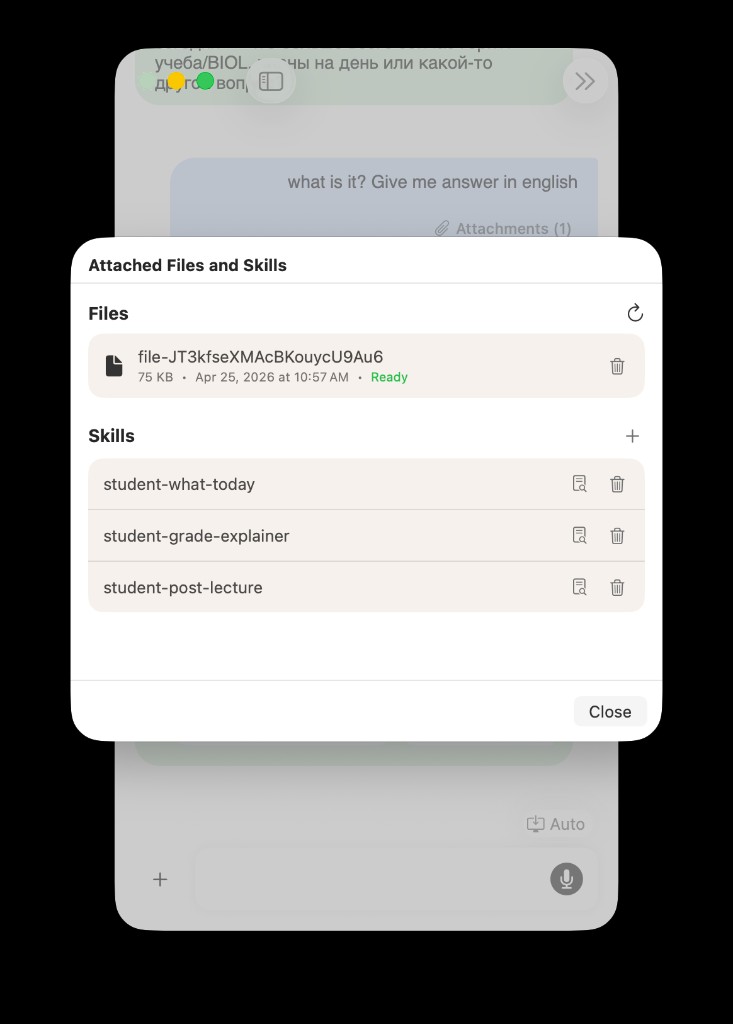
AideAI can bring files, notes, recordings, and repeatable workflows into the same assistant conversation, so the answer is grounded in the material you are actually using.
The Problem
Students do not study from isolated questions.
You might ask:
What should I focus on for this quiz?
But the useful answer depends on the lecture slides, the reading, your notes, the professor's hints, the assignment page, and what you already understand.
Or you might ask:
Help me improve this essay.
But a good answer needs the prompt, the rubric, the draft, the source notes, and the class expectations. Without that context, the assistant can only give generic advice.
That is the core problem with many AI study tools: they are good at generating text, but they start from an empty room. The student has to become the integration layer.
Why Copy And Paste Breaks Down
Copying text into chat works for a short paragraph.
It breaks down when the real task involves several materials:
- Find the right PDF.
- Open the lecture slides.
- Copy the assignment prompt.
- Paste part of the rubric.
- Summarize what the professor said.
- Add your draft.
- Explain which parts matter.
- Ask the actual question.
By the time you have prepared the context, you have already spent energy on the wrong problem.
This is especially painful when the material is spread across different formats:
- PDFs from Canvas, Google Classroom, Drive, or your Mac
- Google Docs, Sheets, and Slides
- Apple Notes or exported notes
- local
.docx,.txt,.md, code, and project files - lecture recordings and voice memos
- transcripts, summaries, and meeting notes
- rubrics and assignment pages
The study question may be simple. The context gathering is not.
What AideAI Does Differently
AideAI helps turn your class material into usable assistant context.
Instead of treating files as separate objects you have to manually copy from, AideAI gives you several ways to bring real study material into the workflow:
- attach files directly to a chat
- search local files on your Mac
- connect selected Google Workspace files
- work with notes and documents
- turn recordings into transcripts and summaries
- use class materials when asking for explanations, outlines, plans, or reviews
The goal is not to replace your files. Your PDFs, Docs, notes, and recordings still live where they belong.
The goal is to make them useful at the moment you ask for help.
File-Aware AI Beats Blank Chat
A blank chat can explain photosynthesis.
A file-aware assistant can explain the photosynthesis lecture your professor assigned, using the slides, the reading, and your own notes as context.
A blank chat can tell you how to write a lab report.
A file-aware assistant can look at your lab rubric, your data notes, and your draft, then help you see what is missing.
A blank chat can summarize what a research paper is about.
A file-aware assistant can compare that paper with the other sources you saved, pull out useful quotes, and help you decide which ones actually support your argument.
That difference matters because students are not usually asking for generic knowledge. They are asking for help with a specific class, assignment, deadline, or body of material.
How It Works In A Real Study Session
Imagine you have a biology quiz on Friday.
Your material is scattered:
- two lecture PDFs
- one reading
- your notes from class
- a short voice memo from office hours
- a practice question sheet
- a Canvas assignment page
In a normal workflow, you would open each item, skim it, copy pieces into chat, and ask for a study plan.
With AideAI, you can bring the material into the assistant workflow and ask something closer to the real need:
Use these lecture slides, my notes, and the office-hours recording to help me make a quiz review plan.
A better answer can then include:
- the concepts that appear across multiple materials
- the parts your notes barely cover
- likely quiz topics based on the assigned documents
- a review sequence for today and tomorrow
- flashcard prompts or practice questions
- a summary of the office-hours clarification
The assistant is no longer guessing what your class is about. It is working from the material you gave it.
What Students Can Use As Context
PDFs And Lecture Slides
PDFs are everywhere in college: slides, readings, assignment sheets, handouts, papers, lab instructions, and rubrics.
AideAI can help you use those documents for questions like:
Summarize the main argument of this paper.
or:
Turn these slides into a study guide.
or:
Compare this rubric with my draft and tell me what to fix first.
This is useful when the PDF is too long to paste manually or when you need the assistant to keep the document in view while helping you reason about it.
Local Files On Your Mac
Some class material never lives in a cloud workspace.
It may be a downloaded PDF, a .docx file, a Markdown note, a coding assignment, a spreadsheet, or a project folder on your Mac.
With Local Files, AideAI can search selected folders by content, file type, path, and date. That helps when you remember the idea inside a file but not its exact name.
For setup details, read Local Files in AideAI: Search PDFs, Docs, Notes, and Class Materials on Your Mac.
Google Docs, Sheets, Slides, And Drive
If your schoolwork lives in Google Workspace, selected Google files can become useful assistant context too.
That matters for group projects, essays, lab data, presentation slides, and shared class files. Instead of manually copying between Drive and chat, you can ask for help with the files you explicitly connect.
For the full setup and privacy model, read Google Workspace in AideAI: Connect Docs, Sheets, Slides, and Drive for Schoolwork.
Notes And Drafts
Notes are often messy, but they are valuable.
They contain professor comments, your own questions, partial outlines, office-hour takeaways, quote lists, and ideas you have not organized yet.
AideAI can help turn notes into:
- study guides
- essay outlines
- question lists
- review plans
- clearer summaries
- next actions
The point is not that every note must be perfect. The point is that imperfect notes can still become useful context.
Audio Recordings
Audio is one of the easiest ways to capture class context and one of the hardest formats to reuse manually.
Lecture recordings, voice memos, and project discussions can contain exactly the explanation you need, but replaying and scrubbing through audio takes time.
When audio becomes a transcript or summary, it can join the rest of your study material. You can ask what was decided, what the professor emphasized, what needs follow-up, or how the recording connects to a current assignment.
For a focused walkthrough, read Apple Voice Memos Integration for Students: Turn Recordings into Study Notes and How to Turn Lectures Into Notes, Summaries, and Action Items.
Example Workflows
Catch Up After Missing Class
Attach the lecture slides, bring in your notes, add a recording or transcript if you have one, and ask AideAI:
Help me catch up on what I missed and tell me what to review first.
The assistant can summarize the material, identify concepts that need attention, and turn the catch-up session into a concrete plan.
Start An Essay From Real Sources
Bring in the assignment prompt, rubric, draft notes, and saved readings.
Then ask:
Build an essay outline from these materials and show which source supports each section.
That gives you a structure grounded in the actual assignment instead of a generic essay template.
Review A Draft Against The Rubric
Attach the draft and rubric together.
Ask:
Compare my draft to the rubric and tell me the highest-impact changes to make first.
This is where context matters. The assistant can focus on the criteria your instructor actually cares about.
Turn Files Into A Study Plan
If your course material is spread across PDFs, notes, and recordings, ask:
Make a two-day study plan from these materials, starting with the weakest areas.
The output can be more useful than a generic study schedule because it is based on the material in front of you.
Find The Right Material Before You Ask
Sometimes the first task is not answering a question. It is finding the right context.
With Local Files, you can ask for documents that mention a topic, filter by folder or type, and then use those files in the next step.
That turns "Where did I save that?" into part of the assistant workflow instead of a separate search chore.
How This Helps Students Learn
Using real context does not just make answers more accurate. It changes the kind of help you can ask for.
You can move from:
Explain this topic.
to:
Explain this topic using my lecture slides and point out which parts I should review before the quiz.
You can move from:
Write an outline.
to:
Use this prompt, rubric, and source notes to suggest an outline I can revise.
You can move from:
Summarize this lecture.
to:
Turn this lecture into notes, action items, and a study checklist.
That is the difference between AI as a generic answer machine and AI as a study assistant that understands the work in front of you.
Privacy And Control
Student context can be sensitive.
Assignments, drafts, notes, recordings, and local files may include personal information, class details, group project data, or research material.
AideAI's model is designed around explicit context:
- attach the files you want to use
- connect selected sources when needed
- choose which local folders are indexed
- manage integrations from settings
- remove or disable sources when they are no longer needed
You should still be thoughtful about what you connect. Do not attach private material unless it is relevant to the task, and avoid sharing credentials or secrets inside ordinary chat messages.
The best workflow is selective: bring in the material that matters for the current study question, then let the assistant help you reason over that material.
What To Try First
If you are new to file-aware AI, start with one concrete assignment.
Choose a task that already has real materials:
- a PDF reading you need to understand
- a lecture deck you need to review
- a draft you need to improve
- a rubric you need to satisfy
- a recording you need to turn into notes
- a folder of class documents you keep searching manually
Then ask AideAI for something specific:
Use this material to help me decide what to study first.
or:
Turn these notes into a quiz review sheet.
or:
Compare my draft with the assignment prompt and show what is missing.
The value appears fastest when the assistant has both the question and the context.
Try AideAI
If your schoolwork lives across PDFs, notes, docs, files, and recordings, AideAI helps bring that material into one assistant workflow.
Start with your own class material. Attach a PDF, connect the files you actually use, or bring in a lecture recording, then ask AideAI to help you understand, write, review, or plan from the real context.
For related workflows, read Use AI to Understand Class Material Faster, Not Just Generate Answers, How Students Can Use AI to Write Better Essays and Assignments, and Local Files in AideAI: Search PDFs, Docs, Notes, and Class Materials on Your Mac. For plan details, visit Pricing.