 AideAI
One Study Playbook for Your Class Chat: Attach Skills to a Thread
Most students do not need twenty different AI setups.
They need one reliable place for each course — a chat that already knows how that class works.
Not because the assistant magically remembers your entire semester. Because you attached the right playbook once and kept coming back to the same thread.
That is the idea behind a class chat with attached skills: one conversation for BIO 204, one for History Methods, one for the seminar where every assignment has a hidden rubric trap. Same course. Same workflow. Less prompt reconstruction every week.
Why A New Chat Every Time Loses The Plot
A common pattern looks efficient at first.
You open a fresh chat, paste the assignment, ask for help, get a useful answer, and move on. Next week, you do it again from zero.
The problem is not the answer. It is the setup tax.
Every new chat means you have to rebuild:
- how formal the writing feedback should be
- whether the assistant should check the rubric first
- how lecture notes should be turned into review material
- what "plan my week for this course" should always include
By midterms, you are not just doing the work. You are re-teaching the assistant how to help with this class.
A dedicated course thread fixes that. Skills attached to the thread give the conversation a stable working pattern without turning every message into a long custom prompt.
For the broader case for reusable study workflows, read One-Click Study Workflows: How Skills Save Students Time.
Files Give You Material. Skills Give You Method.
Students often mix these up because both show up in the same attachments panel.
They solve different jobs.
Attached files bring documents into context: the syllabus PDF, this week's slides, the draft essay, the problem set, the transcript from Tuesday's lecture.
Attached skills bring playbooks into context: decode the assignment before answering, review a lecture into study notes, explain a concept at your level, check a draft against the rubric.
You usually need both.
A syllabus tells the assistant what the course expects. A skill tells the assistant how to process that kind of material before it replies.
That distinction matters because uploading every document again does not replace method. It only gives the assistant more to read. Skills keep the method stable even when the readings change every week.
For the file layer, read Use PDFs, Notes, Docs, and Audio as Real AI Context.
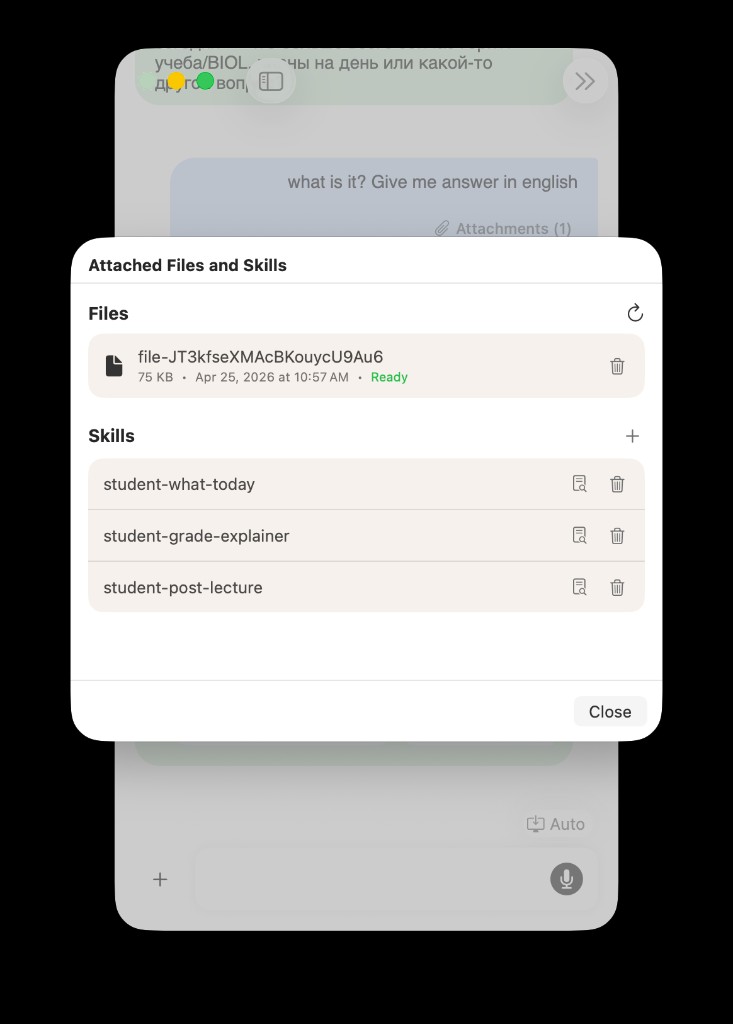
In one class thread, files supply the material while skills supply the repeatable workflow.
Build The Playbook Once For The Semester
A good class chat is not a junk drawer.
It is a small, intentional setup you can explain in one sentence:
This is my BIO 204 thread. It always knows how to decode assignments, review lectures, and check drafts against the rubric.
Start with one course and two or three skills, not a library of everything you might someday need.
Useful first picks often look like this:
| Skill role | What it saves you from rewriting |
|---|---|
| Assignment decoder | "Explain what this prompt is really asking before you help me start." |
| Post-lecture review | "Turn these notes into what I should review before the quiz." |
| Rubric check | "Compare my draft to the grading criteria before suggesting edits." |
Those names are examples. Your library may use packs like student-grade-explainer or student-post-lecture, or skills you imported yourself. The point is to choose workflows you already repeat for this course.
Then name the thread clearly: BIO 204 — Spring, not Chat 14.
That sounds trivial. It matters when you have six active classes and need to reopen the right workflow in two seconds.
Thread Skills Vs Agent Defaults
AideAI gives you two useful scopes.
Thread-attached skills apply to this chat only. Perfect for a course playbook that should not leak into every other conversation.
Agent default skills apply to every new chat opened with that agent. Useful when one Agent Desk panel is already dedicated to a role, like a writing agent or a planning agent.
For a semester-long class chat, thread attachment is usually the cleaner choice. You want the playbook to stay with BIO 204, not follow you into a job interview prep thread or a personal errand chat.
Agent defaults make more sense when the workflow belongs to the role, not the course:
- a planning agent that always starts with a weekly planning skill
- a writing agent that always checks rubrics first
- a learning agent that always explains before quizzing
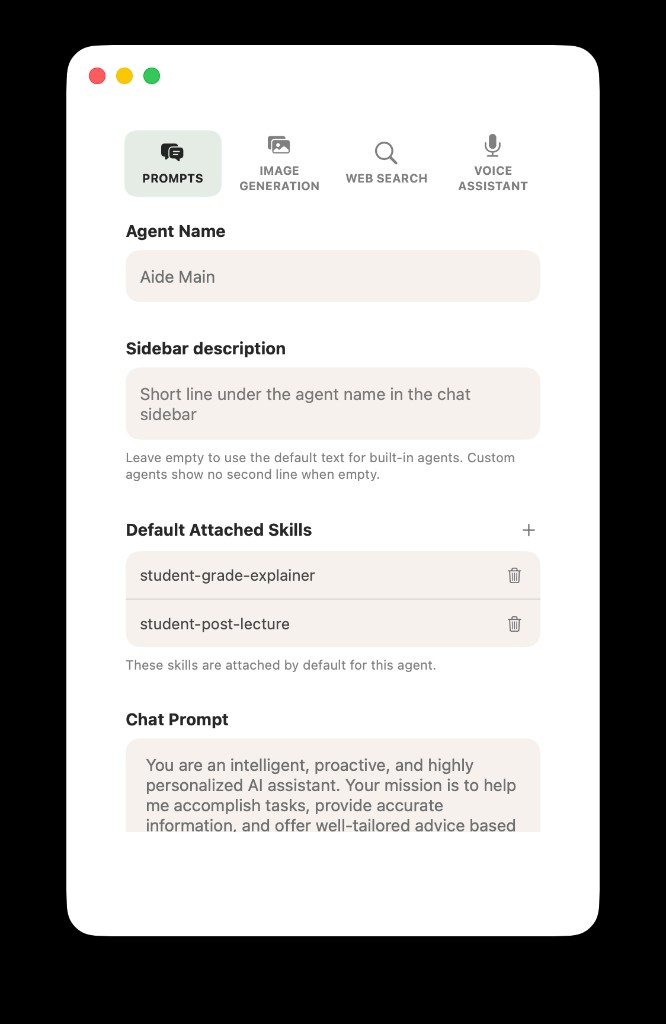
Agent defaults are for role-level habits. A course playbook usually belongs on the thread itself.
For the multi-agent layout, read Meet Agent Desk: A Multi-Agent Workspace for Students.
A Week Inside The Same Class Chat
Here is what the playbook feels like in practice.
Monday. You attach this week's slides and open the thread. You ask what matters before Friday's quiz. The post-lecture skill keeps the answer in review-note shape instead of a generic summary wall.
Wednesday. A new assignment drops. You attach the prompt PDF. The decoder skill forces the assistant to surface hidden requirements, deliverables, and the first concrete step before suggesting a full plan.
Thursday. You paste a draft into the same thread. The rubric skill checks structure and grading criteria before line edits. You still do the thinking. The workflow stays consistent.
Sunday. You do not rebuild the prompt from scratch. You reopen BIO 204 — Spring, attach the new materials, and the thread still behaves like the same assistant for the same class.
That is the payoff: not one magical answer, but less friction every time the course repeats a familiar kind of work.
If the course also lives in Canvas or Classroom, pair the thread with the broader semester view in How to Finally See Everything Going On in Your Semester.
Check What Playbook Actually Shaped The Reply
Sometimes an answer feels right. Sometimes it feels oddly generic.
AideAI can show a per-message breakdown of which skills were considered for a reply. On desktop, hover an assistant message and open the info control in the same row as copy, delete, or share. The popover shows which skills were included, whether they came from This chat or Agent default, and how much skill context was injected.
That matters for trust.
If you attached a rubric-check skill to the thread, you can verify it was actually in play before you trust writing feedback. If a reply feels off, the breakdown helps you see whether the right playbook was used or whether you need to attach a different skill.
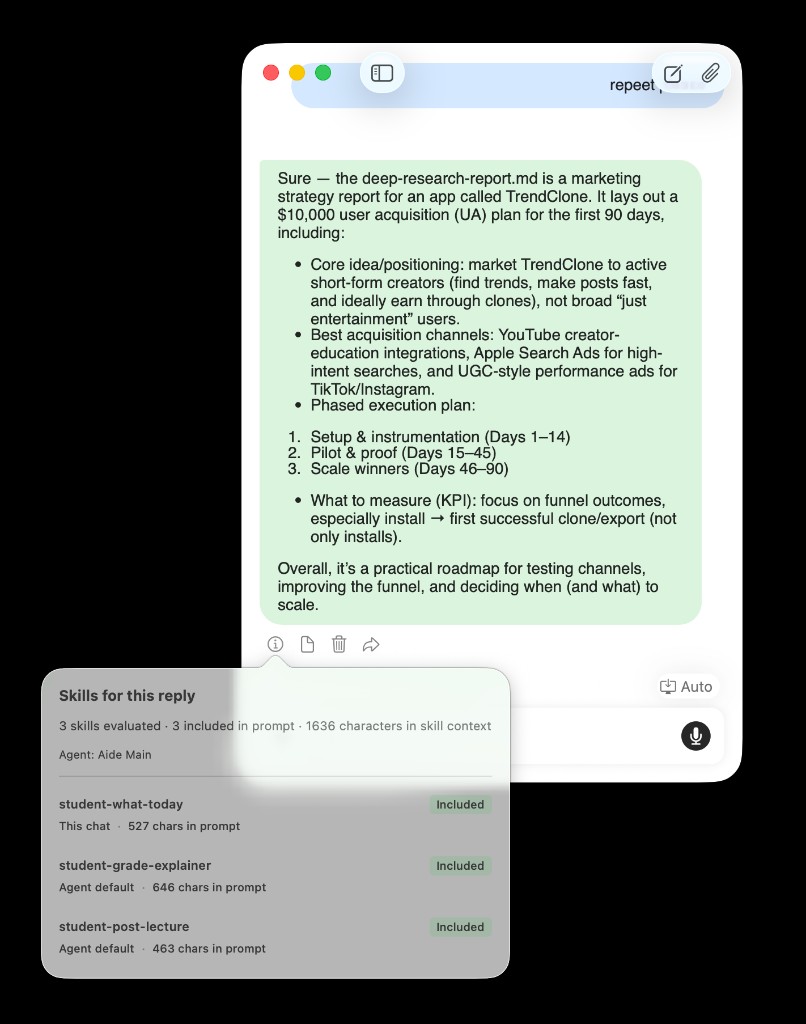
Explainability turns attached skills from a black box into something you can inspect turn by turn.
For import, editing, limits, and the full Skills product model, read AideAI Skills: What They Are, How to Get Them, and How They Relate to OpenClaw-Style Packs.
Three Setup Mistakes To Avoid
Attaching every skill you own. More skills is not more help. Start with the two or three workflows you repeat for that course and add only when a gap keeps showing up.
Treating files like skills. Uploading the syllabus every week is normal. Expecting the syllabus alone to teach the assistant your preferred workflow is not. Keep documents and playbooks in their separate lanes.
Opening a new chat for every assignment. Fresh chats reset the thread-local playbook. Reuse the course thread unless you have a strong reason to isolate a conversation.
Set Up Your First Course Thread
If you want a concrete starting path:
- Pick one active course with repeating work this month.
- Create or open a clearly named chat thread for that course.
- Open Attached Files and Skills and attach two or three skills that match your real routines.
- Attach this week's materials as files when you need them.
- Reuse the same thread for assignments, lecture review, and draft feedback.
- Check the per-message skills breakdown when the workflow matters.
That is the whole playbook: one thread, stable skills, fresh files when the material changes.
Skills do not replace notes, files, or your own judgment. They make one course chat behave like a study workspace instead of a pile of one-off prompts.
Start with one class. Build the playbook once. Reuse it all semester.
For deeper setup and skill packs, read AideAI Skills: What They Are, How to Get Them, and How They Relate to OpenClaw-Style Packs. For plan details, visit Pricing.