 AideAI
Meet Agent Desk: A Multi-Agent Workspace for Students
Most AI tools give students one empty chat box.
That can be useful for quick questions, but real student work is rarely one clean question. You might be planning your week, trying to understand a lecture, improving an essay draft, checking a rubric, reviewing files, and deciding what to do next. When all of that lives in one long thread, the assistant may be smart, but the workflow still feels messy.
Agent Desk in AideAI is built for that messier reality. Instead of forcing every task into one generic chat, it gives you a workspace where multiple AI agents can stay open side by side.
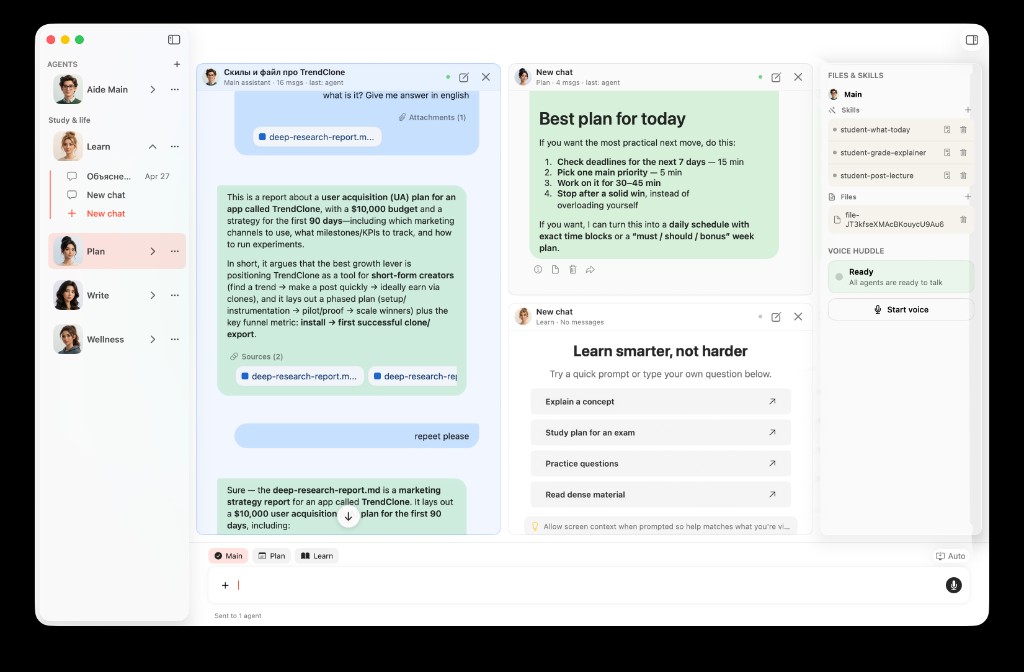
Agent Desk keeps multiple agent workflows visible in one workspace.
The problem
Students do not work in one mode all day.
In one study session, you may need to:
- understand a confusing topic from class
- plan what to do before tomorrow
- rewrite part of an assignment
- compare your draft against the prompt
- pull context from a file, notes, or the current screen
- ask for a more sustainable way to catch up
A single chat thread can technically handle all of those questions, but it does not always handle them well. The thread gets long. The context gets mixed. A planning question interrupts a writing question. A writing answer gets buried below lecture notes. A quick wellness check sits inside the same conversation as a technical explanation.
The result is familiar: you are using AI, but you are still manually managing the workflow.
Why one generic chat breaks down
Generic chat is optimized for a back-and-forth conversation. Student work often needs a workspace.
When everything happens in one thread, you have to keep asking yourself:
- Which part of this conversation was about planning?
- Where did the assistant explain the topic?
- Did I already attach the right file?
- Should I start a new chat or keep going here?
- Am I asking the assistant to think like a tutor, a planner, or a writing coach?
That friction matters because students are usually using AI when they are already overloaded. If the interface makes you organize every task yourself, the assistant becomes another thing to manage.
Agent Desk solves a different problem: not just "can AI answer this?" but "can my AI workspace match the way I actually study?"
What AideAI Agent Desk does differently
Agent Desk lets you work with multiple agent threads in one place.
You can keep up to four agent panels visible, pin the threads you care about, and switch between focused single-panel work and a multi-panel desk. Instead of losing context in one long stream, you can separate work by task:
- one agent for understanding a concept
- one agent for planning the week
- one agent for improving writing
- one agent for checking workload, pace, or next steps
AideAI also includes quick-start agents for common student jobs, including explaining a topic, planning a week, tuning writing, and wellness-oriented support. The point is not to create more noise. The point is to make the assistant's role clearer before you even type.
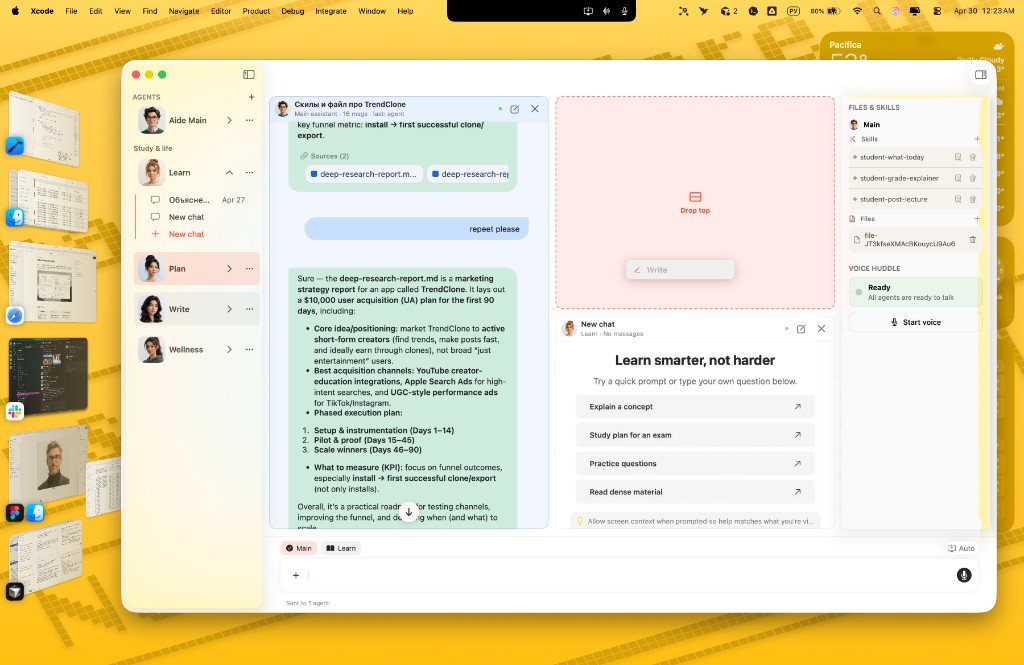
Drag a chat or agent into Agent Desk to add another panel.
Agent Desk also keeps the useful parts of a real workspace nearby:
- pinned agent panels for parallel work
- selected-recipient sending when you want to message one or more panels
- file and skill context through the inspector
- a screen-aware composer for working with what is currently on your Mac
- voice access through Voice Huddle when talking is faster than typing
This turns AideAI from a single chat surface into a student workbench.
How it works in a real student workflow
Imagine you are working on a history paper.
You have a prompt, a rough outline, lecture notes, a few research tabs, and a deadline later this week. You do not need one generic answer. You need several kinds of help:
- Understand what the assignment is really asking
- Turn the deadline into a plan
- Improve the structure of the draft
- Check whether your argument still matches the prompt
In a one-chat workflow, those tasks blend together. You ask one question, then another, then paste a draft, then ask for a plan, then scroll back to find the explanation.
In Agent Desk, you can keep those jobs separate:
- Use a learning-oriented agent to explain the topic and clarify the prompt.
- Use a planning-oriented agent to break the work into realistic steps.
- Use a writing-oriented agent to improve the outline or draft.
- Keep attached files, skills, and screen context available where they are relevant.
If you want one agent to focus, send the message only to that panel. If you want several agents to react to the same context, select multiple recipients.
The benefit is not just speed. It is less mental bookkeeping.
What you can do with Agent Desk
Agent Desk is useful whenever a student task has more than one layer.
For example, you can:
- Keep a planning agent open while a writing agent helps with a draft
- Ask one agent to explain a lecture concept while another turns it into a study plan
- Compare how different agents respond to the same assignment context
- Attach files or use skills for a specific thread without mixing every workflow together
- Use screen context when you want help with what is currently visible on your Mac
- Start a fresh thread for a specific agent without losing the rest of your workspace
- Use voice when it is easier to talk through a problem than type it out
This is especially helpful for longer study sessions, essay work, exam prep, weekly planning, and catch-up days after missing class.
Agent Desk vs a normal AI chat
A normal AI chat is still useful for simple questions.
Ask a definition. Rewrite a sentence. Summarize a short passage. Get a quick answer.
Agent Desk becomes more useful when the task is bigger than one exchange. It helps when your work has multiple roles, multiple inputs, or multiple decisions:
- tutor-style explanation
- planning and prioritization
- writing feedback
- file-aware research
- screen-aware assistance
- skills for repeatable workflows
- voice for fast thinking
The difference is structure. A normal chat gives you one conversation. Agent Desk gives you a place to organize several conversations around the same study session.
Who this is best for
Agent Desk is especially useful for students who:
- work across multiple classes in the same day
- use AI for more than quick answers
- want separate help for learning, planning, and writing
- attach files, notes, lecture material, or screenshots as context
- prefer a native Mac workspace instead of another browser tab
- want to reduce the friction of switching between tasks
If you often open an AI chat and then spend several minutes explaining the whole situation, Agent Desk is designed for you.
Why this helps with real student outcomes
The goal is not to make AI feel more complicated. It is to make student work feel less scattered.
When the right agent is already open, the next step becomes easier. When planning and writing are separated, you do not have to untangle the conversation later. When files, skills, screen context, and voice are close to the work, you spend less energy preparing the assistant and more energy moving forward.
That can help students:
- start faster
- keep context organized
- make better decisions about what to do next
- improve drafts with clearer feedback
- turn confusing material into usable understanding
- reduce the feeling that everything is happening in one overloaded thread
Agent Desk is AideAI's answer to a simple student reality: studying is not one chat. It is a desk full of work, context, questions, and decisions.
Try Agent Desk in AideAI
If you use AideAI on Mac, open Agent Desk when your work needs more than one answer. Start with one agent, add another panel when the task grows, and use the workspace to keep learning, planning, writing, and review in view.
For related workflows, read about using AideAI to plan your college work, understand class material faster, improve essays and assignments, and build one-click study workflows with Skills.