 AideAI
One-Click Study Workflows: How Skills Save Students Time
Every semester has a few prompts you end up writing again and again.
Turn this assignment into steps.
Summarize this lecture into study notes.
Check my draft against the rubric.
Make an exam plan from these materials.
Explain this topic like I am behind but not hopeless.
The first time, writing the prompt feels useful. The fifth time, it feels like admin work. By midterms, the prompt itself becomes a small chore you have to reconstruct before the assistant can help.
AideAI Skills are for that repeated work.
Not every question needs a skill. But the study workflows you repeat every week should not start from scratch every time.
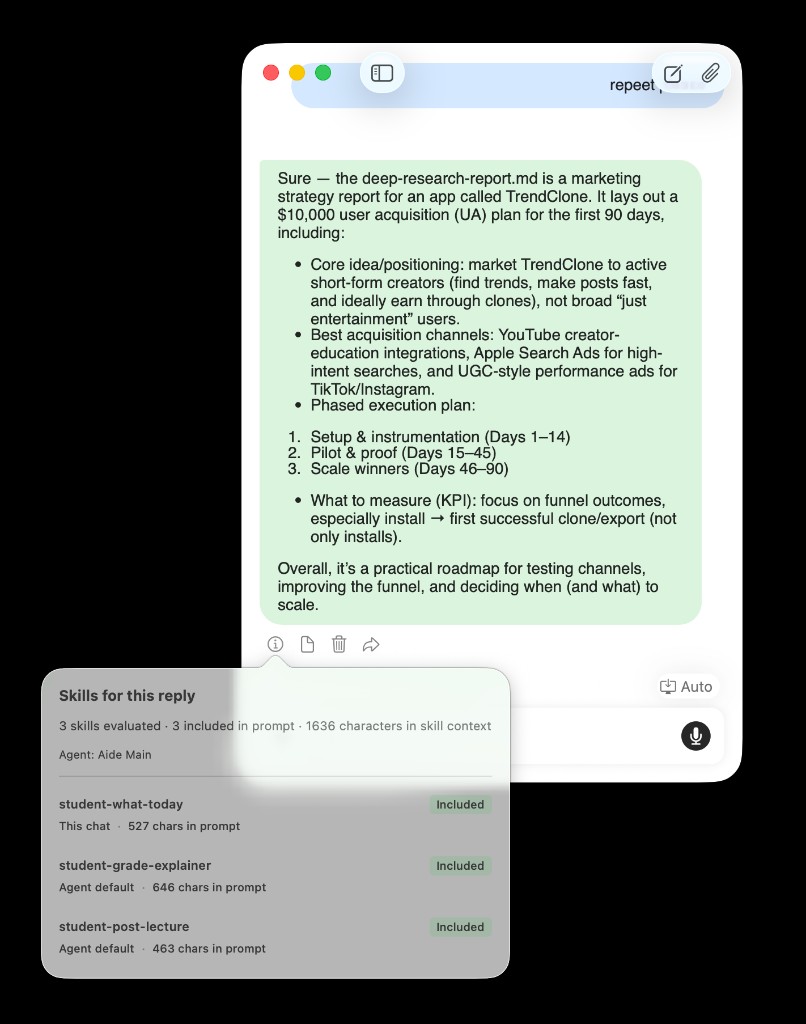
Skills let recurring study workflows stay close to the chat instead of living as long prompts you rewrite by hand.
The Prompt You Should Not Rewrite Every Sunday
Sunday night has a pattern.
You look at the week, open the course page, check notes from the last lecture, skim the assignment prompt, and ask your assistant for help deciding what to do first.
The request is never exactly identical, but the shape is familiar:
- use the course context
- find what matters most
- break the work into steps
- warn me about hidden effort
- make the plan realistic
- give me something I can start tonight
That is a workflow, not a one-off question.
A skill is a way to package that workflow so the assistant already knows how to approach the job. Instead of rebuilding the same instructions each time, you can keep the pattern ready and bring it into the conversation when it fits.
For the deeper technical guide to importing, editing, and managing skill packs, read AideAI Skills: What They Are, How to Get Them, and How They Relate to OpenClaw-Style Packs. This post is the student version: when skills are worth using and what they feel like in real study work.
What A Skill Feels Like In A Study Session
A skill is not just a saved prompt.
A saved prompt is usually text you paste.
A skill is closer to a reusable way of working: a named playbook the assistant can follow when the situation matches. It can describe the goal, the steps, the style of output, the assumptions to check, and the kind of result that is useful.
That distinction matters because students rarely repeat exact prompts. They repeat situations.
The lecture changes. The essay topic changes. The quiz date changes. The rubric changes. But the workflow is familiar.
Skills are useful when the pattern is stable even if the material changes.
Four Buttons Worth Having Before Midterms
1. Decode The Assignment
Some assignment prompts are not hard because the work is impossible. They are hard because the prompt hides the real job.
A useful skill for this moment might ask the assistant to:
- restate what the instructor is asking for
- identify deliverables
- find due dates or constraints
- separate research, writing, formatting, and submission steps
- point out ambiguous parts to clarify
- turn the assignment into a first action
The student prompt can be short:
Use the assignment decoder skill on this prompt.
The value is that the assistant already knows what kind of reading to do. It is not just summarizing the assignment. It is translating the prompt into work.
For planning-heavy workflows, pair this with What Should I Do Today? A Better Way to Plan Your College Work.
2. Turn A Lecture Into A Study Plan
Lecture material often needs the same post-processing:
- key ideas
- terms to know
- confusing sections
- likely review questions
- action items
- what to revisit before the exam
You can ask for that manually every time, or you can make it a skill.
The skill does not need to know this week's biology topic in advance. It needs to know the shape of the output you want after any lecture.
That is especially helpful when you use recordings or transcripts. The assistant can work from the material, but the skill gives it a consistent job: turn raw lecture context into something you can study from.
For lecture capture itself, read How to Turn Lectures Into Notes, Summaries, and Action Items.
3. Build An Exam Prep Pass
Exam prep is full of repeated decisions.
What do I already understand? What should I review first? Which topics need practice? What can wait? What should become flashcards? What is the plan for the next two days?
A good exam-prep skill can make the assistant answer in a familiar shape every time:
- strongest areas
- weakest areas
- likely high-yield topics
- practice prompts
- review schedule
- "start here" step
That consistency matters. When you are tired, the format itself reduces friction. You do not have to decide how the assistant should organize the answer before you can use it.
4. Review A Draft Without Losing The Rubric
Writing help is easy to ask for badly.
Make this better.
That can produce polished text without improving the assignment.
A writing-review skill can keep the assistant grounded:
- compare the draft to the prompt
- check the rubric first
- preserve the student's voice
- separate structure, evidence, clarity, and formatting
- suggest the highest-impact fixes
- avoid rewriting everything unless asked
The skill gives the assistant a role. Not "write for me," but "help me improve this draft against the actual task."
For broader writing strategy, read How Students Can Use AI to Write Better Essays and Assignments.
Skills Are For Repeated Situations, Not Every Message
The easiest way to overuse skills is to turn every tiny request into one.
You do not need a skill for:
- defining one word
- rewriting one sentence
- asking a quick factual question
- getting a simple explanation
Use a normal chat for that.
Skills become useful when the work has a repeatable shape:
- same course routine
- same review format
- same kind of assignment
- same weekly planning ritual
- same lecture cleanup process
- same writing feedback pass
The question to ask is:
Will I want the assistant to do this the same way again?
If yes, it may be a skill.
Skills Vs Files Vs One-Off Chat
These three things solve different problems.
Files give the assistant material to read.
A one-off chat lets you ask something in the moment.
A skill tells the assistant how to work.
That means a strong workflow often uses more than one:
- Attach the assignment prompt or notes.
- Use a skill that knows how to process that kind of material.
- Ask follow-up questions in chat.
For example, a PDF lecture deck is context. A lecture-review skill is the method. The conversation is where you clarify, ask follow-ups, and decide what to do next.
For the file/context layer, read Use PDFs, Notes, Docs, and Audio as Real AI Context.
Where Skills Fit In Agent Desk
Skills become more useful when they are close to the workspace.
In Agent Desk, a student might keep one panel for planning, one for writing, and one for learning. Skills can support those panels without mixing every workflow into one long thread.
For example:
- a planning agent uses a weekly planning skill
- a writing agent uses a rubric review skill
- a learning agent uses a lecture explanation skill
- a course thread keeps the same skill available for recurring class work
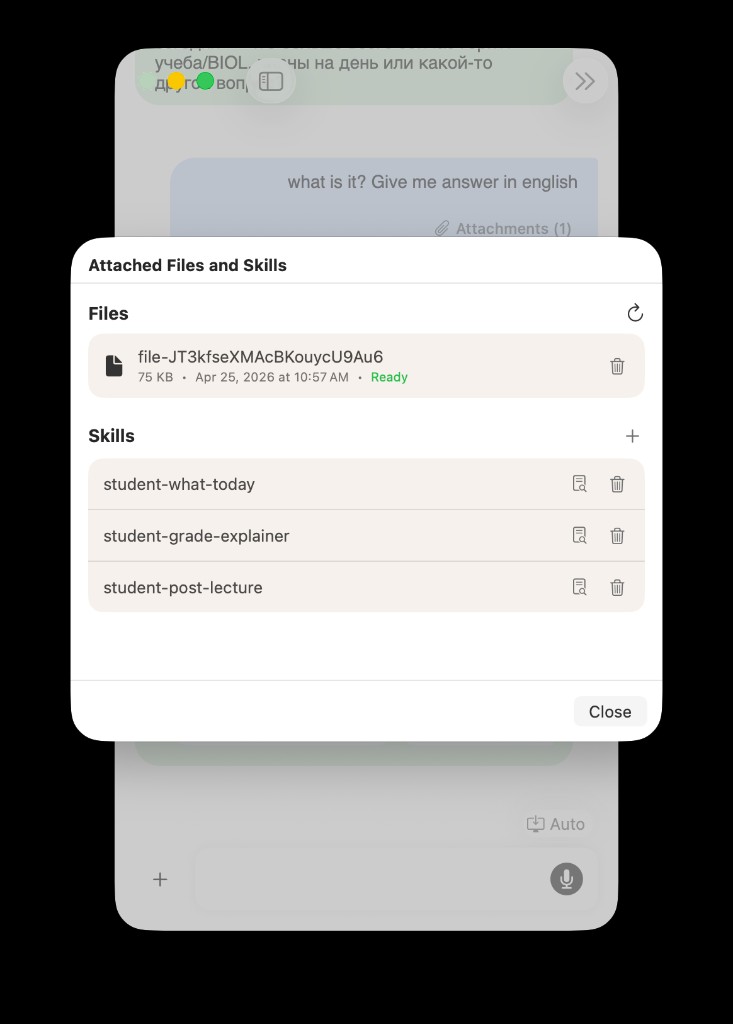
Skills are most useful when they sit next to the files, notes, and agent threads where the work actually happens.
This is why skills are not just a power-user feature. They can make ordinary student workflows feel less repetitive.
For the multi-agent workspace angle, read Meet Agent Desk: A Multi-Agent Workspace for Students.
Start With One Course Routine
The best first skill is not the most complex one.
Start with the routine you already repeat.
Maybe every Monday you need to turn course updates into a plan. Maybe every lecture needs a review sheet. Maybe every essay draft needs the same rubric pass. Maybe every problem set starts with "explain the assignment and show me the first step."
Pick one.
Then make the skill answer a very specific question:
What should this workflow always do before giving me the final answer?
That might be:
- check the rubric before giving writing feedback
- identify hidden steps before making a plan
- explain terms before making practice questions
- list confusing parts before summarizing a lecture
- separate urgent work from important work
If the skill saves you from rewriting that instruction three times, it is already doing its job.
Try Skills In AideAI
Skills are for the parts of studying that should feel repeatable.
They do not replace thinking, files, notes, or conversation. They make the assistant start from a better working pattern when the job is familiar.
Start with one routine: decode assignments, review lectures, plan exam prep, or check writing against a rubric. Then keep the workflow close to the chat or Agent Desk panel where you already do that work.
For the full product instruction, including skill imports and OpenClaw-compatible packs, read AideAI Skills: What They Are, How to Get Them, and How They Relate to OpenClaw-Style Packs. For plan details, visit Pricing.