 AideAI
How Students Can Review Lectures Faster Before Quizzes and Exams
Exam week has a cruel math problem.
You attended the lectures. You may even have recordings, slides, and notes. But the quiz is in forty-eight hours, and "review the whole unit" is not a plan — it is a wish.
Reviewing lectures faster does not mean caring less. It means stopping the workflow that burns time without building recall: replaying long audio, rereading messy notes linearly, and mistaking familiarity for understanding.
The faster path looks like this: small chunks → active recall → targeted gaps → reuse in chat.
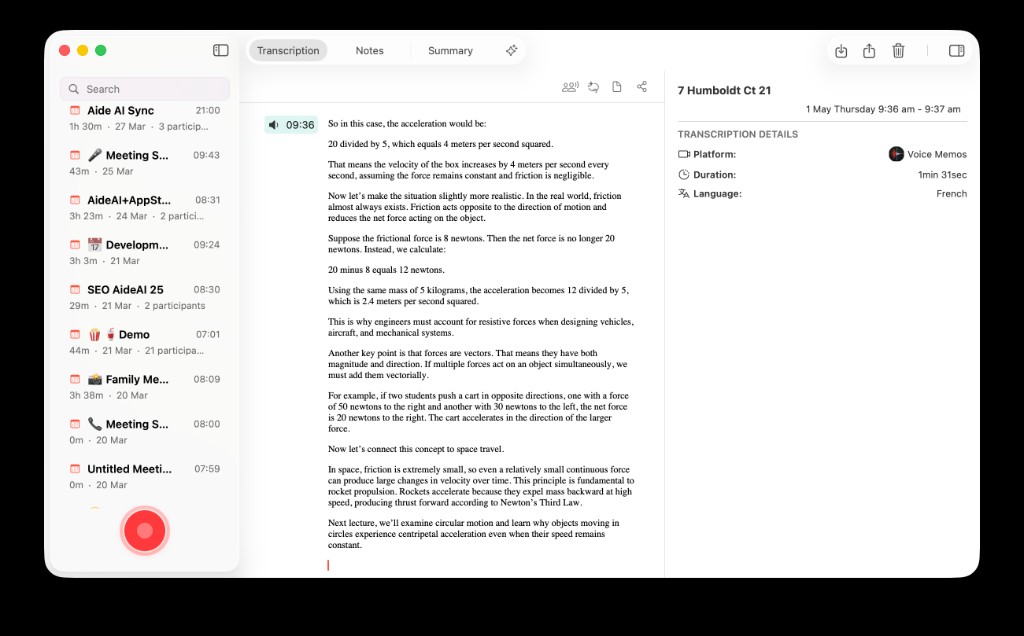
Fast review starts from processed lecture material — summary, transcript, slides — not from minute zero of the recording.
Slow Review Feels Productive. It Often Is Not.
The classic slow loop:
- open the lecture recording or a long note doc
- start from the beginning
- recognize ideas as they appear
- stop early because it "mostly makes sense"
- do poorly on application questions anyway
Recognition is not recall. Hearing the professor explain something again is not the same as explaining it yourself under pressure.
Fast review changes the question from "Did I hear this?" to "Can I produce it?"
Start From Processed Material, Not Raw Audio
You cannot review faster if every session begins with fifty minutes of audio.
Do the processing work once — or use what you already built after class:
- lecture summary from How to Summarize Recorded Lectures
- transcript and meeting context from your capture workflow in How to Turn Lectures Into Notes, Summaries, and Action Items
- slides and readings attached as files
Raw audio is backup for one confusing minute. It should not be your default review surface.
The 20-Minute Lecture Review Loop
Use this loop per lecture when time is tight.
Minute 0–3: Scan the summary
Read only headline ideas, terms, and professor signals. Mark what feels fuzzy.
Minute 3–12: Active recall
Close the summary. Explain the main ideas out loud or on paper without looking. Then check what you missed.
Minute 12–17: Targeted gap fill
Reopen only the sections you failed — transcript snippet, slide, or chat — not the whole lecture.
Minute 17–20: Application check
Ask one question that looks like homework or a quiz: compare, apply, define, or solve.
Repeat for the next lecture instead of trying to marathon one recording.
Prompts That Turn Summaries Into Quiz Prep
Attach the lecture summary or transcript to your course thread and try:
- Quiz me on the terms I keep confusing.
- Ask three short questions that test application, not memorization.
- What would a fair but hard quiz question look like from this lecture?
- I think I understand X — poke holes in my explanation.
- Compare this lecture to the assigned reading. Where do they disagree?
For deeper understanding when a concept still will not stick, switch to Learn mode. Read Use AI to Understand Class Material Faster, Not Just Generate Answers.
For attaching slides, PDFs, and audio together, read Use PDFs, Notes, Docs, and Audio as Real AI Context.
Review Three Lectures, Not One Marathon
Students often review in the wrong unit of time.
One three-hour block before the exam feels responsible. It also drains attention fast. Three twenty-minute passes across the week usually beat one heroic Sunday.
A simple schedule for a Friday quiz:
| Day | Focus |
|---|---|
| Monday | Summarize or confirm summaries exist |
| Wednesday | 20-minute recall loop on lectures 1–2 |
| Thursday | 20-minute loop on lecture 3 + weak spots |
| Friday morning | 10-minute skim + application questions only |
The goal is repeated retrieval, not one perfect reread.
Keep Review In The Same Course Thread
Context switching slows review.
If you processed BIO 204 lectures in one thread with attached skills and files, review there too. You do not rebuild the prompt, reattach the rubric-shaped habits, or hunt for the right summary.
Read One Study Playbook for Your Class Chat for setting that up once per course.
When To Replay Audio (And When Not To)
Replay is for precision, not coverage.
Use audio when:
- one definition or example is still wrong in your head
- the transcript has a gap or garbled term
- the professor's emphasis matters and the summary flattened it
Skip audio when:
- you already have a good summary and your gap is recall, not capture
- you are "reviewing" by listening while doing something else
- you are on pass three and still starting from minute zero
Scrub to the minute you need. Then go back to recall.
Organic Chemistry, 36 Hours Before The Quiz
Slow path: replay three lectures while highlighting notes. Feel busy. Still mix up mechanisms on practice problems.
Fast path: scan three one-page summaries, run a 20-minute recall loop on each, attach weak topics to the course chat, ask for application-style questions, replay audio only for the one step that keeps breaking. Walk into the quiz knowing what you cannot explain yet — and fix that first.
Same material. Less replay. Better retrieval.
Your Pre-Quiz Checklist
Before the next quiz, run this:
- Confirm each lecture has a short summary, not just a recording
- Pick one weak lecture and run the 20-minute recall loop today
- Attach summary + slides to your course thread
- Ask for application questions, not another summary
- Use audio only for targeted gaps
- Stop when you can explain the main ideas without looking
That is faster review — not because you skipped the class, but because you stopped paying twice in full.
For capture and summarization workflows, read How to Turn Lectures Into Notes, Summaries, and Action Items and How to Summarize Recorded Lectures. For plan details, visit Pricing.