 AideAI
How to Summarize Recorded Lectures Without Replaying the Whole Class
You did the responsible thing and recorded the lecture.
Now you have a file you do not want to reopen.
That is the gap most students hit. Capture was easy. Summarizing feels like another class session — except you are alone, tired, and scrubbing through audio trying to find the one example the professor repeated twice.
The useful goal is smaller than a perfect transcript recap. You want a summary you can scan in two minutes before the quiz, not a second pass through the entire hour.
What A Good Lecture Summary Actually Contains
Before you ask AI for help, know what "done" looks like.
A summary worth keeping usually has:
- Headline ideas — the three to five things the lecture was really about
- Terms and definitions — vocabulary the professor treated as load-bearing
- Examples — the ones that might reappear on homework or exams
- Signals — "this will be on the test," assignment clarifications, reading changes
- Review prompts — what you should be able to explain out loud before the next class
You do not need every anecdote. You need the material that changes how you study this week.
Why Replay-And-Pause Fails
Manual replay works for one missing sentence. It scales badly for a full lecture.
The problems are predictable:
- you lose time searching for the important minute
- your notes become a timeline, not a structure
- you stop after ten minutes and tell yourself you will finish later
- the recording becomes guilt storage instead of study material
Summarization is a processing step. Treat it like laundry after class: quick, repeatable, and separate from capture.
For the full capture-to-action workflow, read How to Turn Lectures Into Notes, Summaries, and Action Items.
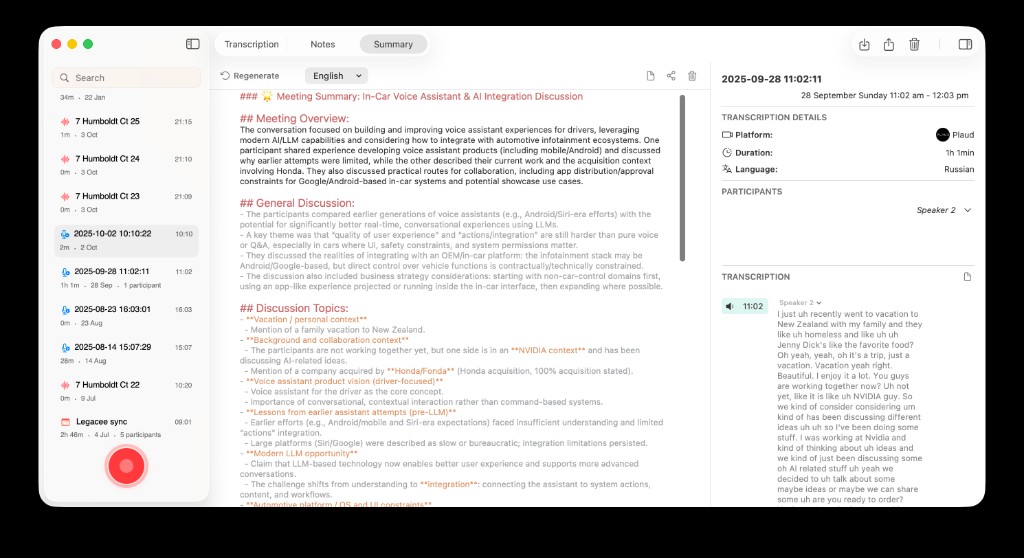
Summarization starts once the lecture exists as transcript and meeting context — not as a file you never open.
Step One: Get The Recording Into One Workflow
Students record lectures in different places:
- AideAI live recording during class
- Apple Voice Memos on iPhone or Mac
- Plaud or another recorder synced to cloud
- Audio files exported from another app
The summarization workflow is the same once the audio lands where AideAI can transcribe it. If you capture in Voice Memos, read Apple Voice Memos Integration for Students. If you use Plaud, read Plaud and AideAI.
Do not let "wrong recorder" become an excuse to skip the summary step.
Step Two: Transcribe Before You Summarize
Text beats audio for review.
Transcription gives you:
- searchable wording for terms and names
- quotable lines for essay or problem set work
- a base layer for shorter summaries on top
Ask for transcript first when it is not automatic. Premium adds speaker diarization for multi-speaker audio. Parakeet v3 is the default on-device engine on Free; Whisper remains available in Settings. The core workflow still starts from usable text on Free.
Step Three: Ask For The Right Summary Shape
Generic "summarize this lecture" often produces a wall of text that is technically correct and practically useless.
Be specific about output:
Summarize this lecture into review notes I can scan in two minutes. Include key terms, one example per main idea, and anything the professor flagged as important.
Other prompts that work:
- Turn this into five bullet points for exam review.
- Separate content from logistics — what did we learn vs what is due?
- What would I regret not knowing before Friday's quiz?
- Compare this lecture to the assigned reading — where do they overlap or conflict?
The shape of the ask determines whether you get study notes or a generic recap.
Step Four: Pull Action Items Out Separately
Lectures hide admin inside content.
Office hour moves. Rubric hints. Lab changes. A throwaway "don't forget the pre-lab."
Run a second pass:
List action items, deadlines, and warnings mentioned in this lecture.
That keeps your summary clean while nothing important disappears into a paragraph you skim too fast.
Step Five: Reuse The Summary In Chat
The best summary is not the final stop.
Two days later, attach the summary or transcript when you work on problem sets or essay drafts:
- Explain the example from Tuesday again, more slowly.
- Quiz me on the terms I usually forget.
- Connect this lecture to question four on the homework.
For attaching slides, readings, and audio together, read Use PDFs, Notes, Docs, and Audio as Real AI Context. For understanding after you summarize, read Use AI to Understand Class Material Faster, Not Just Generate Answers.
A One-Page Checklist For This Week
Use this after your next recorded class:
- Import or sync the recording into AideAI
- Confirm transcript exists
- Generate a short review summary with terms and examples
- Extract action items in a separate pass
- Save or attach the output to your course thread
- Reuse it in chat when homework starts — do not replay the full audio unless one moment is still unclear
If you repeat the same course every week, attach a post-lecture skill to the class thread. Read One Study Playbook for Your Class Chat.
Economics Lecture, Thirty Minutes Later
Before: fifty-minute recording sits untouched until exam panic. You remember the topic existed but not the method.
After: transcript plus one-page summary with four key ideas, six terms, two professor warnings, and one reading note. Thursday's problem set starts from the summary in chat, not from minute zero of the audio.
Same lecture. Less replay. More review.
Try It On One Recording This Week
Pick one lecture you already recorded and never processed.
Transcribe. Summarize for review. Pull action items. Attach the result to your next study session.
That is how recorded lectures stop accumulating and start compounding.
For premium transcription options and plan details, visit Pricing.