 AideAI
How to Turn Voice Memos Into Study Notes
Voice Memos is perfect for the moment before you are organized.
You record a professor explaining something after class. You capture an office-hour answer while walking back across campus. You talk through an essay idea before it disappears. You save a project-team decision because nobody has the shared doc open.
Then the memo sits there.
Turning voice memos into study notes is not mainly a setup problem. The setup is covered in Apple Voice Memos Integration for Students: Turn Recordings into Study Notes. This post is about the workflow after capture: how to move from a quick recording to notes you can review, search, and reuse in chat.
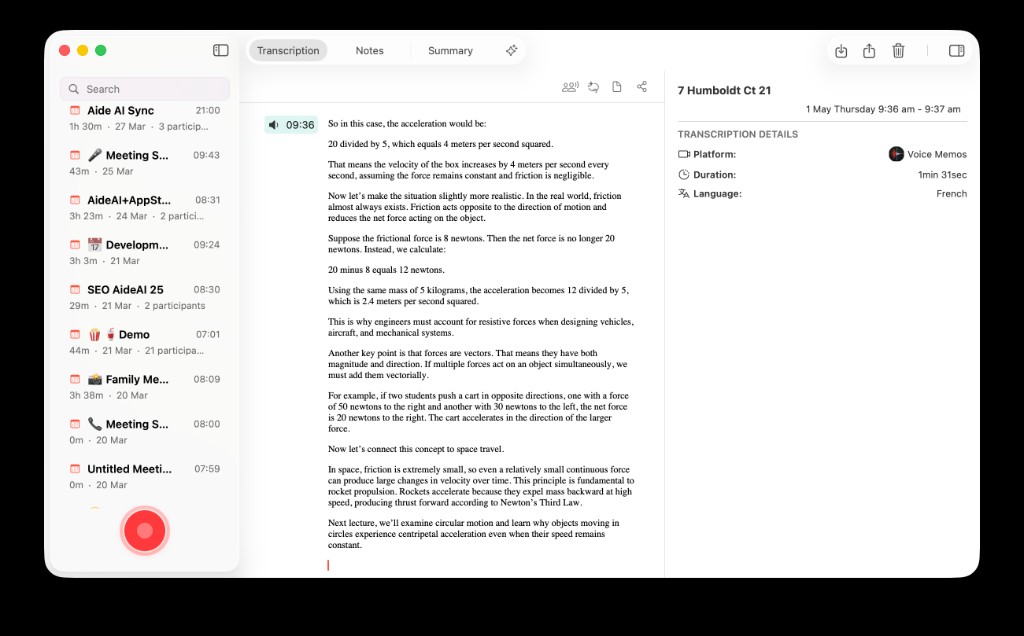
A voice memo becomes useful when it stops being a loose audio file and becomes transcript, summary, and study context inside AideAI.
The Difference Between A Memo And A Study Note
A voice memo is raw capture.
A study note is something you can use later without replaying the original audio.
That usually means it has:
| Layer | What it answers |
|---|---|
| Transcript | What exactly was said? |
| Short summary | What matters from this clip? |
| Key terms or ideas | What should I remember? |
| Action items | What do I need to do next? |
| Review prompt | Can I explain this without listening again? |
If your recording does not reach at least the summary layer, it is still mostly storage.
A Workflow For The Three-Minute Clip
Short memos need a lighter process than full lectures.
Use this when you record a quick idea, office-hour answer, or professor clarification:
- Import the memo into AideAI through the Voice Memos integration.
- Let AideAI transcribe the audio.
- Ask for a short summary in three bullets.
- Pull out any action item or question.
- Save the result into the class thread or attach it to the next study chat.
Useful prompt:
Turn this voice memo into a study note. Give me: what was said, why it matters, what I should do next, and one review question.
That output is small enough to reuse. You are not creating a giant transcript archive. You are creating a note you can scan.
A Workflow For Lecture Snippets
Sometimes Voice Memos is not recording the whole class. It is capturing the part your handwritten notes missed.
For lecture snippets, ask AideAI to preserve more academic structure:
- the concept being explained
- the example the professor used
- any warning about exams, homework, or readings
- what you should be able to explain later
Prompt:
Convert this lecture snippet into review notes. Include the concept, professor example, possible quiz angle, and a question I should answer from memory tomorrow.
This keeps the memo tied to learning instead of turning it into another generic summary.
For full lecture recordings, use the broader workflow in How to Turn Lectures Into Notes, Summaries, and Action Items. For recorded lectures you already have, read How to Summarize Recorded Lectures Without Replaying the Whole Class.
A Workflow For Ideas You Speak Before Writing
Voice memos are not only for lectures.
They are also good for messy pre-writing:
- an essay angle you think of after class
- a lab-report interpretation you are not ready to type
- a discussion-board response you want to draft out loud
- a question for office hours
When the memo is your own thinking, do not ask for a polished essay. Ask AideAI to preserve the idea and make it workable:
Turn this spoken idea into writing notes. Keep my point of view, list the strongest claim, flag missing evidence, and suggest a simple outline.
Then move to Write mode when you are ready to draft. For the writing workflow, read How Students Can Use AI to Write Better Essays and Assignments.
Do Not Let The Voice Memos Inbox Become A Second Backlog
The danger with fast capture is that it feels productive even when nothing gets processed.
Use a simple rule:
If a memo matters, process it within 24 hours.
Not perfectly. Just enough:
- rename or identify the class
- transcribe it
- summarize it
- extract one next step
- attach it to the right course thread
If the memo was not worth that five-minute pass, it probably was not worth keeping forever.
For recurring course work, keep the output in the same class chat. A thread with the right files and skills attached is much easier to reuse than a pile of standalone clips. Read One Study Playbook for Your Class Chat: Attach Skills to a Thread.
Before And After: Office Hours
Before: you record a two-minute office-hour answer about your thesis. Later, the file name says New Recording 14. You vaguely remember the advice but cannot quote it, act on it, or connect it to your draft.
After: the memo imports into AideAI. You transcribe it, summarize the professor's advice, extract two revision tasks, and attach the note to your essay thread. When you revise, the advice is already part of the writing context.
Same recording. Different shelf life.
Review Memos Before Exams
Near a quiz or exam, voice memos can become a fast review source if you process them into prompts.
Ask:
- What concepts appear across these memos?
- Which memo contains the clearest explanation of the topic I keep missing?
- Turn these three short memos into a 10-minute review sheet.
- Quiz me on the ideas from these memos without showing me the answers first.
For the active-recall version of this workflow, read How Students Can Review Lectures Faster Before Quizzes and Exams.
Try It With One Memo
Pick one voice memo you already made and never used.
Import it. Transcribe it. Ask for a short study note, one action item, and one review question. Then attach the result to the course thread where it belongs.
That is the whole shift: Voice Memos captures the moment. AideAI helps turn the moment into study material.
For setup details, read Apple Voice Memos Integration for Students: Turn Recordings into Study Notes. For plan details, visit Pricing.