 AideAI
Why a Native Mac App Feels Better Than Another Browser Tab
The browser is where a lot of schoolwork happens.
It is also where schoolwork gets crowded.
Canvas, Google Docs, readings, email, PDFs, a course portal, a research database, a spreadsheet, a calendar, a half-finished assignment page, and a few tabs you opened because they looked important at 1:14 AM. Then somewhere in that stack is the AI assistant you meant to use.
That is the tension AideAI is trying to avoid.
A study assistant should not feel like one more tab to manage. It should feel close to the work, quick to reach, and able to help without making you rebuild your context every time.
AideAI is a native Mac app because student work is not confined to the browser. It moves across documents, recordings, notes, files, meetings, screen context, browser history, keyboard shortcuts, and the small moments between tasks.
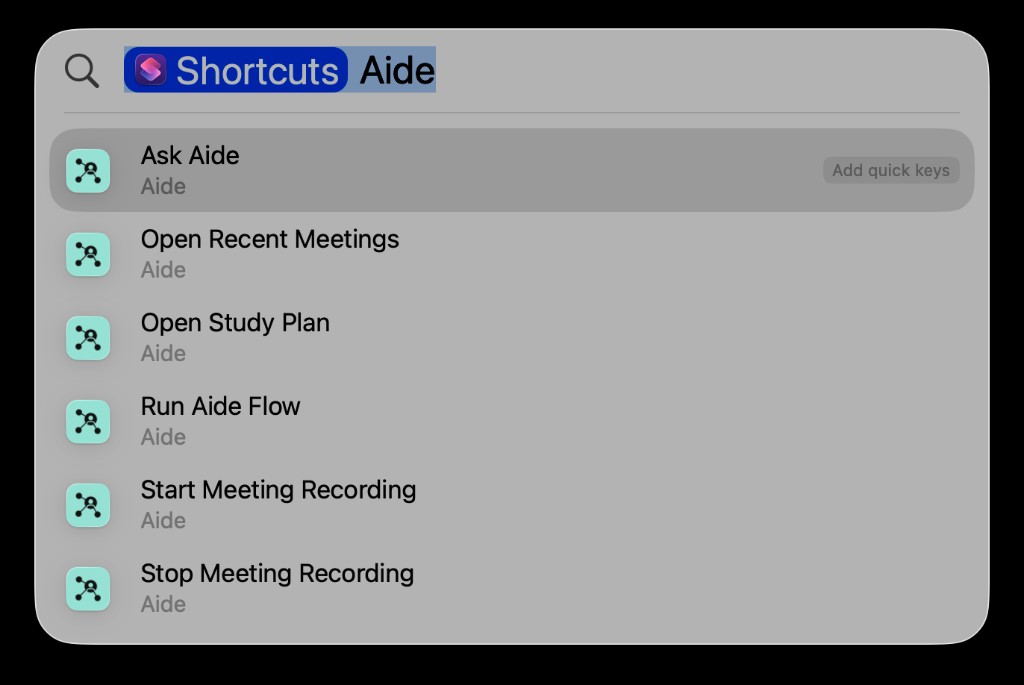
Native Mac access means AideAI can show up where student work already starts: Spotlight, shortcuts, menu bar actions, meetings, and the desktop workflow.
The Cost Of One More Tab
Browser-based AI has an obvious advantage: it is easy to open.
But easy to open is not the same as easy to use all day.
In a real study session, a browser chat can become part of the clutter it is supposed to reduce. It sits next to the assignment, the LMS, the document, the research tabs, the calendar, and the distraction tabs. When you need it, you still have to locate it, switch to it, paste the right context, and then switch back to whatever you were doing.
That creates a quiet tax on momentum.
The tax is not dramatic. It is five seconds here, ten seconds there, a lost thought when you switch windows, a recording started late because the right page was hidden, a planning question you skip because opening the assistant feels like another task.
For students, those tiny breaks matter. Study work is fragile. A good explanation, a clear next step, or a captured lecture moment is most useful when it happens immediately.
A Study Assistant Should Be Closer Than A Website
The native Mac argument is not that browsers are bad.
Browsers are excellent for web pages. They are less ideal as the only home for a tool that is supposed to help across the whole student workflow.
AideAI is meant to sit closer to the operating system because the work itself is spread across the operating system:
- a PDF on the desktop
- a Google Doc in the browser
- a lecture recording
- a screenshot
- a calendar event
- a local class folder
- a note you wrote last month
- a research page you opened yesterday
- a study plan you want before you start
If the assistant can only see what you paste into one tab, the student becomes the connector. A native app can make those connection points more natural: Spotlight for starting, menu bar access for quick availability, local integrations for context, and app windows that do not disappear into the tab stack.
Five Moments Where Native Access Matters
1. The Moment Before Class Starts
A lecture begins in two minutes. You are finding the Zoom link, checking the syllabus, and opening notes from last week.
This is not the moment to hunt for an AI website.
Native actions make the recording workflow feel closer to a system action: start recording, stop recording, reopen recent meetings, and review the transcript later. The difference is small on paper, but it is the difference between capturing the first five minutes and missing them.
For lecture workflows, read How to Turn Lectures Into Notes, Summaries, and Action Items.
2. The Moment You Need A Plan
Planning often happens between other tasks.
You finish one class, have 40 minutes before the next one, and need to know what to do first. Opening a buried tab can feel like too much friction, so you keep going without a plan.
That is where native entry points help. AideAI can be reached from Spotlight or the app itself, and your Study workflow can feel like part of the Mac rather than a destination you have to remember.
For the focused Spotlight walkthrough, read Use AideAI from Spotlight: A Faster Way to Start Study Work on Mac.
3. The Moment Your Context Is Local
Not everything is online.
Students keep drafts in folders, notes in local apps, screenshots on the desktop, PDFs in Downloads, and project files scattered across course folders. A browser tab can help if you paste the material into it. A native assistant can support workflows where local material is part of the system from the beginning.
That does not mean the assistant should use everything automatically. It means the path from "this file matters" to "help me understand it" can be shorter.
For a deeper look at this layer, read Use PDFs, Notes, Docs, and Audio as Real AI Context.
4. The Moment Your Research Is Already In The Browser
Sometimes the browser is the context, but not in a clean way.
The useful page might be in history, not open. The source might be bookmarked in another browser. The course page might require a signed-in session. The article might need to be read, compared, and turned into notes.
AideAI's native app can still work with browser-oriented workflows, but without making "another tab" the center of the product. Browser History and Browser Automation become context sources for the assistant, not a separate pile of manual copying.
For the browser layer, read Too Many Tabs? Use AideAI to Work With What You're Already Reading.
5. The Moment One Chat Is Too Small
Student work often has more than one lane.
You may need one assistant thread for a writing draft, another for planning, another for understanding a topic, and another for checking what changed across your materials. Putting all of that into one chat technically works. It also turns the chat into a long mixed scroll.
Agent Desk is the native-workspace version of the same idea: keep multiple agent panels visible, separate the jobs, and let the workspace match how studying actually unfolds.
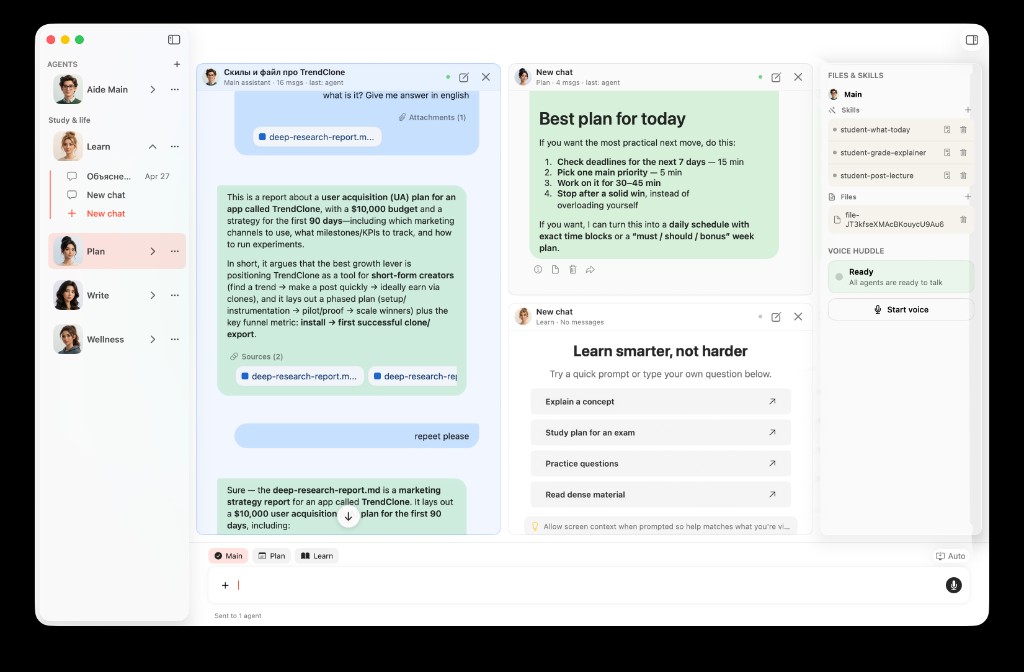
Agent Desk makes AideAI feel more like a student workspace than a single chat tab.
For the full Agent Desk walkthrough, read Meet Agent Desk: A Multi-Agent Workspace for Students.
Native Does Not Mean Heavy
The best native student app should not feel like a giant dashboard you must maintain.
It should mostly reduce the number of things you have to remember:
- where to ask
- where to record
- where to find recent meetings
- where to open the study plan
- where to use local context
- where to keep different assistant threads
That is why the experience layer matters. It is not decoration. It shapes whether the assistant is actually used at the right moment.
There is also a trust side to this. Native access should stay understandable. Permissions, connected sources, attached files, and actions should be explicit enough that students know what the assistant can use and when.
The goal is not a mysterious background brain. The goal is a useful study assistant that is close by, but still under your control.
When A Browser Chat Is Enough
Sometimes a browser AI tool is perfectly fine.
If you have a short question, a quick rewrite, or a one-off explanation, opening a web chat may be all you need.
A native app matters more when the workflow repeats:
- you ask for help throughout the day
- you study from local files and browser research
- you record lectures or meetings
- you want keyboard-first access
- you need multiple assistant threads
- you want the assistant to feel connected to your Mac, not parked in a tab
That is the positioning: AideAI is not trying to make the browser irrelevant. It is trying to stop the assistant from being trapped inside the browser.
A Small Test
The easiest way to understand the difference is to watch one normal study session.
How many times do you switch tabs just to get to the tool that is supposed to reduce switching? How often do you skip asking a useful question because the assistant is not where your hands already are? How many useful materials live outside the chat window?
If the answer is "often," the native layer is not just a nice interface choice. It is part of the product value.
AideAI is built for that kind of day: ask from Spotlight, open Agent Desk, record a lecture, review your study plan, bring class material into chat, and keep moving.
For related posts, read How to Finally See Everything Going On in Your Semester, Use AideAI from Spotlight: A Faster Way to Start Study Work on Mac, and Meet Agent Desk: A Multi-Agent Workspace for Students. For plan details, visit Pricing.