 AideAI
What Codex Can Read from AideAI — and What Stays Local

Useful coding context and careless oversharing are one toggle apart.
If OpenAI Codex can see your project meetings, that can save a rewrite. If it can also see mail, clipboard history, and personal memory you forgot was enabled, the same connection becomes a trust problem.
AideAI’s Codex settings follow a simple rule: nothing is shared with Codex unless you turn that source on, and the connection runs on your Mac while AideAI is open.
The simple picture
- AideAI on your Mac already holds meetings, files, and other student context you use day to day.
- Apps → Codex is where you allow—or block—what Codex may ask for.
- Codex only receives what you enabled for that request.
AideAI must be running. You choose sources. You can disconnect anytime.
How it feels in a real project: From Meeting Notes to Working Code. Clicks: setup guide.
Source toggles are the real permission screen
On Apps → Codex, open What Codex can read.
Meetings is the main source for meeting → code work.
Under More sources, you can also allow:
- Chats
- Screenshot OCR (text from screenshots)
- Local files
- Personal Memory
- Browser history
- Calendar
- Reminders
- Notes
- Clipboard
- Activity
- Academic
A practical default for coding from a sync:
- Meetings on
- everything else off until a task truly needs it
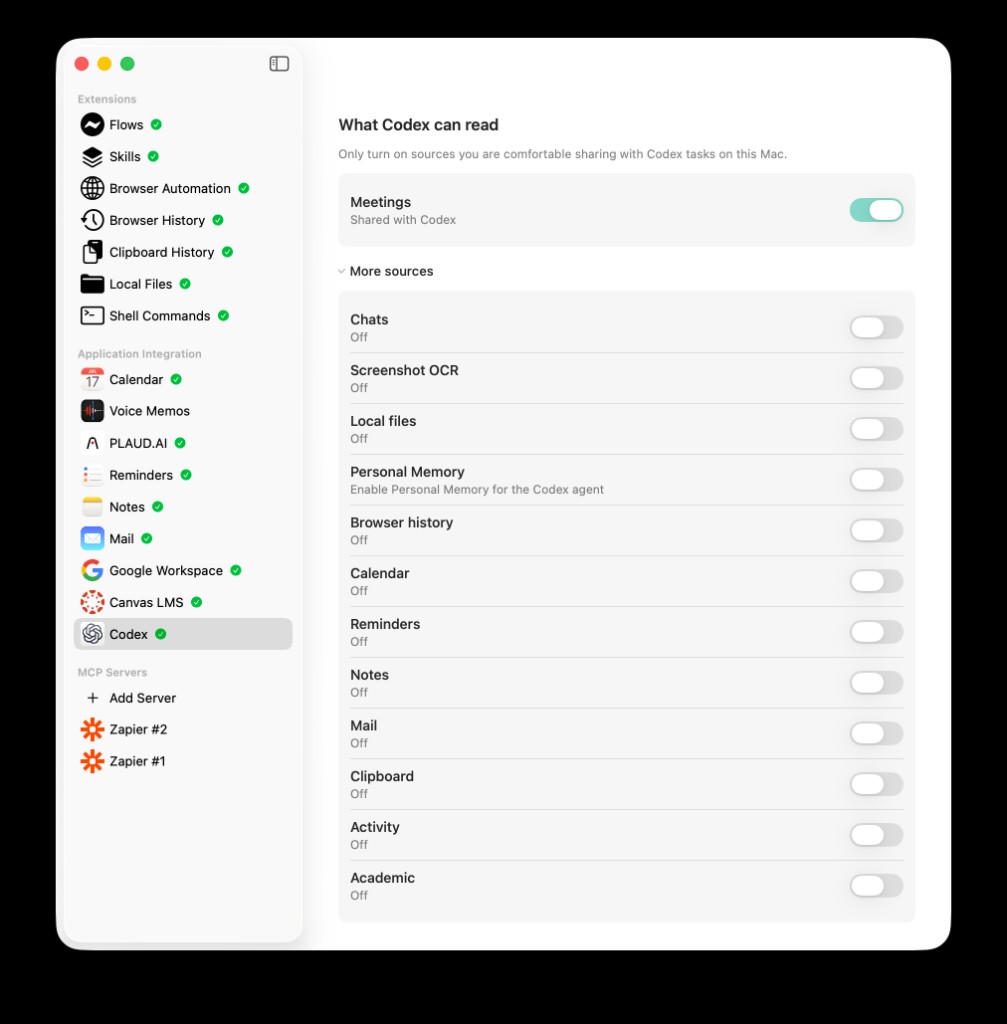
Meetings shared; chats, mail, clipboard, and the rest off. That is the trust default for most coding tasks.
If a source asks you to enable a related AideAI app first, that is intentional. Codex cannot read Notes through this connection if Notes is off in Apps.
Local on your Mac—what that does and does not mean
When Codex is enabled and Ready, AideAI keeps a local connection on your computer so Codex can request allowed context.
That means:
- the connection that answers Codex runs on your Mac
- the connection secret is stored in Keychain
- you can Rotate it, Repair the plugin, or Disconnect under Advanced
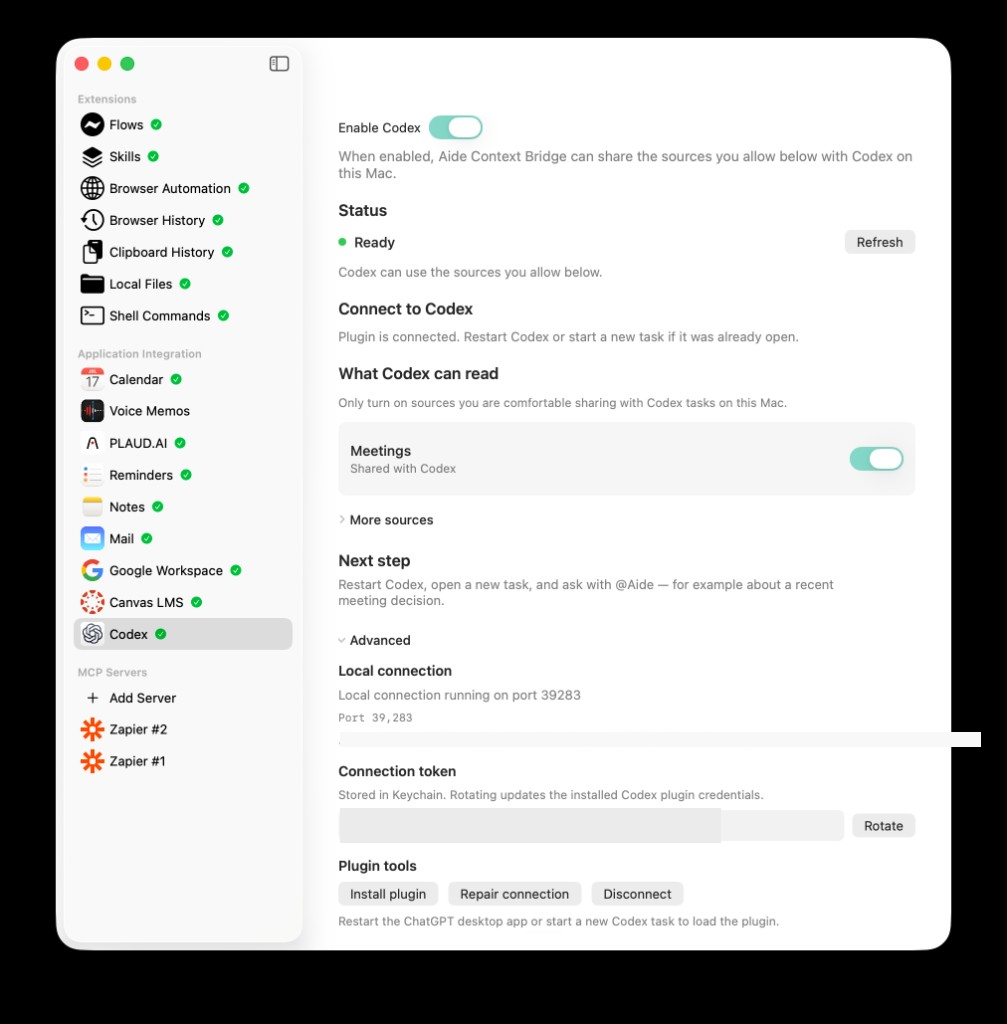
Advanced is for rotating the connection secret or disconnecting—not for everyday sharing decisions. Source toggles matter more.
It does not mean:
- Codex never sends code or prompts to OpenAI as part of normal Codex use
- every AideAI feature is offline-only
- turning on Mail for Codex is “private just because it is local”
Local connection + source toggles reduce accidental oversharing from AideAI. Your coding app still has its own cloud behavior. Treat them as separate decisions.
Mac download vs App Store
The Codex connection is available in the Mac download from the website. In the App Store build, the Codex screen explains that the feature is unavailable.
That is expected—not a broken setting. If you need this workflow, use the website Mac download.
What stays out unless you opt in
When their toggles are off, these stay out of Codex—even if AideAI can use them elsewhere:
- clipboard history
- personal memory
- browser history
- local files
- academic data
- text from screenshots
- chats
Also not the default:
- treating every open question in a meeting as a requirement
- sharing anything while Enable Codex is off
- using Codex as a stand-in for Add MCP Server (that feature brings outside tools into AideAI)
Related privacy guides in AideAI
- Screen questions: Ask AI About Your Screen Without Oversharing
- What AideAI remembers about you: Local-First Personal Memory
- Broader connected apps: Student integrations
If you enable Personal Memory for Codex, memory still has its own confirmation rules. The Codex toggle does not bypass them.
A one-minute check before a sensitive week
- Open Apps → Codex
- Keep Enable Codex on only when you need it
- Enable Meetings only (or the minimum set)
- Expand More sources and confirm surprises are off
- Know where Disconnect lives under Advanced
- Restart Codex after connection changes
- Prefer a new Codex task when testing access
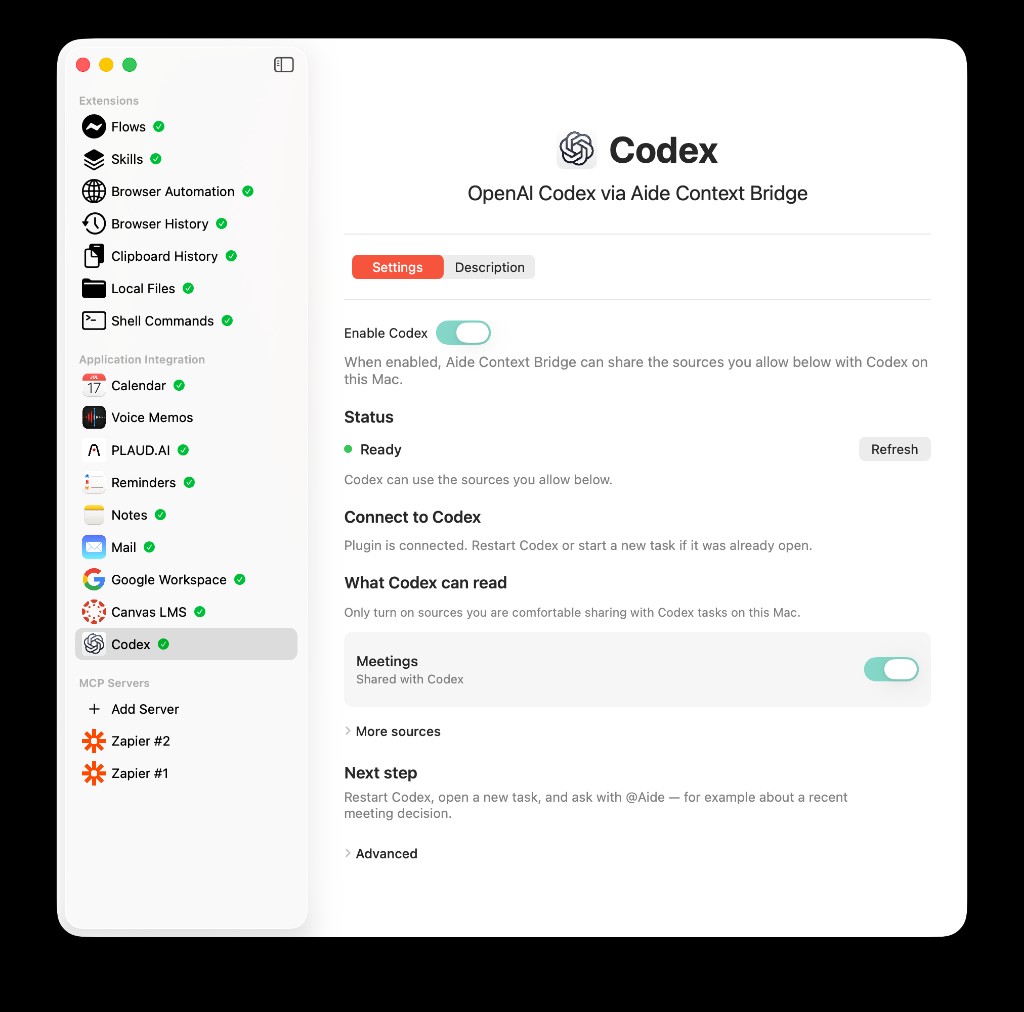
A clean everyday view: Ready, Meetings on, More sources collapsed so you are not tempted to overshare.
If something feels too open: turn sources off first, Disconnect second, Rotate third.
Bottom line
Codex should see the evidence you chose for the task, not your entire student life by default.
Keep Meetings on for meeting → code work. Keep the rest off until you have a reason. Keep AideAI running only when you want Codex to get that context. That trust model is simple enough to audit in under a minute before you type @Aide.