 AideAI
Local-First Personal Memory: Confirm, Control, and Delete What AI Remembers
Useful memory requires trust.
If an assistant remembers your training schedule, that can save time. If it silently stores health details, mislabels a joke as a fact, or shares the wrong preference with the wrong agent, memory becomes a liability.
AideAI Personal Memory is designed around a simple contract:
- store durable facts on your Mac
- ask before keeping sensitive information
- never store secrets
- let you audit, edit, export, and delete
This guide maps the control surfaces—not marketing claims.
Local-first means local storage first
Personal Memory text, evidence snippets, and related encrypted payloads stay in your local graph store on macOS. Keys live in Keychain. Analytics for this feature reports counts, decisions, and outcomes—not the text of what was remembered.
Cloud models still process chat requests when you use online assistants, but Personal Memory is not "upload your profile to our server by default." The profile is a local product surface you manage.
That is a different promise from visual recall (screenshots, Activity Log, files), which helps you recover what you saw. Read A Better Way to Remember What You Saw, Read, and Worked On for that layer. Personal Memory is about stable facts you choose to keep, not every pixel on your screen.
Screen-aware help has its own trust model too—see Ask AI About Your Screen Without Oversharing.
Three write outcomes you should expect
After a finished chat turn, extraction ends in one of a few user-visible paths:
Auto-save + Undo (neutral explicit facts)
Example: "I usually study after dinner."
If policy allows, AideAI saves the fact and shows Undo for ten minutes. Undo removes the auto-saved change from this turn.
Confirmation required (sensitive explicit facts)
Example: "I have diabetes."
Medical, financial, and similarly sensitive statements require confirmation—even if the model mislabels them. They should never auto-save.
You see Save this to memory? with Remember, Edit, Don't save. Until confirmed, other agents do not get the fact through shared memory.
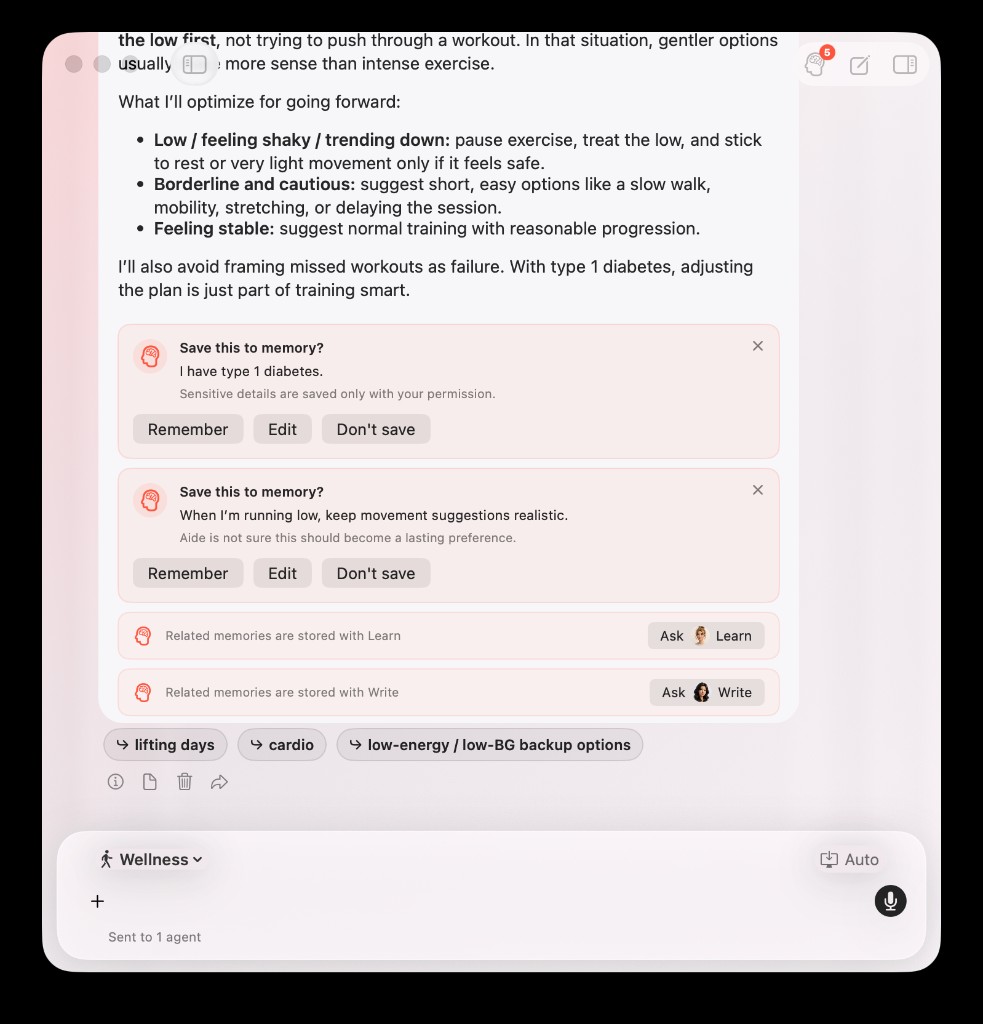
In chat, sensitive medical facts and uncertain preferences can appear as separate confirmation cards in one reply—each requiring explicit approval.
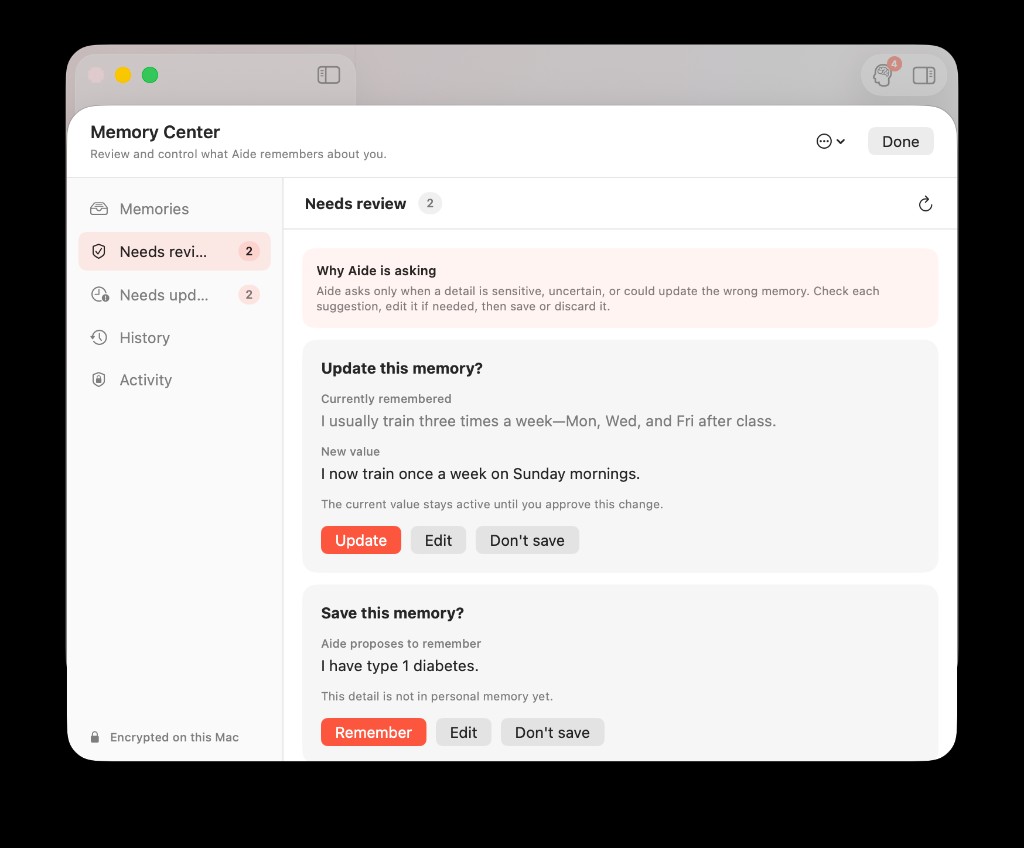
Needs review holds confirmation cards for sensitive facts and update proposals—the current value stays active until you approve a change.
Reject or no-op (inferred, low-confidence, prohibited)
Inferred guesses, weak extractions, and prohibited content do not become canonical memories. Passwords, tokens, recovery codes, and similar secrets are blocked before storage.
Memory Center is your audit desk
Open Settings → Application → Personal Memory → Open Memory Center.
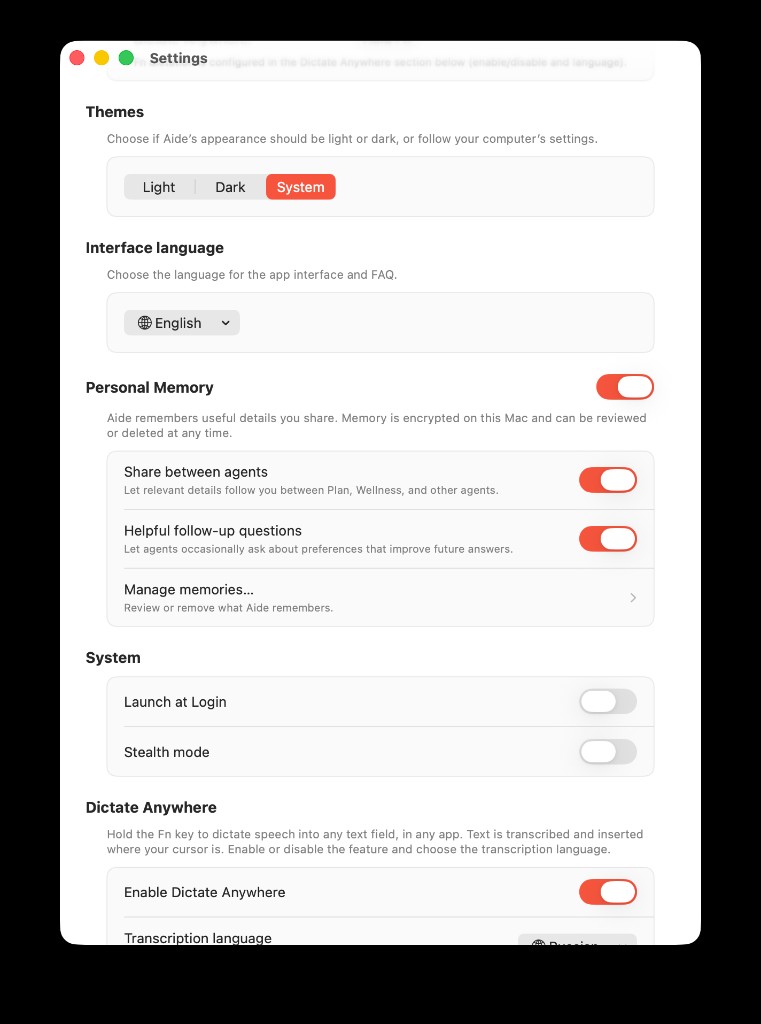
Personal Memory settings: turn memory on or off, control cross-agent sharing, and open Memory Center from Manage memories…
Tabs you will use:
| Tab | Purpose |
|---|---|
| Active | Current facts available for retrieval |
| Needs review | Pending confirmations |
| Needs update | Stale facts excluded until you respond |
| History | Revision timeline |
| Access | Which agent retrieved which memory (no query text) |
From Memory Center you can confirm, edit, forget, export JSON, or delete all memories with confirmation.
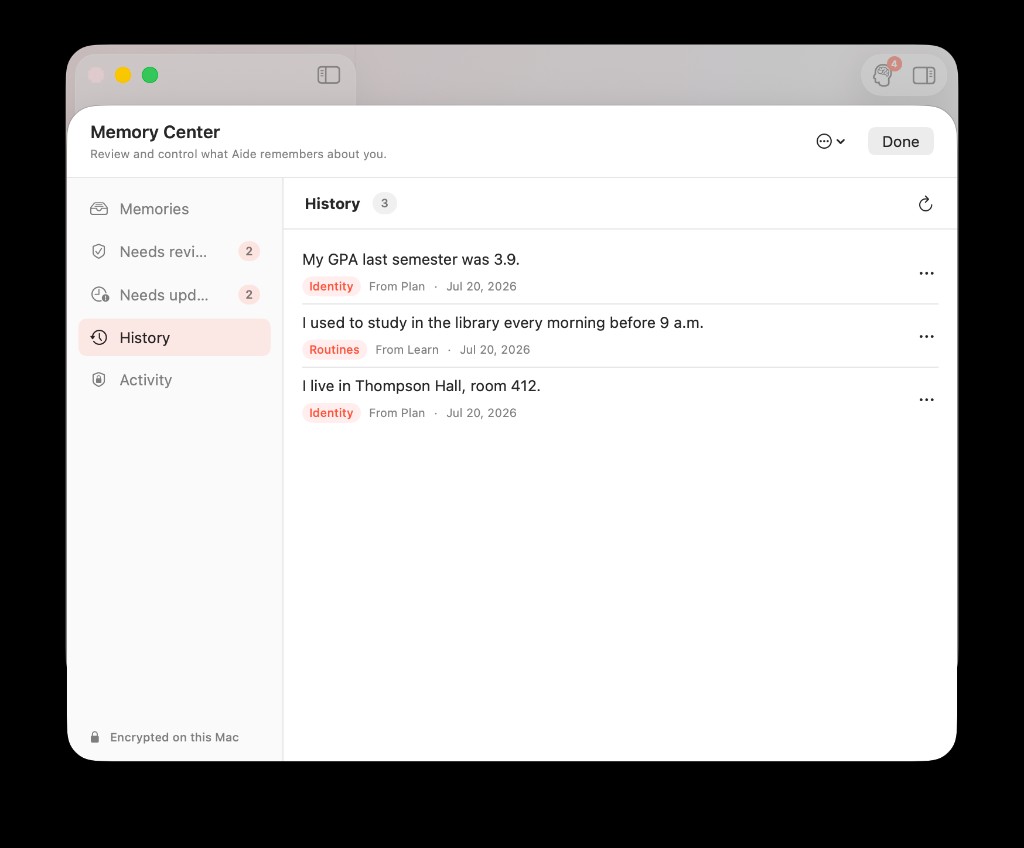
History keeps forgotten and rejected entries auditable—so deletion and rejection are visible, not silent.
Export gives you a readable JSON snapshot of stored memories. It does not dump raw chat history.
Domain access beats "share everything"
Built-in agents do not copy each other's chats. They read allowed domains from the same graph when retrieval policy permits.
Plan might store a fitness routine. Wellness may retrieve it in a relevant wellness turn. Write should not receive unrelated fitness facts unless domains and settings allow it. Custom agents start with no memory domains until you enable them in agent settings.
Toggle Share memory between agents in Personal Memory settings when you want cross-agent retrieval at all. Agent-specific settings still respect domain boundaries.
For a concrete Plan → Wellness example, read How Plan Remembers Your Workouts and Wellness Uses Them Later.
Stale facts pause themselves
Memory is not "forever true because you said it once."
Expired validity, long-unconfirmed entries, or periodic freshness checks can mark a fact needs update. Until you confirm, edit, or forget, it is excluded from retrieval.
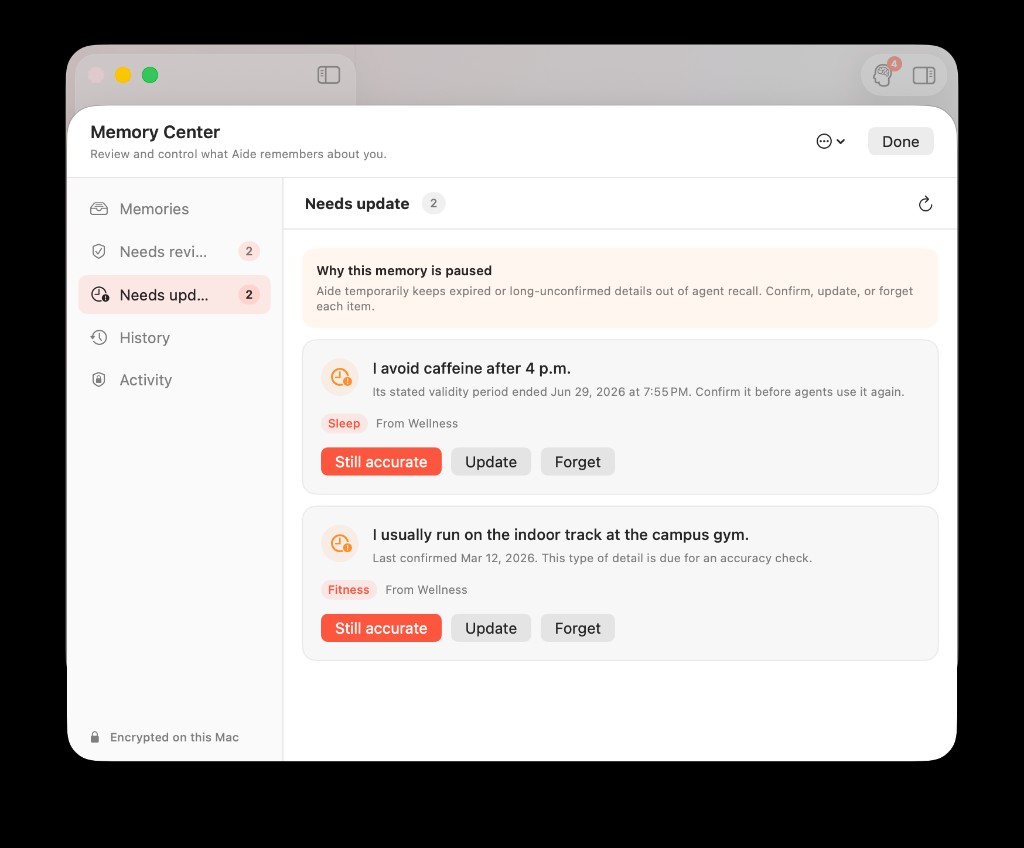
Stale facts pause themselves until you confirm, edit, or forget—so agents do not keep acting on outdated details.
That is why you may see Is this still accurate? under a reply. Closing the card means review later—not automatic rejection.
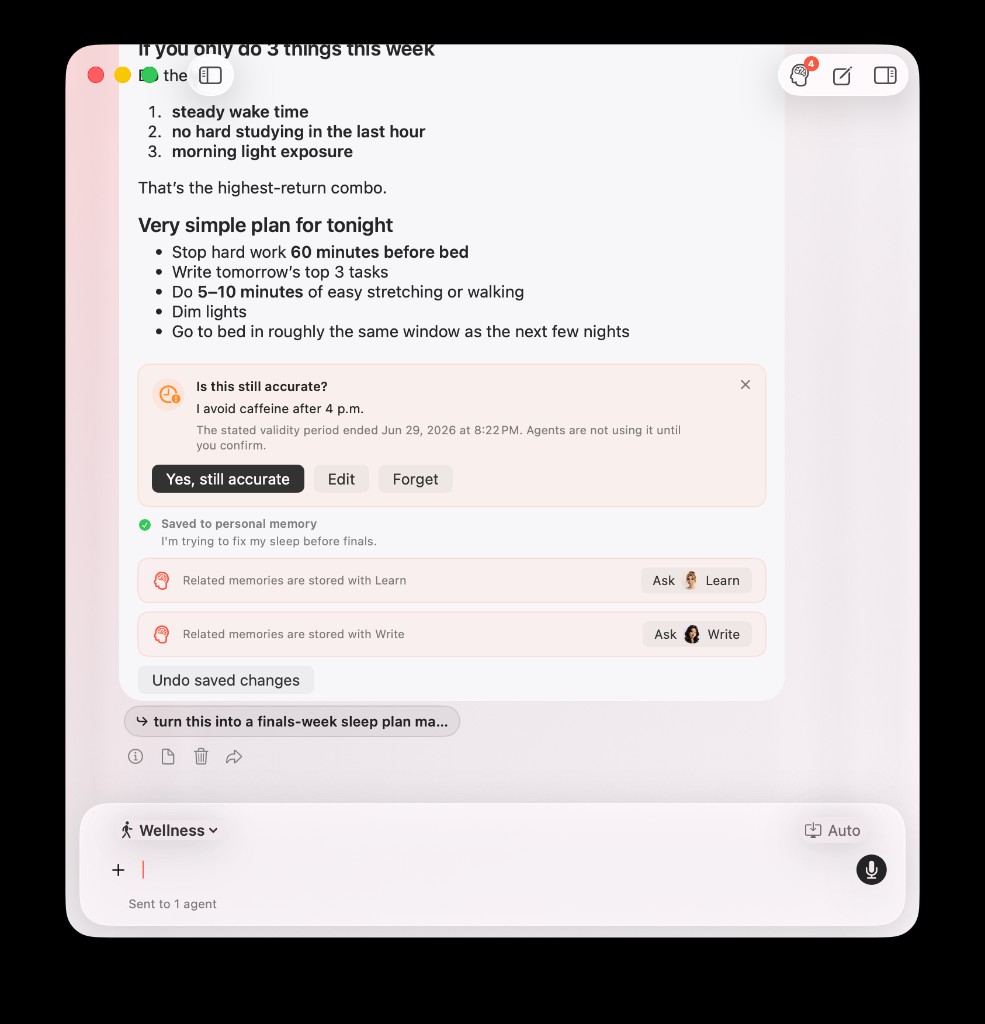
When a stated validity period ends, the inline card explains that agents pause using the fact until you confirm, edit, or forget.
Voice and proactive questions have budgets
Voice: incremental transcript updates do not write memory. Extraction runs after a final voice flush when voice memory write is enabled.
Proactive questions: occasional follow-ups when a useful profile slot is missing. They do not block the main answer, respect snooze and "don't ask again," and stay within global budgets.
Details and click paths: Personal Memory User Guide: How to Save, Review, and Control What AideAI Remembers.
Key loss is fail-closed
If encrypted memory exists but the active Keychain key is missing, AideAI does not silently mint a replacement key. Recall and writes block; chat continues without memory; Memory Center shows a recovery state. Destructive reset requires explicit confirmation.
That is intentional. Guessing your way back into encrypted data would be worse UX than being honest.
Honest limits worth knowing
Personal Memory is strong at stable explicit facts with user control. It is not a claim that AideAI "knows everything about you."
In particular:
- not every relationship type in the temporal graph is fully surfaced in product UX yet
- retrieval respects prompt budget limits alongside Wellness, skills, and other optional context
- the assistant should not tell you a fact is "remembered for future chats" until the memory pipeline succeeded; inline UI reflects actual status
Those limits are why confirmation, audit, and deletion are first-class—not afterthoughts.
Control checklist
Before you rely on Personal Memory for a semester:
- Open Settings → Application → Personal Memory and confirm master toggle + sharing preferences
- Save one neutral fact in chat; verify Saved or confirmation card behavior
- Open Memory Center and inspect Active + Access
- Try Forget on a test entry you no longer want recalled
- Export once so you know what "your memory file" looks like
For product positioning across agents, read Personal Memory in AideAI: One Profile for Plan, Learn, Write, and Wellness.
Download AideAI on Mac and open Memory Center after your first saved fact. For plan details, visit Pricing.