 AideAI
Personal Memory User Guide: How to Save, Review, and Control What AideAI Remembers
This is the practical instruction post for Personal Memory—what to click, what the cards mean, and how to fix mistakes.
If you want the product story first, read Personal Memory in AideAI: One Profile for Plan, Learn, Write, and Wellness. If you want the privacy model, read Local-First Personal Memory: Confirm, Control, and Delete What AI Remembers.
Turn Personal Memory on
- Open Settings
- Go to Application → Personal Memory
- Enable the master memory toggle
- Optional: enable Share memory between agents
- Optional: enable Helpful follow-up questions for proactive memory questions
- Click Open Memory Center when you want the full audit view
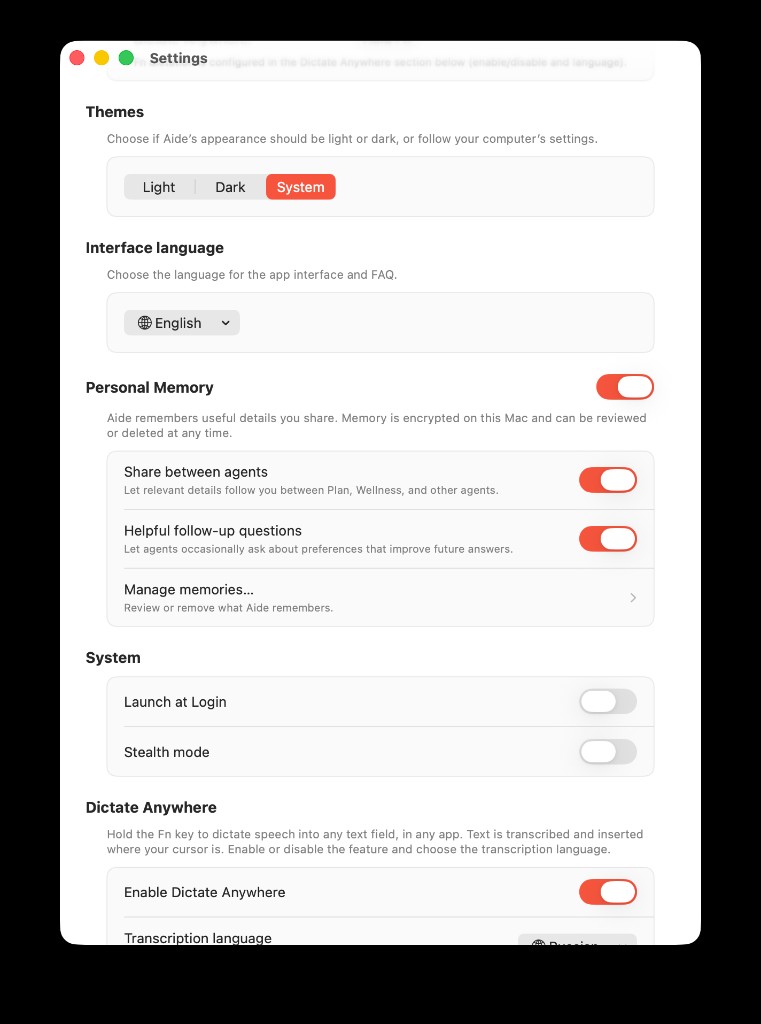
Settings → Application → Personal Memory: master toggle, Share between agents, Helpful follow-up questions, and Manage memories… to open Memory Center.
Per-agent controls live in each agent's settings: enable memory and choose allowed domains (especially important for custom agents).
What gets saved automatically?
After you send a message and the assistant finishes replying, AideAI analyzes the turn in the background.
| You said | Typical result |
|---|---|
| Neutral explicit habit ("I train three times a week") | Auto-save + Undo (10 minutes) |
| Sensitive explicit fact ("I have diabetes") | Confirmation card—never auto-save |
| Secret, password, token | Nothing stored |
| Pure question, code, quote, joke | Usually no memory action |
You can also instruct memory directly in chat—"remember that…", "forget…", "don't ask about this"—or use the assistant's memory tool when available.
Inline cards under replies
These appear in the chat transcript—not only in Settings.
Demo chats for screenshots (Debug builds)
In Memory Center → ⋯ → Load Demo Data for Screenshots, AideAI also creates seven ready-made chats under Plan, Wellness, and Learn. Each thread shows a different inline memory state:
| Agent | Chat title | Inline memory UI |
|---|---|---|
| Plan | Midterm week + gym slots | Saved + Undo, Used from memory, cross-agent Ask Learn / Wellness chips |
| Plan | Training schedule changed | Save this to memory? (schedule correction) |
| Wellness | Movement with T1D context | Two Save this to memory? cards (sensitive + uncertain) + Ask Learn / Write |
| Wellness | Light movement after classes | Answer used memory from Plan |
| Wellness | Sleep before finals | Is this still accurate? + Saved + Undo |
| Wellness | Finals-week sleep plan | Saved + Used from memory + Ask Learn/Write |
| Learn | Explain thermodynamics simply | Saved to personal memory + Undo |
To capture the same flows live (without demo data), try these prompts after Personal Memory is enabled:
Plan — auto-save
I train three times a week—Mon, Wed, and Fri after class. Help me protect those gym slots around my two midterms next week.
Plan — update proposal
Quick update: I'm down to one gym session now—Sunday mornings only.
Wellness — sensitive confirmation
For context, I have type 1 diabetes—keep movement suggestions realistic if I'm running low. What should I do on lifting days vs cardio when my numbers are borderline?
Wellness — uses Plan memory
I'm wiped after back-to-back classes. What's a realistic movement option tonight?
Wellness — stale check
I'm trying to fix my sleep before finals. Any quick wins for this week?
Learn — auto-save preference
When you explain concepts, keep it short with one concrete example—I don't need long lectures.
Saved / Updated + Undo
The fact is active. Undo appears for ten minutes and rolls back auto-save from this turn.
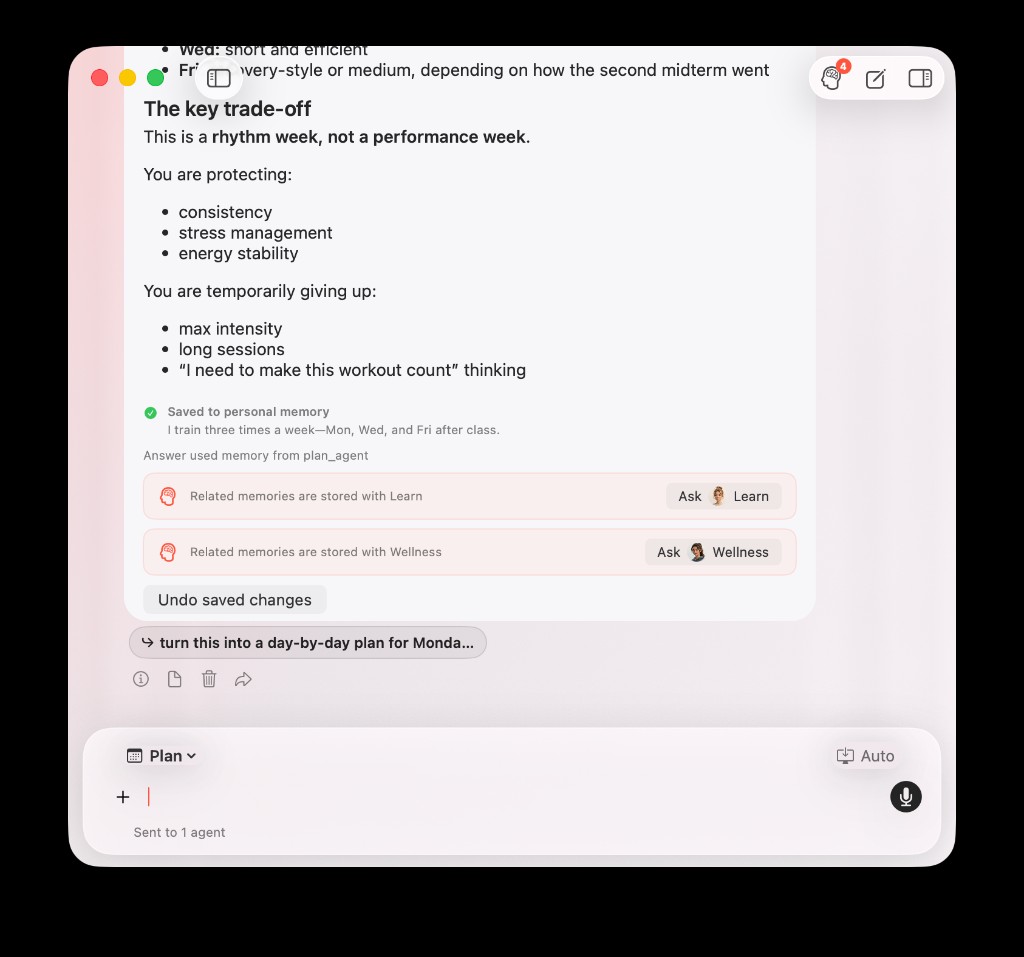
One Plan reply can show several memory signals at once: a new Saved fact, Undo, Used from memory, and cross-agent Ask Learn / Wellness chips when related memories live with another agent.
Save this to memory?
Pending confirmation. Choose:
- Remember — store it
- Edit — adjust wording, then store
- Don't save — discard the proposal
Other agents do not receive it through shared memory until confirmed.
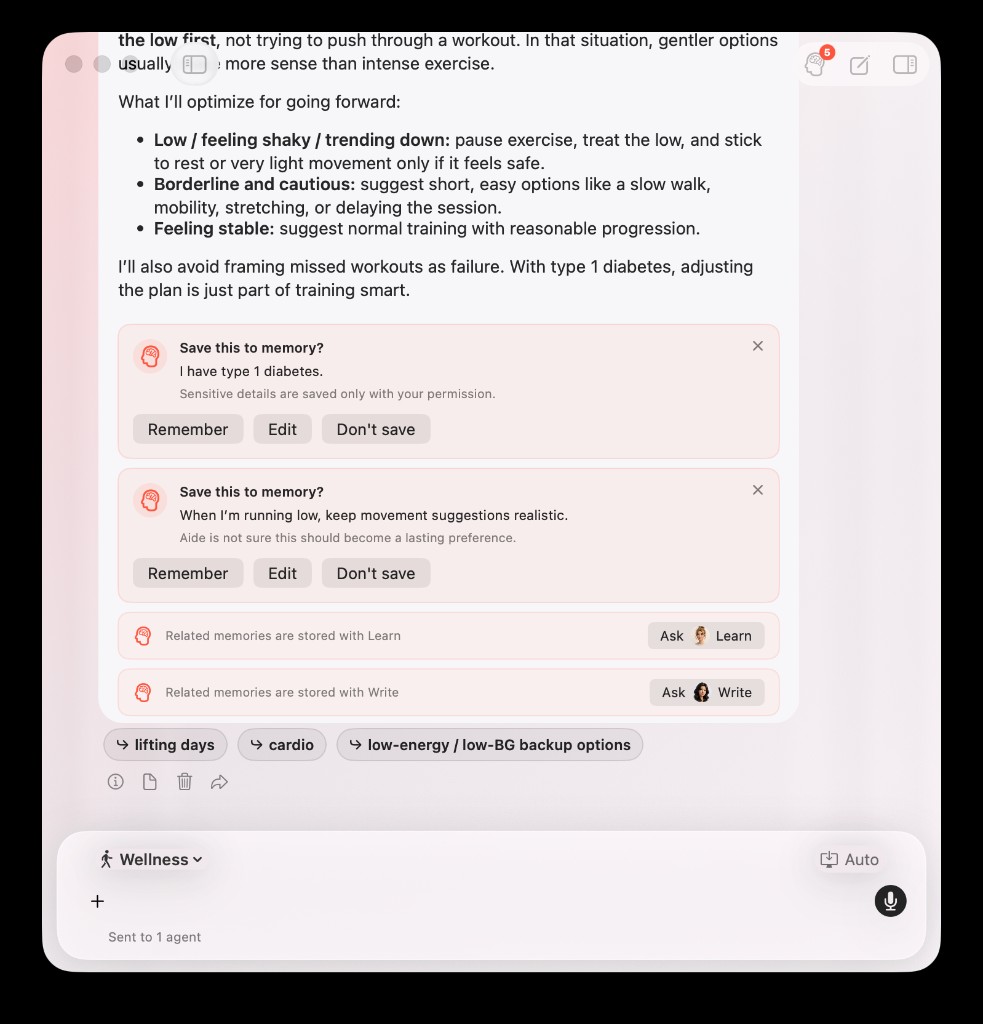
Sensitive facts and uncertain preferences can both ask for confirmation in the same Wellness reply—each with its own Remember, Edit, or Don't save choice.
Is this still accurate?
A stored fact may be stale. Choose:
- Yes, still accurate
- Edit
- Forget
Until you decide, retrieval excludes the stale entry. Closing the card means review later.
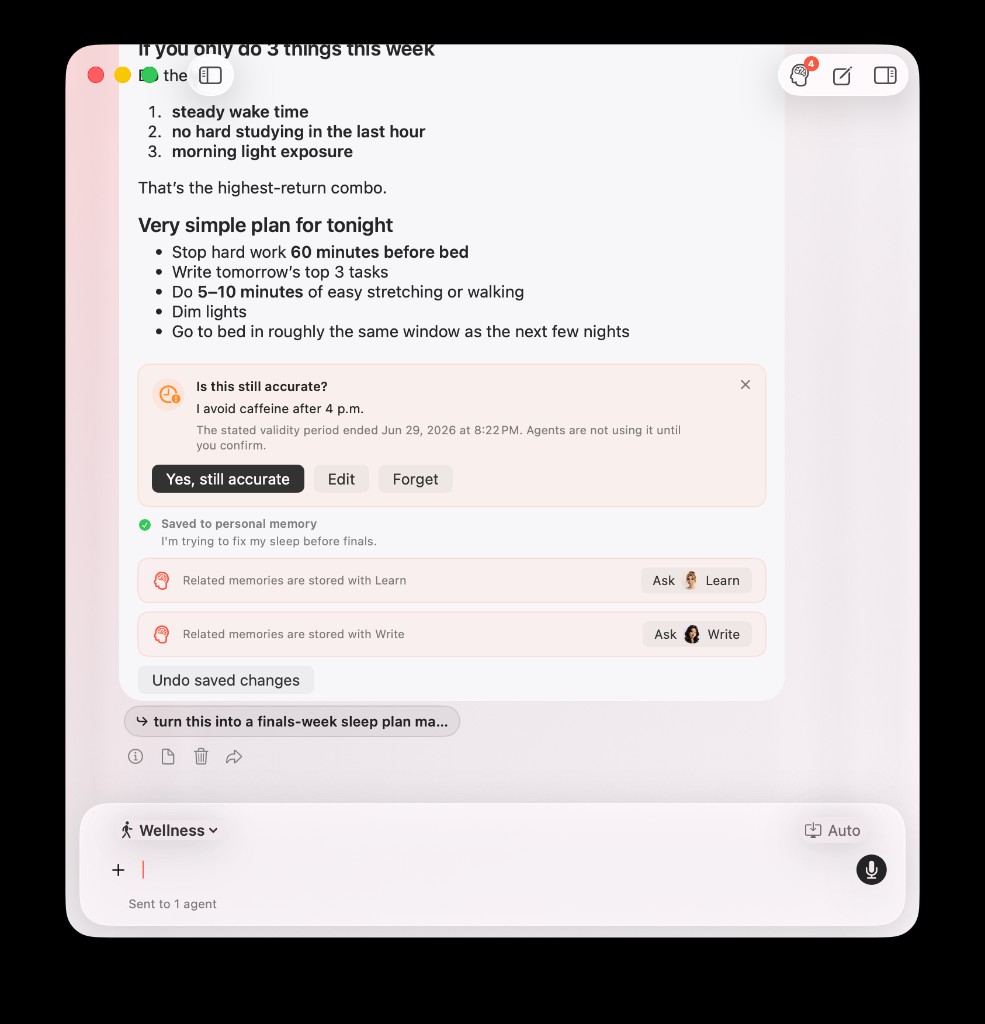
A stale fact triggers Is this still accurate? while a new explicit goal from the same turn can still Save with Undo in the same reply.
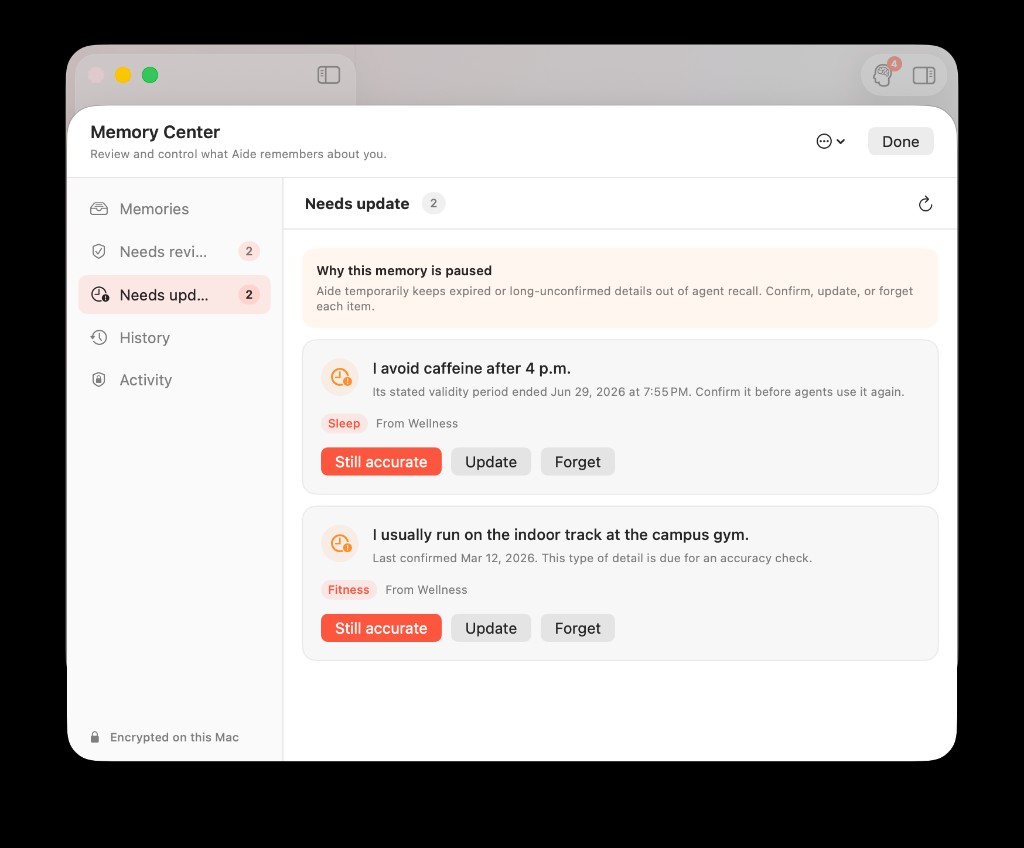
The Needs update queue mirrors inline stale cards—facts stay paused from retrieval until you choose Still accurate, Update, or Forget.
Used from memory
Shown when the assistant actually applied a stored fact in that reply—not merely retrieved it.
When Plan cannot read a domain owned by Learn or Wellness, you may also see Related memories are stored with … chips that open the owning agent with your question prefilled—without exposing the fact text in the wrong chat.
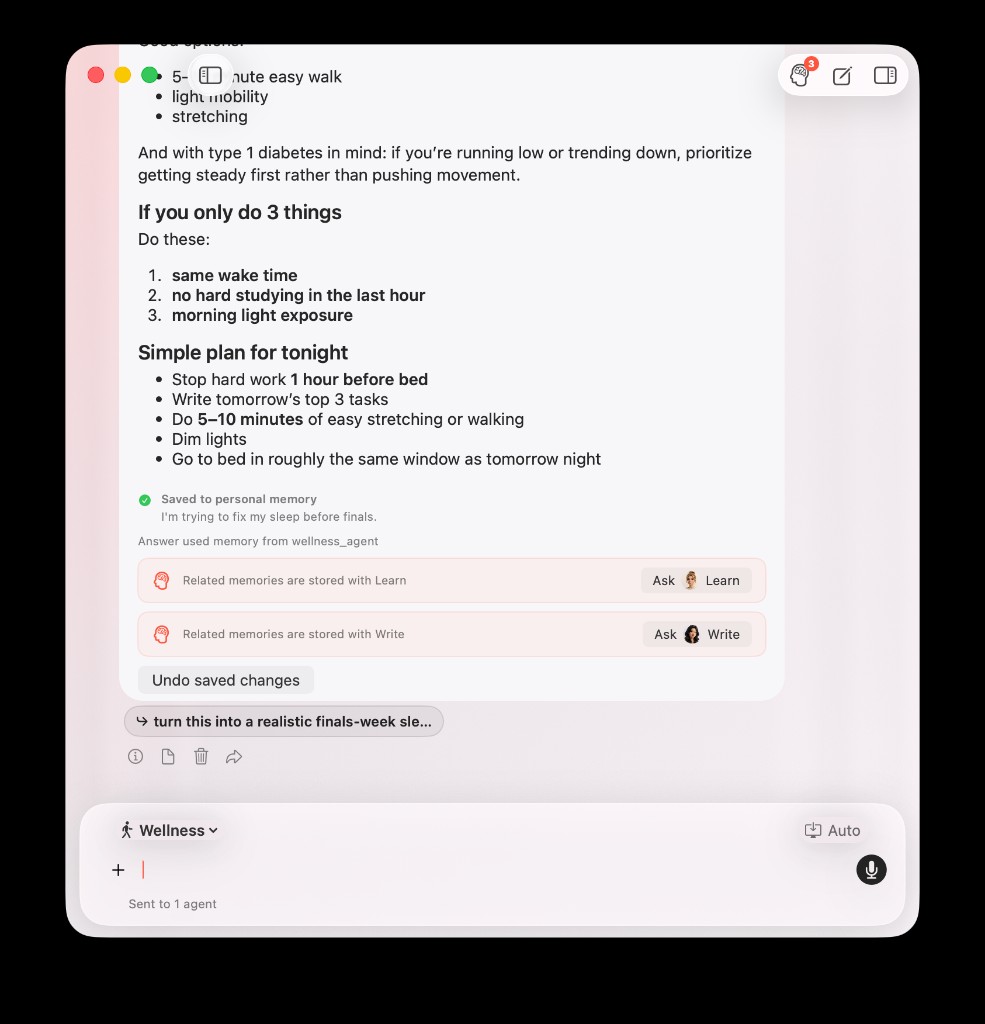
Wellness can Save a new goal from your message and Use it in the same reply—plus cross-agent Ask Learn / Write chips when related memories live elsewhere.
Toolbar badge and Memory Center
The memory button in the chat toolbar shows a badge when Needs review or Needs update queues are non-empty. Click it to open Memory Center on the first queue with work.
Memory Center tabs:
- Active — current facts
- Needs review — pending confirmations
- Needs update — stale entries
- History — revisions over time
- Access — retrieval log by agent (no query text)
Use Memory Center for bulk review, editing, forgetting, export, and delete-all.
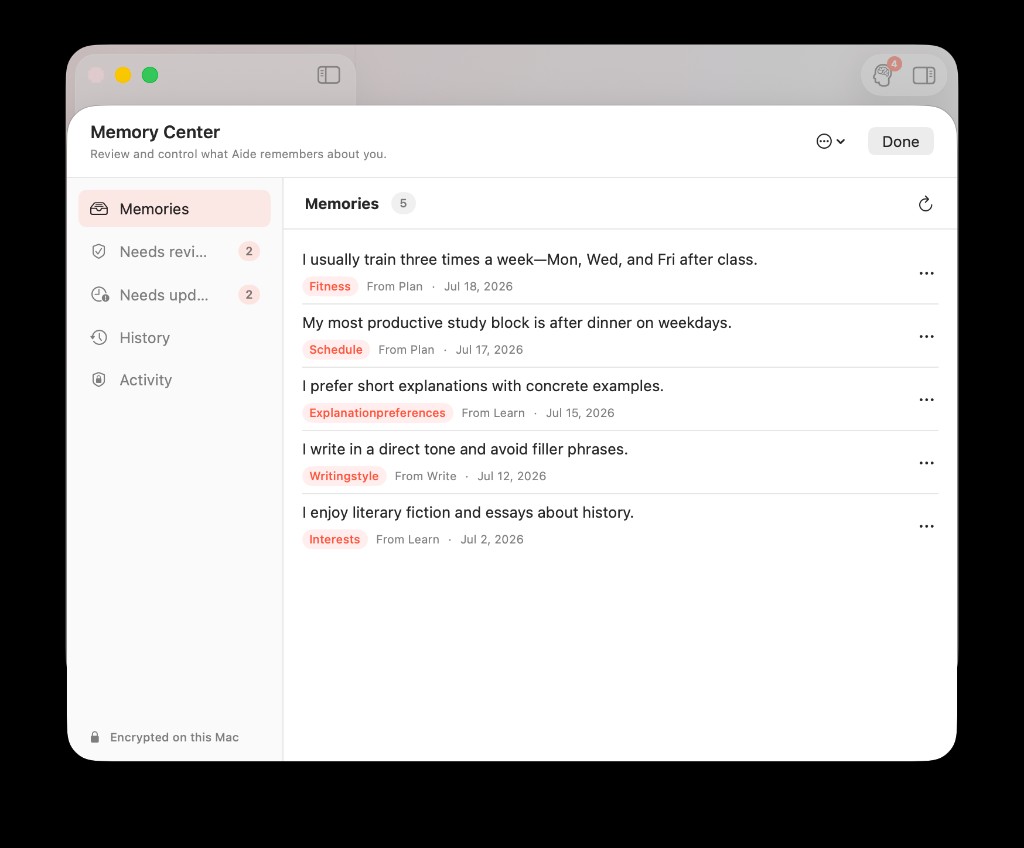
Active lists current facts with domain tags, source agent, and last update.
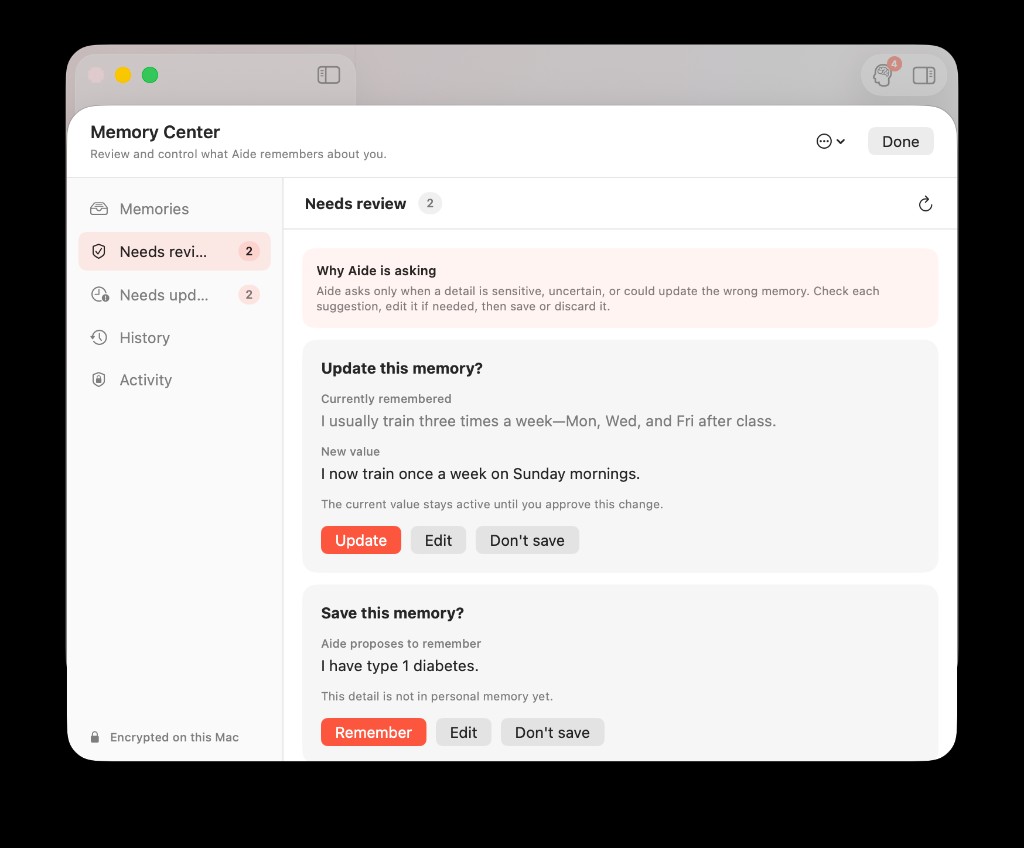
Needs review holds pending saves and update proposals—sensitive facts never auto-save.
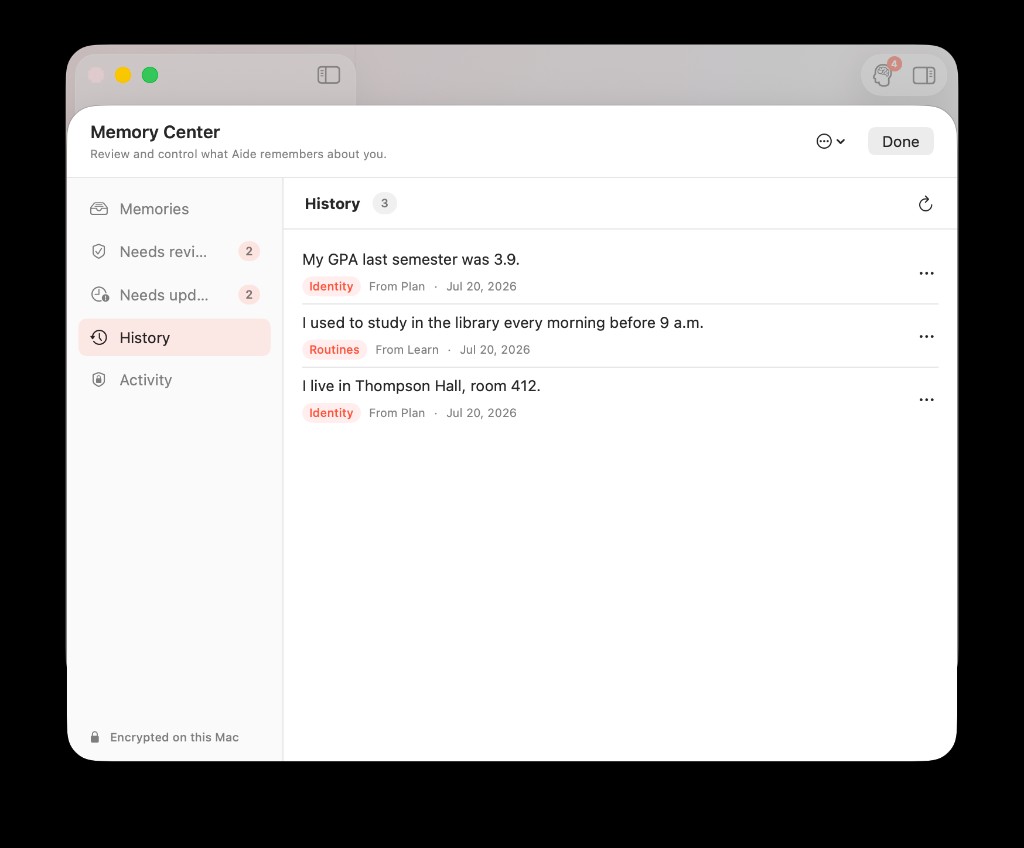
History shows forgotten and rejected entries so changes stay auditable.
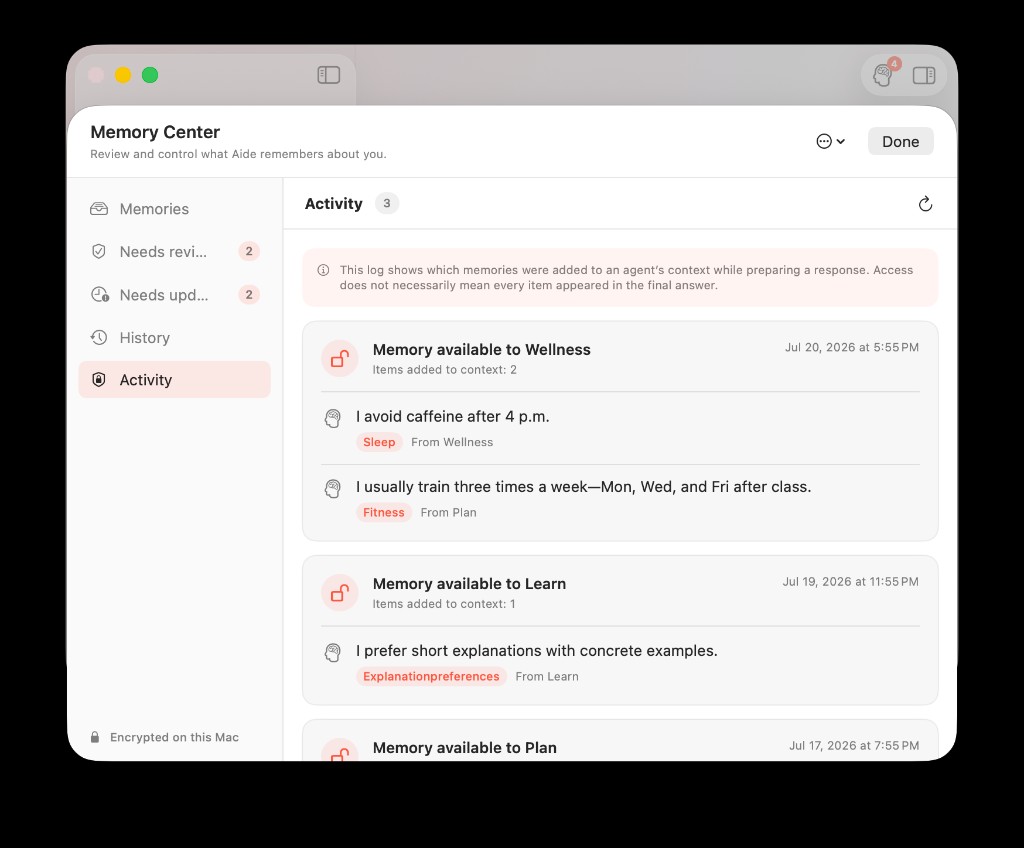
Access (Activity) logs which memories were added to an agent’s context—without storing query text.
Open any active entry to inspect revision history when a fact changed over time:
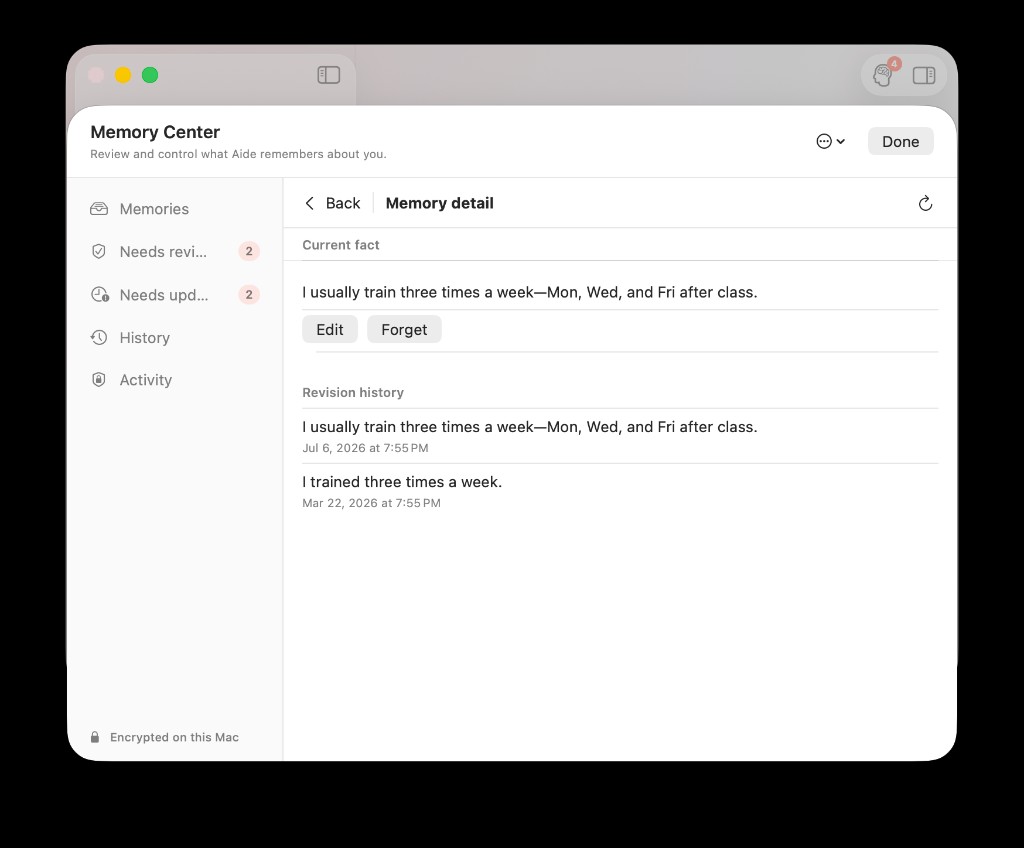
Revision history shows how wording evolved—helpful after schedule changes or corrections in chat.
Cross-agent sharing in practice
With Share memory between agents enabled:
- Plan can store a fitness routine
- Wellness can use it later in a relevant wellness turn
- Write does not automatically receive unrelated fitness facts
Domain rules and agent settings still apply. Custom agents only see domains you enable for them.
Walkthrough: How Plan Remembers Your Workouts and Wellness Uses Them Later.
If you run Plan and Wellness in parallel, Meet Agent Desk: A Multi-Agent Workspace for Students keeps panels separate while memory carries stable facts.
Proactive follow-up questions
When enabled, AideAI may ask a rare, context-relevant question to fill a useful profile slot—for example preferred movement types or sleep routine.
Each card offers:
- Answer
- Later (snooze)
- Don't ask again (disables that slot)
Proactive questions never block the main answer and respect global budgets.
Voice conversations
Voice can read memory like text chat when memory is enabled.
Writing memory from voice happens only after the final voice flush—not on every partial transcript update. If a voice session ends without a reliable final pair, extraction may not run for that session.
For voice basics, read Talk to Your Study Assistant: When Voice Is Better Than Typing.
Export, forget, and delete-all
Export JSON — download a readable snapshot of stored memories (not raw chats).
Forget on an entry — stops future recall for that fact.
Delete all — removes the graph with confirmation; also clears related jobs and indexes.
Memory Center remains available for export/delete even if you turn off the master memory toggle for chat read/write.
Troubleshooting
I saved something but another agent doesn't use it
Check: master toggle on, cross-agent sharing on if needed, target agent memory enabled, domain allowed, fact is Active (not pending/stale), question actually relevant.
I see Saved and a confirmation card for the same fact
You should not. If it happens, treat confirmation as authoritative and review Memory Center.
The assistant said it remembered me but I see no Saved status
Trust inline UI over casual phrasing. Memory writes finish after the turn; status appears when the pipeline completes.
Memory looks broken after a key error
Recall/write may block fail-closed. Memory Center shows recovery guidance. Chat continues without memory.
I confused Personal Memory with Activity Log recall
Activity Log and screenshots answer "what did I see/work on?" Personal Memory answers "what stable facts should agents carry forward?" See A Better Way to Remember What You Saw, Read, and Worked On.
Quick start checklist
- Enable Personal Memory in Settings
- Tell Plan or Learn one stable fact in plain language
- Confirm or undo the inline result
- Open a different agent thread and ask a relevant question
- Open Memory Center → Access to verify retrieval
- Export once so you know what is stored
Download AideAI on Mac and run the checklist this week. For plan details, visit Pricing.