 AideAI
Personal Memory in AideAI: One Profile for Plan, Learn, Write, and Wellness
Every week, students repeat the same context.
You tell Plan that you train three times a week. You tell Learn that you prefer short explanations with examples. You tell Write that you want a direct tone and fewer filler phrases. You tell Wellness that evenings are your only realistic window for movement.
Each conversation starts from zero unless you paste the whole story again.
That is not a model problem. It is a memory architecture problem.
AideAI Personal Memory is built for the facts that should survive between chats: habits, preferences, schedule constraints, and other stable details you actually want an assistant to carry forward. Built-in agents—Plan, Learn, Write, and Wellness—can read from the same local profile when the fact is relevant and permitted, without dumping one agent's full thread into another.
What Personal Memory is not
Personal Memory is easy to misunderstand because AideAI already has several kinds of "memory."
Chat history is the transcript of one conversation. It is useful inside that thread, but it is the wrong primitive for cross-agent continuity. Copying Plan's entire chat into Wellness would leak planning noise, half-finished drafts, and context that was never meant to travel.
Visual context and recall—screenshots, Activity Log, files, browser research—is about recovering what you saw or worked on. That layer answers questions like "where was that slide?" or "what was I reading before I started this draft?" Read A Better Way to Remember What You Saw, Read, and Worked On for that story.
Adaptive Study Session memory is scoped to a Learn prep flow and a specific assignment. It tracks session progress, not your general life profile.
Personal Memory sits in a different category: durable user facts with explicit policy, confirmation, and deletion.
One profile, four agent roles
Student work is multi-role even when it feels like one overloaded day.
You might need:
- Plan to turn deadlines into a realistic week
- Learn to explain a concept in the style that actually sticks
- Write to improve structure and tone on a draft
- Wellness to keep routines humane when the week gets tight
Those agents do different jobs. They should not each maintain a separate private notebook about you.
With Personal Memory, a neutral fact you share in one place can become available elsewhere when domain rules allow. Plan might learn that you usually study after dinner. Learn might later use your explanation preferences without you restating them. Write might remember audience and formatting choices. Wellness might use fitness or sleep-related facts in a relevant wellness turn—without seeing unrelated interests from another agent.
If you keep several agents open at once, Meet Agent Desk: A Multi-Agent Workspace for Students is the workspace pattern; Personal Memory is the continuity layer underneath it.
Facts become versions, not erasures
Personal Memory is a temporal graph, not a sticky note that gets overwritten.
When you correct yourself—"I used to train three times a week, now it's once"—AideAI creates a new revision rather than silently rewriting history. Older versions remain auditable in Memory Center. That matters when you want to see what changed, undo a recent auto-save, or confirm that an outdated fact should stop influencing answers.
Sensitive facts follow stricter rules. Medical, financial, or similarly sensitive statements require your confirmation before they enter shared memory. Secrets, passwords, and tokens are never stored.
How you stay in control without living in Settings
Most memory decisions happen in chat, not in a settings maze.
After a turn finishes, AideAI may:
- Auto-save a safe, explicit neutral fact and show Undo for ten minutes
- Ask Save this to memory? when confirmation is required
- Ask Is this still accurate? when a stored fact may be stale
- Show Used from memory only when a fact was actually applied in the reply
- Surface Ask Learn / Wellness chips when related memories belong to another agent’s domains
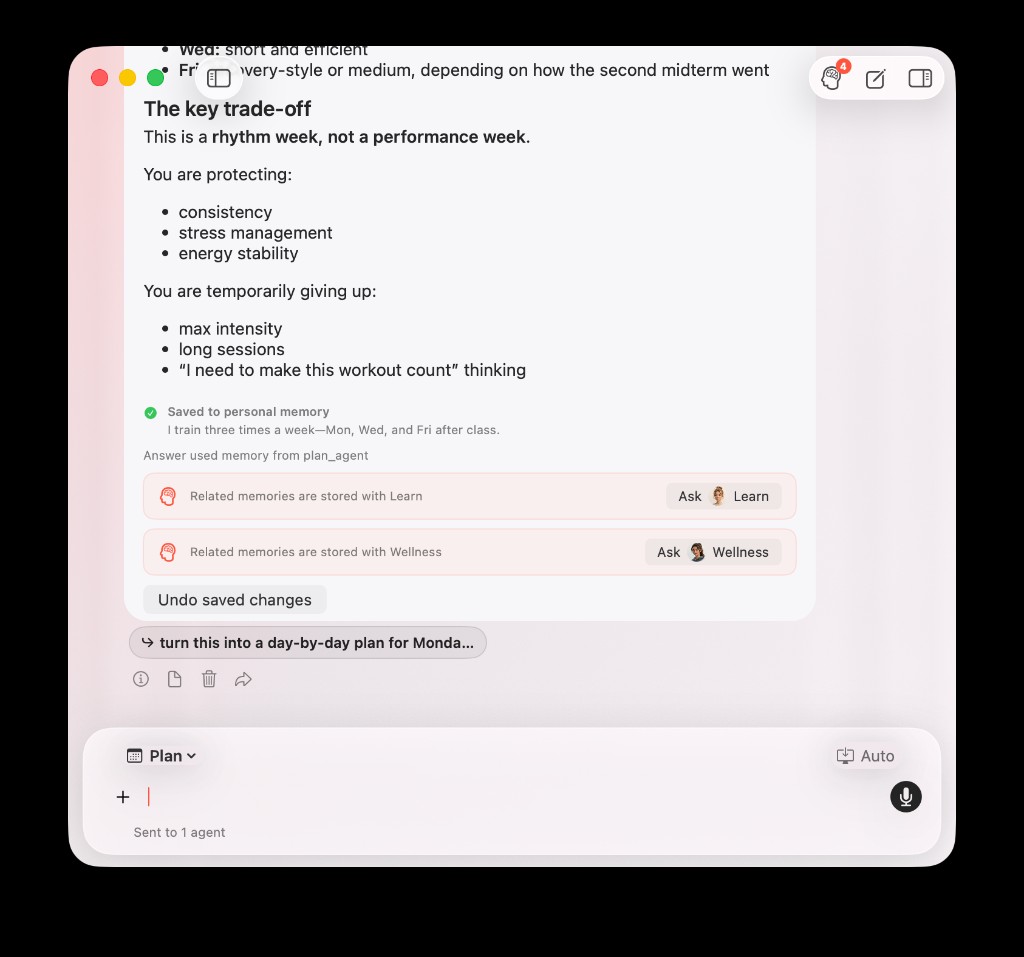
Inline memory UI under a Plan reply: a new fact saved, undo available, memory applied in the answer, and pointers to related facts stored with Learn or Wellness.
The memory button in the chat toolbar shows when something needs review. Memory Center—opened from Settings → Application → Personal Memory—is where you audit active entries, pending confirmations, history, access log, export, and delete-all.
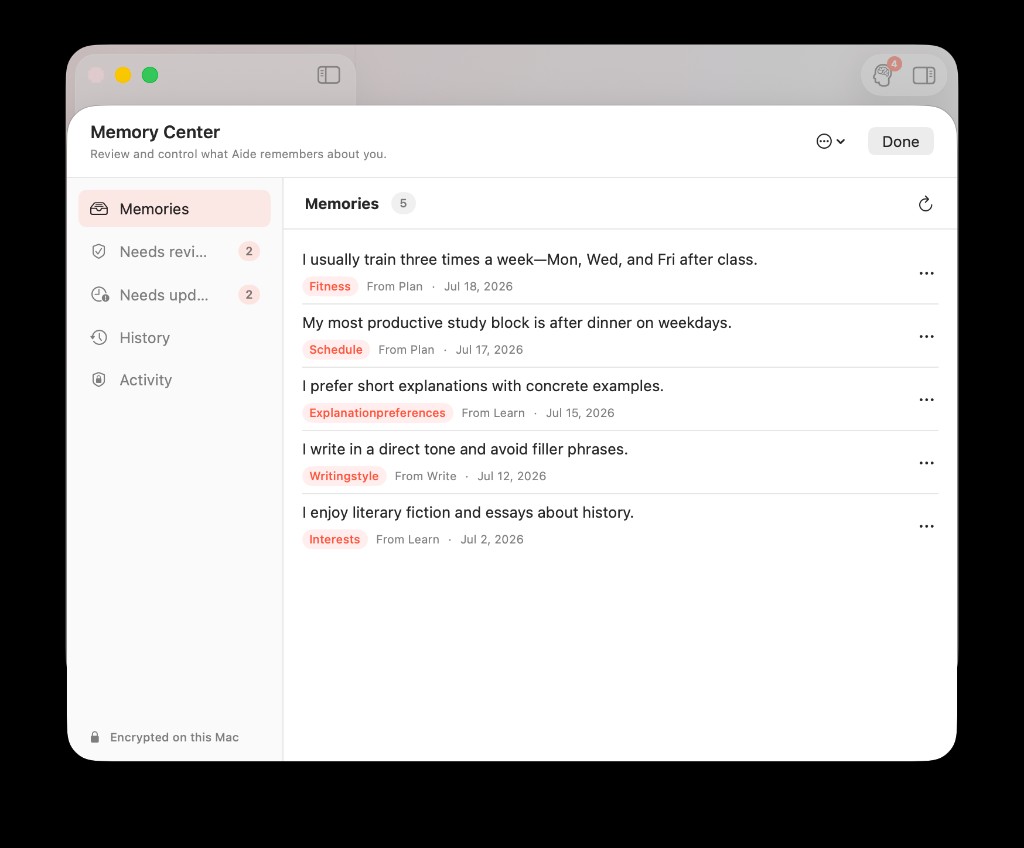
Memory Center keeps active facts visible in one place—domain, source agent, and last update—without opening every chat thread.
You do not need to open Settings after every conversation. The product is designed so ordinary usage surfaces the decision at the moment it matters.
Why this changes student workflows
Personal Memory reduces three recurring costs:
- Re-explaining context every time you switch agents or start a fresh thread
- Mixing unrelated history when one agent needs a single fact from another workflow
- Guessing what the assistant "remembers" without a visible audit trail
The payoff is not magic omniscience. It is fewer false starts.
Plan can build around a training rhythm you already stated. Learn can stay in your preferred explanation style. Write can respect tone choices from prior work. Wellness can respond to movement or sleep context in a wellness-relevant moment—not because it read your entire planning chat, but because the fact was stored once and retrieved under policy.
For a concrete before/after walkthrough, read How Plan Remembers Your Workouts and Wellness Uses Them Later.
Privacy is part of the design, not a footnote
Personal Memory is local-first. Fact text and evidence are encrypted on your Mac. Analytics for this feature are counts and decisions, not memory content.
If you want the full control model—confirmation rules, domain access, export, forget, and key-loss behavior—read Local-First Personal Memory: Confirm, Control, and Delete What AI Remembers.
For step-by-step usage inside the app, read Personal Memory User Guide: How to Save, Review, and Control What AideAI Remembers.
Try Personal Memory in AideAI
Download AideAI on Mac, open Settings → Application → Personal Memory, and turn on memory if it is not already enabled.
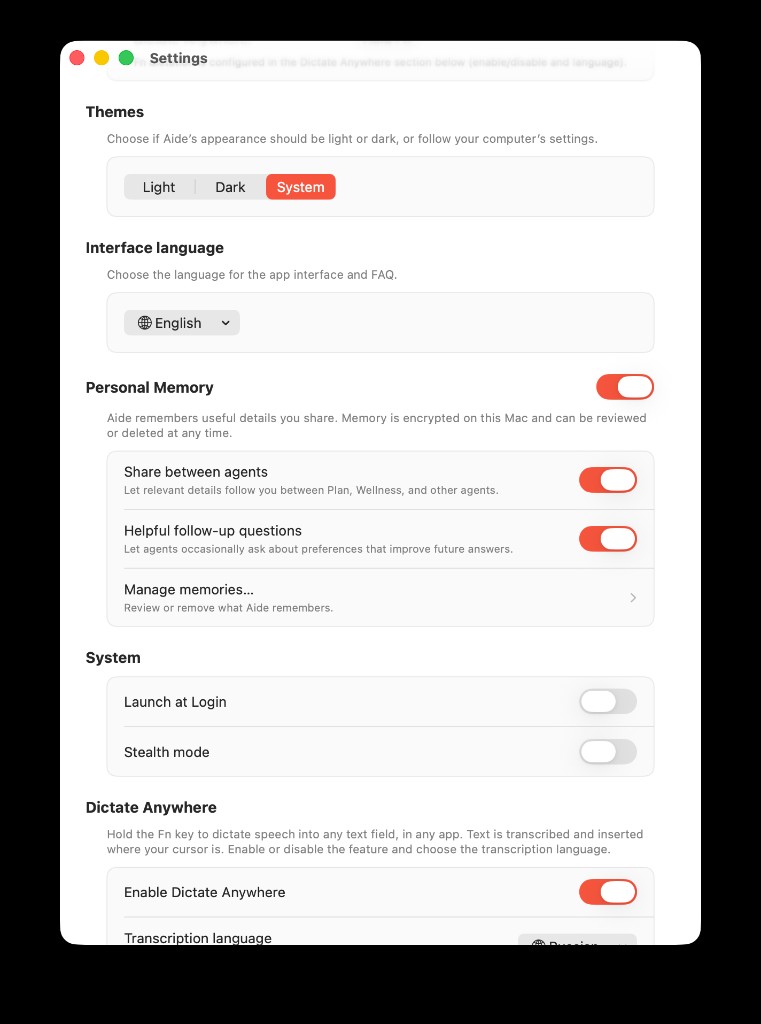
Enable Personal Memory once in Settings—then let inline cards and Memory Center handle day-to-day review.
Share a stable fact in Plan or Learn, then open another built-in agent in a new thread and ask a question where that fact should matter.
If you are comparing plans or voice features, visit Pricing. If you want sustainable routines alongside planning, How to Stay Productive in College Without Burning Out pairs well with Wellness plus Personal Memory.