 AideAI
A Better Way to Remember What You Saw, Read, and Worked On
The hardest part of studying is not always learning something new.
Sometimes it is remembering where the useful thing already was.
The sentence from the article. The chart from the lecture slide. The assignment note you saw in a portal. The code example from a documentation page. The professor's wording in a PDF. The browser tab you closed because you thought you would remember it.
Students lose context in small ways all day.
Not because they are careless. Because modern schoolwork produces more visual and digital traces than any student can hold in working memory.
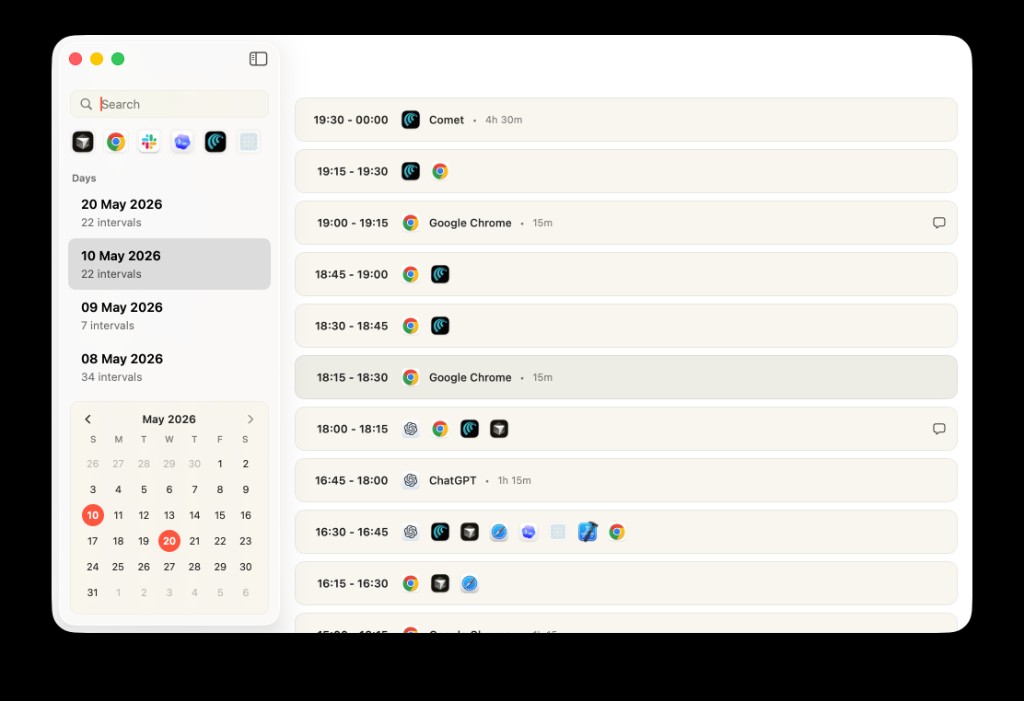
Activity Log turns scattered work sessions into a timeline you can return to later, instead of relying on memory alone.
The Missing Middle Between Notes And Memory
Most student tools assume context becomes useful only after you deliberately save it.
You bookmark the page. You copy the quote. You write the note. You download the PDF. You move the screenshot into a folder. You name the file correctly. You keep the tab open until you are done.
That is a nice theory.
In practice, useful context often appears while you are doing something else:
- a Canvas announcement you skim before class
- a formula in a lecture slide
- a paragraph in a PDF
- a browser result you open and forget to save
- a screenshot of a confusing error
- a note in a rubric that changes how you should write
- a file you looked at briefly and then lost in Finder
The moment matters, but it does not always become a note.
That creates a missing middle: information was visible, but it never became organized.
Screens Are Part Of The Study Material Now
A lot of academic context is visual.
Students read screens more than they read neat documents. Course portals, PDFs, browser pages, slides, calendar events, issue trackers, spreadsheets, email threads, local files, and screenshots all become part of the study surface.
The old workflow treats that visual layer as temporary. If you did not copy it, save it, or write it down, it is gone.
But for many student questions, the useful memory sounds like this:
What was the page where the professor mentioned peer review?
or:
Where did I see that graph about attention?
or:
What was the error message I had yesterday?
or:
Which slide had the definition I need for the quiz?
Those are not clean file searches. They are recall questions.
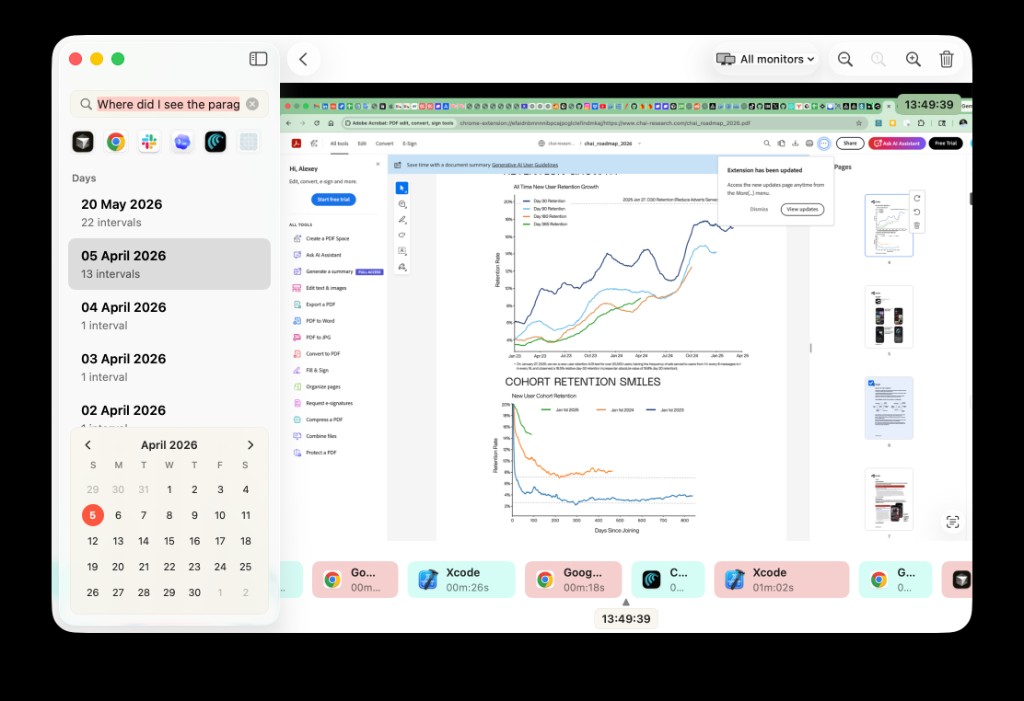
Activity Log can connect a remembered phrase or moment back to the screen where it appeared.
A Recall Layer For Student Work
AideAI's visual context and recall layer is meant for the messy material that sits between "I saved this perfectly" and "I have no idea where it went."
The idea is simple:
If a piece of context appeared in your work, the assistant should have a better chance of helping you find it later.
That can include screenshots, recognized screen text, activity history, files, browser research, meetings, and study data when you choose to use those sources.
This does not replace good notes. It supports the moments where notes were never created.
Think of it less like a notebook and more like a retrieval layer:
- "Find the screen where I saw this phrase."
- "What was I working on around the time I opened that reading?"
- "Show me the material related to this topic."
- "Help me recover the context for this assignment."
- "What did I look at before I started this draft?"
That kind of recall is especially useful when you know the idea but not the location.
Three Kinds Of Context Students Lose
1. The Context You Saw Once
Some information only flashes by.
A deadline in a portal. A note in a syllabus. A citation requirement in an assignment page. A paragraph in a reading you meant to revisit.
You may not need it at the time. Later, it becomes important.
This is where screenshots and OCR can help: the useful part may be the text that was visible, not the app or filename where it appeared.
2. The Context You Worked Around
Sometimes the value is not one phrase. It is the surrounding activity.
You were comparing sources, switching between a browser page and a draft, checking a PDF, and then writing an outline. Later you want to reconstruct why you made a choice.
An activity timeline can help you see the shape of that session: what was open, what you searched for, what material you touched, and what work followed.
The point is not surveillance. The point is academic memory: helping you recover the trail you already created.
3. The Context You Did Not Know Was Context
Students often do not know what will matter later.
An example from a page, a sentence from feedback, a screenshot of an error, a professor's wording in a handout, a diagram in a slide deck. At the time it feels minor. Later it becomes the missing piece.
This is why recall should not depend entirely on perfect organization upfront.
When Visual Recall Is Better Than Another Note
Taking notes is still valuable.
But notes are best when you know what deserves attention. Visual recall helps when you do not.
It is useful for questions like:
- "Where did I see this?"
- "What was on my screen when I was working on this?"
- "Which course page mentioned this requirement?"
- "What did I read before writing this section?"
- "Can I recover the text from that screenshot?"
Those are different from ordinary study questions. They are recovery questions.
And recovery questions happen often in college because the work is fragmented across systems.
For browser-heavy research trails, read Too Many Tabs? Use AideAI to Work With What You're Already Reading. For files, docs, notes, and audio, read Use PDFs, Notes, Docs, and Audio as Real AI Context.
The Line Between Helpful Memory And Too Much Memory
Memory features need boundaries.
Students should not feel like an app is silently turning their whole computer into a black box. Context is useful only when it is understandable and controllable.
A good recall layer should make three things clear:
- What kind of context can be used.
- When that context is relevant to the task.
- How the student can manage or avoid using sources they do not want involved.
That is why visual recall should be treated as a study aid, not as a magical claim that the assistant "knows everything." It works best when the student asks a specific recovery question and chooses the context sources that make sense.
The goal is not perfect memory. The goal is less wasted time rebuilding what you already saw.
A Tuesday Night Example
You are working on a psychology paper.
Earlier in the week, you opened a reading about attention, skimmed a lecture slide with a useful diagram, checked the assignment page, and took a screenshot of a paragraph because you thought it might matter.
Now it is Tuesday night. You remember the idea, not the source.
The old workflow is a scavenger hunt:
- search browser history
- reopen the course portal
- skim the PDF again
- inspect Downloads
- scroll through screenshots
- hope the phrase appears somewhere obvious
A recall-oriented workflow starts from the question:
Find where I saw the material about divided attention and help me use it in this paper.
From there, AideAI can help connect the remembered idea to screen text, browser context, files, or other study material you choose to use.
That is the difference between keeping more tabs open and having a better way back to the work.
Why This Belongs In A Native Mac Assistant
Visual context is one of the reasons AideAI is a Mac app, not just another webpage.
The browser can hold browser pages. It is not the whole study environment.
Your Mac has files, windows, screenshots, meetings, notes, calendars, local apps, and the browser all happening together. A recall layer becomes more useful when it can sit near that broader workspace.
For the product format argument, read Why a Native Mac App Feels Better Than Another Browser Tab. For the broader academic overview, read How to Finally See Everything Going On in Your Semester.
Try AideAI
If your study work disappears into tabs, files, screenshots, and half-remembered pages, AideAI gives you a better way to recover context.
Start with a real recall question: something you saw, read, copied, opened, or worked on but cannot quickly find again.
Then ask AideAI to help reconstruct the trail.
For plan details, visit Pricing.