 AideAI
How to Do a Weekly Study Review Without Spending an Hour on It
Most students do not need another hour-long planning ritual.
They need ten minutes of clarity before the next week begins.
By Friday or Sunday, the week often feels like a blur: classes happened, assignments moved a little, something got postponed, one course quietly became harder to stay on top of, and Monday is already waiting with new deadlines. You know you were busy. You are less sure whether that busyness moved you forward.
That is the gap a weekly study digest is built for. It helps you zoom out, notice patterns, and enter the next week with intention instead of background stress.
The Week That Blurs Together
Daily work is loud. Weekly patterns are quiet.
During the week, urgency wins. The assignment due soon gets attention. The reading for tomorrow's class gets attention. The email that feels immediate gets attention. The course that is merely becoming risky often waits.
By the end of the week, the important question is no longer "What do I do next?"
It is:
Where is my semester drifting?
That question is hard to answer from memory alone. The traces of the week are scattered across coursework, calendar events, notes, reminders, meetings, and half-finished tasks. Reconstructing the story by hand takes energy many students do not have on Sunday night.
So the week ends without a reset, and Monday starts in reactive mode again.
Busy Is Not The Same As On Track
A weekly review fails when it becomes paperwork.
Opening five tools, scrolling through recent work, and trying to stitch together a story can easily turn into a 45-minute chore. That is why many students skip weekly reviews entirely, even when they know they should not.
The useful version is faster and sharper:
- which class kept slipping?
- what got postponed more than once?
- where is workload compounding?
- what should next week start with before urgency takes over?
AideAI's weekly digest is designed for that kind of review. It looks across a rolling seven-day window and tries to turn scattered activity into a compact academic picture: risks, carry-over, and next-week focus.
That is different from a morning digest, which helps you enter a day, and an evening recap, which helps you hand a day off. The weekly digest helps you steer the week. For the full rhythm, read How to Use a Daily and Weekly Study Digest to Stay on Top of College.
What The Weekly Digest Looks At
The weekly digest can draw from local academic context such as:
- coursework and study dashboard signals
- calendar events across the week
- meetings, notes, and reminders
- recent activity patterns
The output is not a transcript of everything you did. It is a review brief meant to answer:
- where the load is building across classes
- what stayed unfinished
- which risks deserve attention early next week
- what next week should probably focus on first
When the digest is ready, AideAI can notify you locally on your Mac. Read it once, then open it in chat only if you want help turning the review into a tighter plan:
I have a heavy Monday. What should I protect time for first next week?
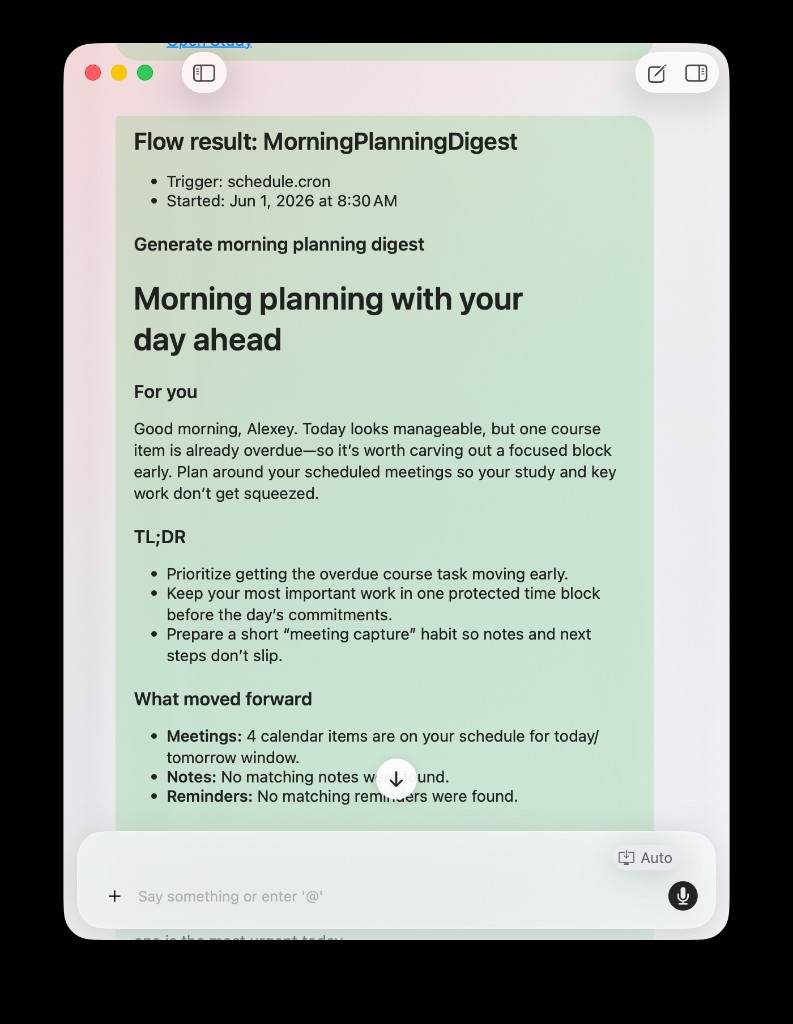
Weekly, morning, and evening digests can all publish into chat as readable briefs you can review quickly or refine with one follow-up question.
If your main problem is semester-wide visibility rather than weekly rhythm alone, also read How to Finally See Everything Going On in Your Semester.
A Sunday Night, Before And After
Before: you know one class felt harder than expected, a paper moved less than you hoped, and some reading is still open. You enter Monday with stress but no clear reset. The same slipping course stays in the background until it becomes urgent.
After: the weekly digest shows that one course kept getting postponed, the paper needs an earlier block next week, and Monday should start with reading before reactive tab-switching takes over. You still have work ahead. You have a clearer direction.
That is the point. A weekly review should change what next week feels like, not just document what last week contained.
How To Turn It On
Weekly digests run through AideAI Flows, like the morning and evening digests.
On the Flows screen, enable Weekly review under Digest delivery, pick a weekday and time that fits your week, and keep the built-in flow visible with your other routines. Many students use Sunday evening, but the useful part is picking a moment when you will actually read it.
For custom output or chat behavior, click Edit flow on WeeklyReviewDigest. In the Flow Editor, set Output and Chat, confirm Trigger schedule and missed-run policy, and expand Smart daily digest with Mode weeklyReview.
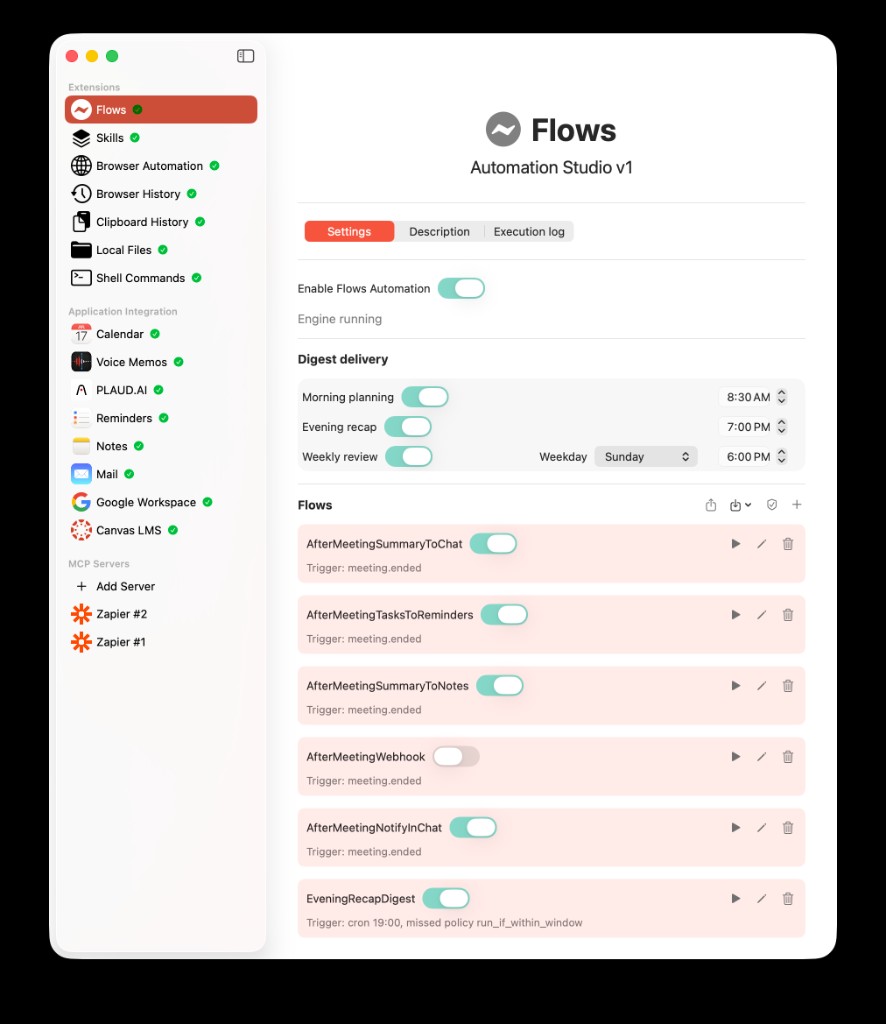
Weekly review is toggled in Digest delivery alongside morning and evening digests. Use the Flow Editor on WeeklyReviewDigest to tune Output, Chat, Trigger, and the Smart daily digest action.
For the automation layer behind digests, read How to Automate Repetitive Student Work with AideAI Flows.
A Ten-Minute Weekly Reset
You do not need a perfect planning session.
Try this:
- Read the digest once. Look for patterns, not every detail.
- Name one risky course or task stream. What kept slipping?
- Choose one next-week priority. What deserves protection early?
- Use chat only if needed. Ask for a smaller Monday plan, not a full life overhaul.
- Pair daily digests with weekly review. Morning helps you start days. Evening helps you close them. If either daily handoff is weak, read How to Start Your Study Day With a Morning Planning Digest and How to End the Day Without Losing Track of Unfinished College Work.
The goal is not to replay the entire week. The goal is to enter the next one less blindly.
When A Weekly Digest Helps Most
This workflow is especially useful if:
- your weeks blur together until something becomes urgent
- you feel busy all week but unsure where you stand
- one quiet class keeps slipping while louder tasks win
- you want a reset without a complicated planning ritual
- you need pattern visibility, not just task visibility
It helps less if your daily handoffs are already broken. Fix the day-to-day rhythm first, then add the weekly zoom-out.
Try The Weekly Digest In AideAI
If you keep entering new weeks with the same background stress and no clearer plan, a weekly study digest gives you a faster reset than manually reconstructing the whole week.
Enable Weekly review under Digest delivery, read the brief when it arrives, and use it to choose one next-week priority before Monday turns reactive.
For everyday prioritization, read What Should I Do Today? A Better Way to Plan Your College Work. For the full digest system, read How to Use a Daily and Weekly Study Digest to Stay on Top of College. To compare plans, visit Pricing.