 AideAI
How to Start Your Study Day With a Morning Planning Digest
The first twenty minutes of a student day are expensive.
Not because you are lazy. Because you are deciding.
Before you write anything, read anything, or submit anything, you are usually trying to answer a harder question in your head:
What should I do first?
That question arrives while your context is still scattered: yesterday's unfinished work, today's classes, a deadline that is getting closer, one course that feels slightly risky, and a browser full of tabs you meant to close last night.
A morning planning digest is for that exact moment. It is a forward-looking brief that helps you start the day with direction instead of tab triage.
Why Mornings Feel Busy Before Work Starts
Students often confuse activity with orientation.
You can check your calendar, skim Canvas, open Notes, scroll Reminders, and still not know where to begin. Each tool shows a slice of the truth. None of them naturally merge those slices into a morning answer.
That is the hidden cost of fragmented student workflows. Your best attention often goes to reconstruction:
- What did I leave open yesterday?
- Which class is actually urgent today?
- Is the quiz tomorrow or the reading due today more important?
- What is the smallest move that would make the rest of the day easier?
By the time you have answered those questions manually, you may already feel behind.
The morning digest exists to shorten that gap.
A Morning Brief Is Not A To-Do List
A to-do list tells you what exists.
A morning brief should tell you what matters now.
That difference matters on a normal Tuesday when you have:
- reading for today's seminar
- a quiz tomorrow
- a paper draft that needs progress this week
- one class you have been quietly postponing
A list would show all four. A useful morning brief should help you decide which one deserves the first hour, which one can wait until after class, and which one is becoming risky even if it is not due today.
AideAI's morning planning digest is built for that kind of decision. It looks ahead at the day, not backward at everything you ever collected.
That also makes it different from an evening recap. The evening digest closes the loop on what happened. The morning digest opens the loop on what should happen next. For the full digest rhythm, read How to Use a Daily and Weekly Study Digest to Stay on Top of College.
What The Morning Digest Tries To Answer
When the morning digest runs, AideAI is trying to give you a usable starting point, not a motivational paragraph.
The brief can draw from local academic context such as:
- connected coursework and study dashboard signals
- calendar events for today
- recent meetings or class notes
- reminders and notes you already use
- activity patterns that suggest where your attention has been going
The output is meant to help you see:
- what classes, meetings, or deadlines matter today
- which academic risks deserve attention early
- what looks most likely to unblock the rest of your workload
- where to start if you only have one focused block before class
You do not need to open five apps and synthesize the picture yourself. The digest does the synthesis at the moment when synthesis is hardest.
A Tuesday Morning, Before And After
Before: you wake up knowing the day is full, open your laptop, and start switching between tools. Calendar says you have class at 11. Canvas says something is due soon. Notes remind you that the paper outline is still weak. Twenty-five minutes pass before you pick a task.
After: the morning digest arrives while the day is still quiet. It shows today's class, the reading that should happen before it, the quiz tomorrow that deserves a short review block, and the paper as the bigger task for later. You start with the reading because it protects today's class and creates momentum.
That is the practical value. Not infinite productivity. One clearer first move.
If your main planning question is broader than mornings alone, read What Should I Do Today? A Better Way to Plan Your College Work.
How To Turn It On
Morning digests are delivered through AideAI Flows.
On the main Flows screen (Apps → Automation → Flows), use the Digest delivery section to enable Morning planning and pick a time when you will actually read the brief. The default schedule targets a normal start-of-day moment, but the useful part is choosing a slot that fits your routine.
To customize output routing or chat behavior, click Edit flow on MorningPlanningDigest. In the Flow Editor:
- Output — choose Chat and Activity, Chat only, or Activity only, and set Output language if you want a fixed language.
- Chat — pick the Chat agent (built-in digests use Plan), Chat thread mode, and Chat focus behavior.
- Trigger — confirm Scheduled time, Missed run policy, and Grace window (min) for catch-up after sleep.
- Actions — expand the Smart daily digest step; Mode should be
morningPlanning.
Use Run test in the editor header to preview once before relying on the schedule.
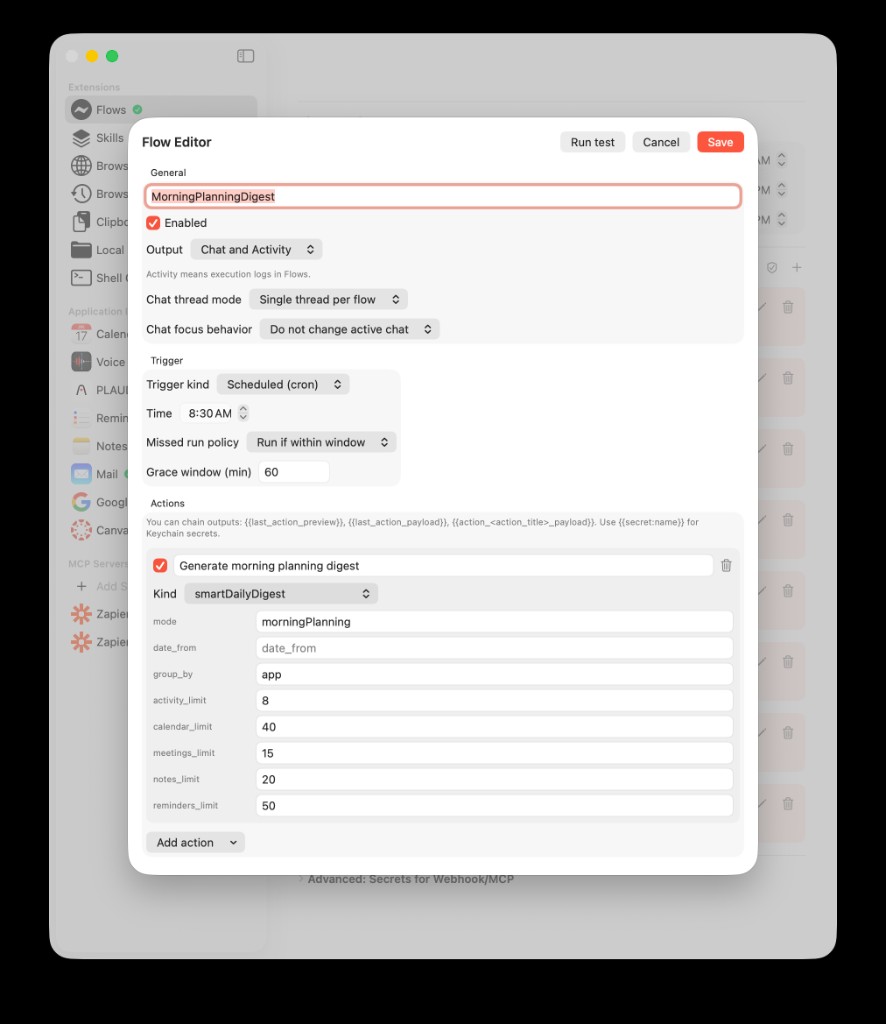
In the Flow Editor, built-in digest flows use Settings-style cards: Output and Chat control where results go, Trigger sets the schedule, and the expanded Smart daily digest action sets Mode to morning planning.
When the digest is ready, AideAI can notify you locally on your Mac. Tap in, read the brief, and open it in chat if you want to ask follow-up questions like:
I only have 45 minutes before class. What should I do first?
That keeps the workflow lightweight: the digest gives you direction; chat is optional depth.
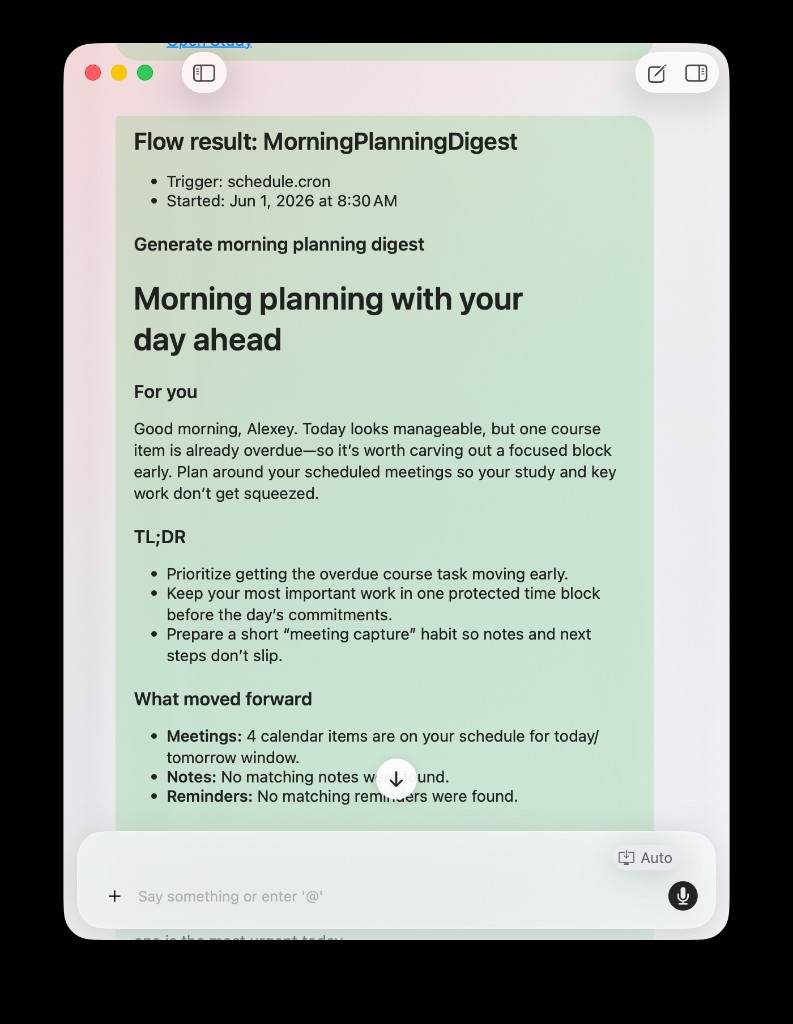
A morning digest can land in chat as a readable brief you can act on immediately or refine with one follow-up question.
For the broader automation layer behind digests, read How to Automate Repetitive Student Work with AideAI Flows.
A Simple Morning Routine With The Digest
You do not need a complicated ritual.
Try this:
- Read the digest once. Do not turn it into another task list.
- Pick one first move. One block, one class, one concrete step.
- Protect the first focused window. Even 25 minutes counts.
- Use chat only if the plan still feels fuzzy. Ask for a smaller sequence, not a perfect day.
- Let the evening recap handle the handoff. If unfinished work keeps disappearing overnight, pair morning planning with How to End the Day Without Losing Track of Unfinished College Work.
The goal is not to plan the entire day in detail before breakfast. The goal is to stop losing your first good hour to indecision.
When A Morning Digest Helps Most
This workflow is especially useful if:
- you often know you need to work but do not know where to begin
- your mornings start with tab-switching instead of actual progress
- you balance multiple classes with overlapping deadlines
- one quiet course keeps slipping while louder tasks take over
- you want proactive help, not another blank chat box
It helps less if your real problem is end-of-week drift rather than start-of-day confusion. In that case, start with the hub post and consider adding a weekly review digest after the morning habit feels stable.
Try The Morning Digest In AideAI
If your study days often begin with overload instead of direction, a morning planning digest gives you a better first move than a calendar glance or a generic AI prompt.
Enable Morning planning under Digest delivery in Flows, pick a time that matches your real morning, and use the brief to choose one concrete next step before the day gets noisy.
For the full digest system, read How to Use a Daily and Weekly Study Digest to Stay on Top of College. To compare plans, visit Pricing.