 AideAI
How to Use a Daily and Weekly Study Digest to Stay on Top of College
Most student tools wait for you to ask the right question.
A calendar waits until you open it. A to-do list waits until you maintain it. A generic AI chat waits until you reconstruct your whole situation in a prompt.
Digests work differently.
They show up at a moment when clarity usually breaks down: the start of the day, the end of the day, or the end of the week. AideAI prepares a study digest from your local academic context, sends a local notification when it is ready, and lets you open the result in chat if you want to think further.
This post is the hub for that workflow: what each digest is for, how they differ from Skills and Flows, and how to turn them into a repeatable student rhythm.
The Three Moments Where Control Slips
Students rarely lose the semester in one dramatic failure.
They lose it in small recurring gaps:
- Morning: you know you are busy, but not what deserves the first hour
- Evening: unfinished work disappears instead of being deliberately carried forward
- Weekly: you were active all week, but still cannot tell which class is becoming risky
Each moment needs a different kind of answer.
A morning digest should help you start. An evening recap should help you close the loop. A weekly review should help you zoom out.
That is why AideAI treats digests as three separate modes, not one generic summary setting.
What Each Digest Is For
Morning Planning Digest
The morning question is simple and hard:
What matters today?
Not everything on your list. Not every tab you left open yesterday. The few things that actually deserve attention first: classes ahead, deadlines getting close, academic risk, and a realistic place to start.
This is useful when you have enough work to feel overloaded, but not enough clarity to begin.
For a deeper morning-only walkthrough, read How to Start Your Study Day With a Morning Planning Digest.
Evening Recap Digest
The evening question is different:
What actually happened today, and what should not disappear overnight?
That matters because unfinished work often becomes dangerous when it quietly fades. You did not forget the assignment on purpose. You just stopped working, got tired, and moved on.
An evening recap helps you see what stayed open, what got done, and what deserves a deliberate handoff to tomorrow.
For the end-of-day angle, read How to End the Day Without Losing Track of Unfinished College Work.
Weekly Review Digest
The weekly question is bigger than today's tasks:
Where is the semester drifting?
Which course is building risk? What kept getting postponed? What pattern showed up this week? What should next week focus on first?
That is the difference between being busy all week and actually steering your semester.
For a weekly-only guide, read How to Do a Weekly Study Review Without Spending an Hour on It.
What Goes Into A Digest
A digest is not a motivational paragraph.
AideAI builds it from local signals you already have in your workflow, such as:
- study dashboard context from connected coursework
- calendar events
- recorded meetings
- notes and reminders
- recent activity patterns
The point is synthesis at the right moment. Instead of opening five apps and mentally merging them yourself, the digest brings the relevant academic picture into one readable brief.
That also connects to the broader semester view. If your main problem is scattered context across classes and tools, read How to Finally See Everything Going On in Your Semester.
Digests, Skills, And Flows Are Different Jobs
These features overlap in a student's mind because all three make work repeatable.
They repeat different things:
- Skill: how the assistant should handle a familiar kind of task in chat
- Digest: what you need to know at a planning or review moment
- Flow: what should happen automatically when a trigger or schedule fires
Digests are delivered through Flows automation, but they are not the same as building a custom Flow from scratch. AideAI includes built-in digest flows for morning planning, evening recap, and weekly review.
Quick setup: on the Flows screen, open Digest delivery and enable the digests you want (morning, evening, weekly), each with its own time (and weekday for weekly).
Advanced setup: click Edit flow on a built-in digest (MorningPlanningDigest, EveningRecapDigest, or WeeklyReviewDigest) to open the Flow Editor — adjust Output, Chat, Trigger, and expand the Smart daily digest action to confirm Mode (morningPlanning, eveningRecap, or weeklyReview).
Use a Skill when you want a repeatable playbook on demand. Use a Digest when you want proactive clarity. Use a Flow when you want a full trigger → actions → output routine.
For the broader automation layer, read How to Automate Repetitive Student Work with AideAI Flows.
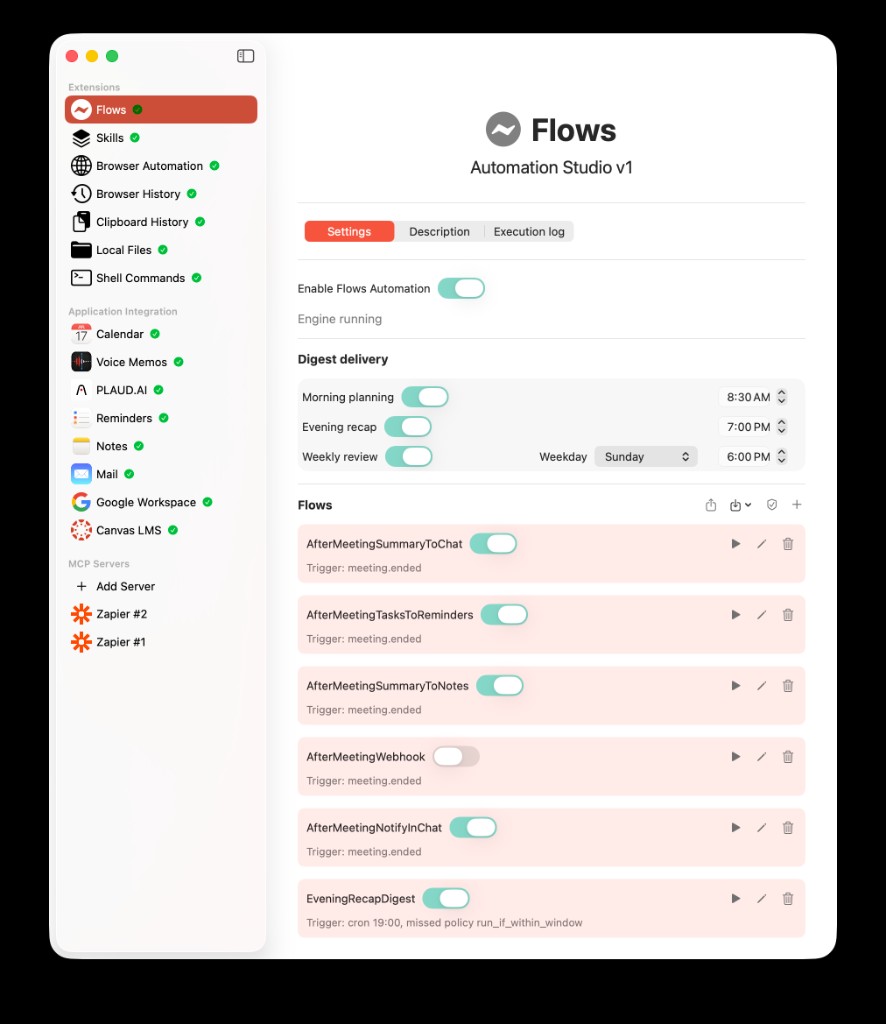
The Flows list screen combines Digest delivery toggles with your flow list. Enable morning, evening, or weekly digests here; open Edit flow on a built-in digest to fine-tune Output, Chat, Trigger, and Actions in the Flow Editor.
Why Notification Plus Chat Matters
A digest only helps if it arrives when you can use it.
That is why delivery is part of the product, not an afterthought. When a digest is ready, AideAI can notify you locally on your Mac. Tap in, read the brief, and continue in chat if you want to ask follow-up questions or turn the summary into a plan.
That creates a practical loop:
- the digest arrives at the scheduled moment
- you get a short prepared view instead of starting from zero
- you open chat only if you want to go deeper
A feature buried in settings often gets ignored. A feature that arrives with good timing is much more likely to become a habit.
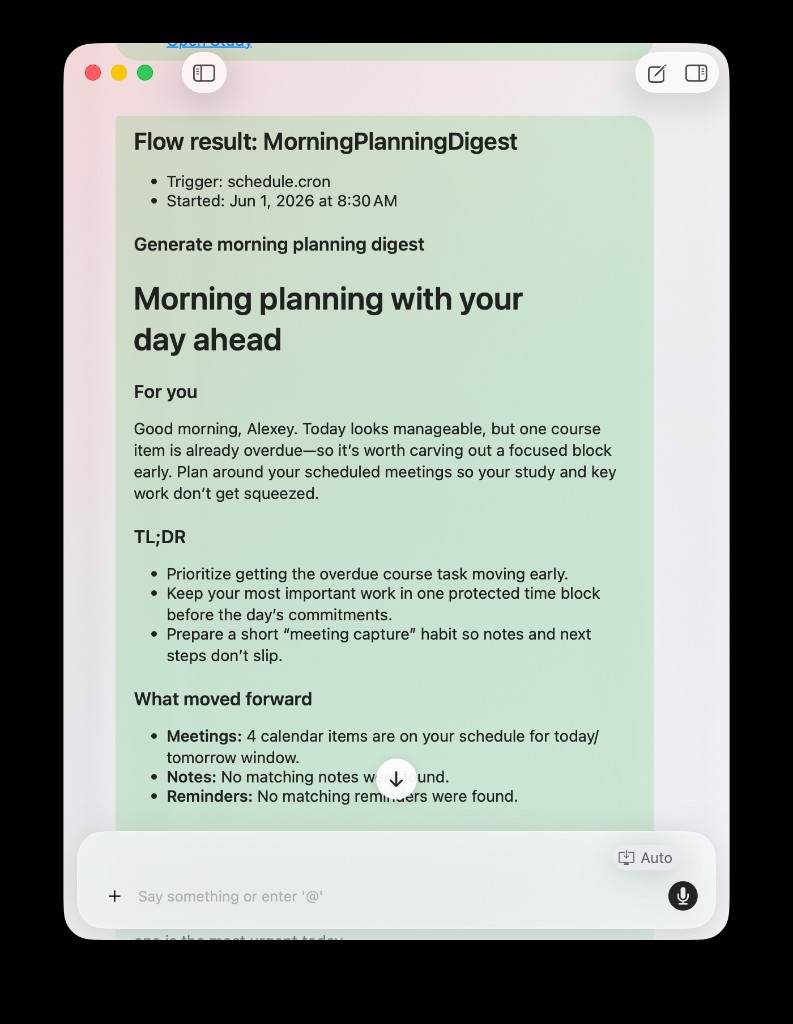
A digest can publish into chat so the routine ends with something readable and actionable, not just a notification you forget to open.
A Realistic Week With Digests
Imagine a normal college week with three classes, one paper, and a lab.
Monday morning: the morning digest shows today's classes, the paper deadline getting closer, and one course that has felt slightly behind. You start with the smallest high-leverage move instead of opening six tabs.
Monday evening: the evening recap shows that reading stayed unfinished and the paper outline did not move. Tomorrow's first step is visible instead of buried in memory.
Sunday evening: the weekly digest shows that one class kept slipping to the bottom of the list and next week should start with a catch-up block, not another reactive scramble.
That is the rhythm: start with clarity, close with a handoff, zoom out before the pattern hardens.
If daily prioritization is your main bottleneck, also read What Should I Do Today? A Better Way to Plan Your College Work. If you want a more sustainable pace overall, read How to Stay Productive in College Without Burning Out.
Start With One Digest, Not Three
You do not need to turn on every digest on day one.
A practical starting point:
- enable one digest that matches your biggest gap
- pick a time when you will actually read it
- use the result for one concrete next step
- add the other digests only after the first one feels useful
Many students feel the evening recap first, because that is when unfinished work most often disappears. Morning and weekly digests become more valuable once the basic handoff habit exists.
The goal is not more notifications. The goal is fewer moments where you have to rebuild your academic picture from scratch.
Try AideAI Digests
If your semester feels reactive — busy all week, but never quite on top — digests give AideAI a proactive layer that generic chat does not.
Turn on the digest that matches your weakest moment under Digest delivery, let AideAI bring the brief to you, and open it in chat when you are ready to plan the next move.
Start on Pricing if you want to compare plans, or open Apps → Automation → Flows in AideAI and enable your first digest today.